ETL pipelines are essential for transforming raw data into actionable insights, but they often face common issues like missing values, duplicates, and schema changes. These problems can lead to inaccurate reports, unreliable machine learning models, and costly business errors. Automating data quality checks can help catch these issues early, saving both time and resources.
Here’s the core takeaway: low-code and no-code tools make data quality automation accessible to both technical and non-technical teams. These platforms use AI to suggest validation rules, offer visual interfaces for rule creation, and integrate seamlessly into ETL workflows. By implementing automated checks at every stage - extraction, transformation, and loading - you can safeguard your data pipelines and prevent costly mistakes.
Key highlights:
- Common issues: Null values, duplicates, and schema drift.
- Metrics to monitor: Completeness, uniqueness, timeliness, and consistency.
- Tools to consider: Great Expectations, AWS Glue Data Quality, and Soda.
- Integration tips: Use CI/CD pipelines, real-time alerts, and version-controlled rules.
Automating data quality ensures reliable analytics, reduces manual effort, and avoids errors that can hurt your bottom line.
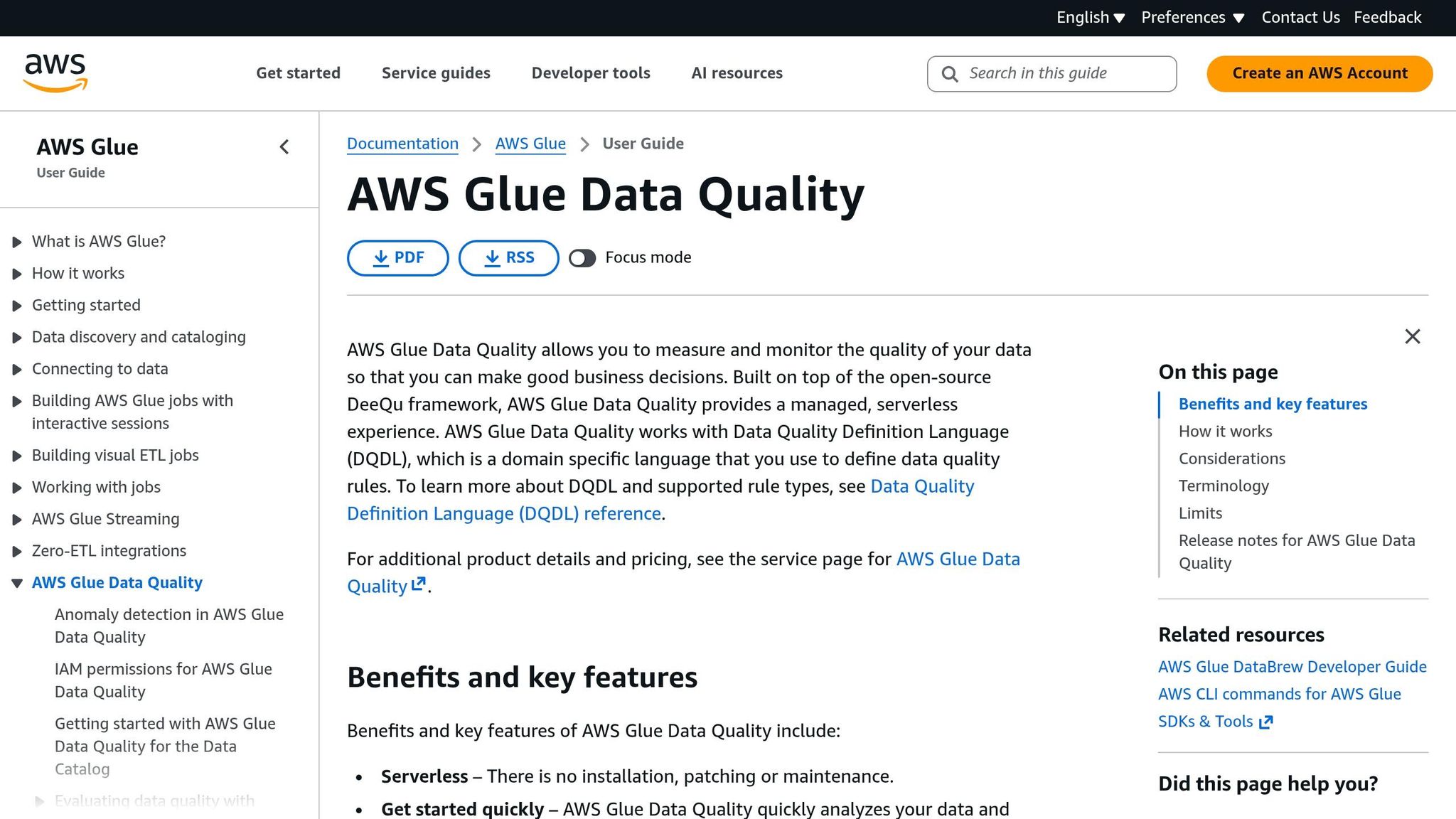
Building Data Quality in ETL pipelines using AWS Glue Data Quality
sbb-itb-3a330bb
Common Data Quality Problems in ETL Workflows
ETL pipelines often grapple with three major data quality challenges: null values, duplicate records, and schema drift. These issues not only disrupt operations but can also become costly to address if not caught early. The "100x Rule" highlights this stark reality: fixing a data error in production can cost up to 100 times more than addressing it at the source. Let’s break down each problem and its impact on data reliability.
Null values and missing data are common culprits, often caused by user input mistakes, system errors, or optional fields in source APIs. These gaps can cripple key operations. For example, if your customer database is missing email addresses or phone numbers, entire audience segments may become unreachable. Beyond communication issues, missing data can distort statistical calculations, leading to inaccurate averages, totals, and ultimately flawed business insights.
Duplicate records arise when data from multiple sources is merged without proper validation. These duplicates inflate metrics and mislead decision-making. Imagine a customer appearing three times in your database due to slight variations in their name. This inflates your customer count, throws off revenue-per-customer calculations, and could result in your marketing team sending repetitive messages, damaging customer relationships.
Schema drift happens when source data structures change without documentation. This includes renamed columns, deleted fields, or altered data types. Such changes can break ETL pipelines and disrupt downstream queries. For instance, a developer might modify a column type to fix a bug, but if the analytics team isn’t informed, their reports could fail. In fast-paced environments managing massive datasets, even a tiny error rate - like 0.01% - can lead to millions in lost revenue.
"Poor data quality leads to: Decisional Paralysis, Compliance Catastrophes, Operational Friction, and AI Hallucinations."
– Sujay Ambelkar, QA Engineer, Testriq
Unchecked, these issues undermine trust in data and make decision-making far more difficult. When leaders can’t trust their dashboards, they hesitate to act - a phenomenon Sujay Ambelkar aptly calls "Decisional Paralysis". The key to avoiding these pitfalls lies in early detection through automated validation. By understanding these challenges, we can lay the groundwork for implementing effective automated quality checks, which we’ll cover later in this guide.
Setting Up Automated Data Quality Rules
After identifying common ETL pipeline challenges, the next step is creating automated rules to catch data quality issues early. Today’s low-code and no-code platforms make this process much easier, removing the need for extensive custom coding. The key lies in defining clear metrics and letting automated tools take care of the rest.
Defining Data Quality Metrics
The foundation of data quality automation is setting measurable dimensions for your datasets. Industry frameworks often group these rules into eight key categories: accuracy, completeness, consistency, volumetrics, timeliness, conformity, precision, and coverage. To ensure efficiency, prioritize rules by severity levels: Warning (potential issues), Error (significant problems), and Fatal (causing pipeline stoppage).
For example:
-
Enforce 99% completeness for critical fields like
customer_idto minimize data gaps. - Primary keys should maintain 100% uniqueness, while secondary fields can allow more flexibility.
-
For timeliness checks, use a SQL expression like:
This ensures data freshness aligns with your SLA requirements.TIMESTAMP_DIFF(NOW(), MAX(date), HOUR) < 24
Here’s how some common data quality dimensions translate into automated checks:
| Dimension | Description | Example Automated Check |
|---|---|---|
| Completeness | Percentage of non-null values | nonNullExpectation or Completeness > 0.8 |
| Validity | Conformance to specific formats or ranges | Regex checks for IDs or range checks for prices |
| Uniqueness | Detection of duplicate records | uniquenessExpectation or IsUnique |
| Timeliness | Data freshness according to SLAs | TIMESTAMP_DIFF(NOW(), MAX(date), HOUR) < 24 |
| Consistency | Logical relationships between fields | Cross-field check: shipped_date >= order_date |
Once these metrics are defined, automated profiling tools can enforce them seamlessly.
Using Low-Code/No-Code Tools for Data Profiling
Defining metrics is only half the battle - efficient automation is just as critical. Low-code platforms streamline this process by automating rule generation. Instead of manually creating hundreds of checks, tools like Google Dataplex and AWS Glue Studio use statistical profiling and machine learning to analyze datasets and suggest rule candidates, cutting manual effort by up to 95%.
The process typically starts with a profiling scan of historical data. For example, Databricks DQX samples 30% of the data and limits analysis to 1,000 records to keep compute costs manageable. These tools identify patterns, such as consistently non-null columns, specific value ranges, or uniform formats, and then propose rules for review and fine-tuning before production deployment.
For large-scale ETL operations, incremental scans focus on new data - such as partition-level checks on the last seven days of data - to maintain performance and reduce cloud processing costs.
To keep rules flexible and reusable, avoid hardcoding values. Instead, use data dictionaries. For instance, reference an external CSV file for currency codes with a token like ${dictionary://currencies.csv}.
Most no-code platforms also provide visual interfaces for building complex validation logic without any coding. Tools like Sifflet offer IF-THEN builders that let non-technical users define rules easily. For example: "IF product_category = 'Clothing', THEN tax_rate must be 0.08". Similarly, AWS Glue Studio allows users to drag-and-drop "Evaluate Data Quality" nodes into ETL workflows. These nodes use simplified languages like DQDL for defining rules, such as:
Completeness "year" > 0.8
.
For teams managing multiple environments, storing rules in version-controlled YAML files enables a "data quality as code" approach. This ensures consistency in rule review and deployment across environments. You can explore various platforms supporting this workflow through the Best Low Code & No Code Platforms Directory.
A handy feature often overlooked is row-level outcomes. These add metadata columns to datasets, flagging records that fail specific rules. This granular detail simplifies troubleshooting and eliminates the need to decipher issues from summary statistics alone.
Choosing Low-Code/No-Code Tools for Data Quality Automation
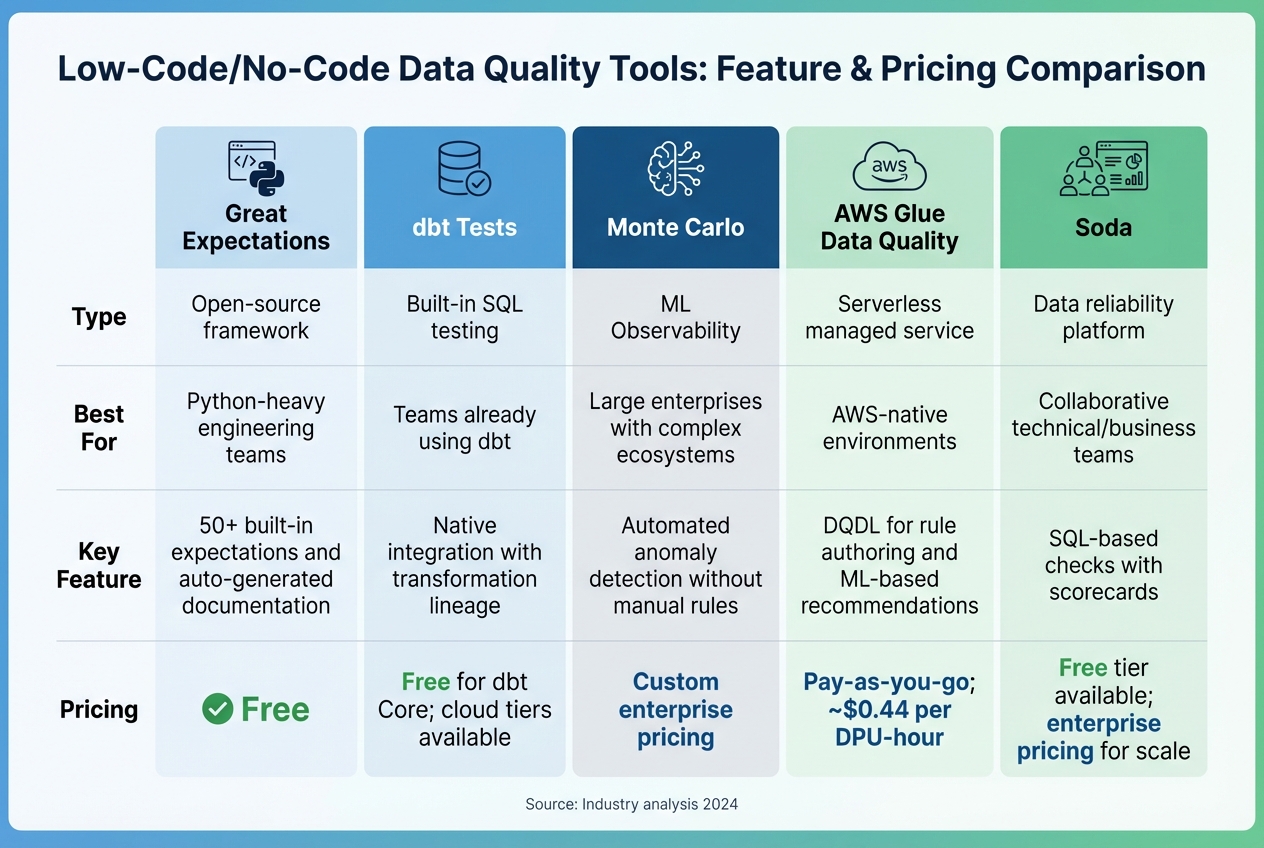
Data Quality Automation Tools Comparison: Features and Pricing
Once you've established your data quality rules, the next step is selecting the right automation platform. The platform you choose should align with your team's technical skills and existing infrastructure.
If your team is Python-savvy and prefers a code-driven approach, Great Expectations is a solid option, offering customizable validation workflows. For teams already using dbt for data modeling, dbt Tests integrates seamlessly with SQL-based transformation workflows. On the other hand, Monte Carlo leverages machine learning to automatically detect anomalies, which is particularly useful for large enterprises managing complex data ecosystems.
For AWS users, AWS Glue Data Quality offers a serverless solution tailored to AWS environments. It employs a simplified language, DQDL, for defining rules. For example, you can set a rule like Completeness "year" > 0.8. Additionally, the platform can analyze your data patterns and suggest rules with minimal effort - just two clicks. Another option, Soda, bridges the gap between technical and business teams by combining SQL-based checks with user-friendly scorecards.
Interestingly, by 2026, it's expected that 80% of tech products will be developed by non-IT teams. Organizations adopting low-code platforms have reported cutting costs by up to 70% and achieving deployment speeds three to five times faster.
To help narrow down your options, consider using a detailed tool comparison. For an in-depth breakdown of features across analytics, automation, and development categories, visit the Best Low Code & No Code Platforms Directory. This resource provides detailed insights to help you find tools tailored to your specific needs.
Tool Comparison Table
Here's a quick reference guide summarizing the features and pricing of leading platforms:
| Tool | Type | Best For | Key Feature | Pricing |
|---|---|---|---|---|
| Great Expectations | Open-source framework | Python-heavy engineering teams | 50+ built-in expectations and auto-generated documentation | Free |
| dbt Tests | Built-in SQL testing | Teams already using dbt | Native integration with transformation lineage | Free for dbt Core; cloud tiers available |
| Monte Carlo | ML Observability | Large enterprises with complex ecosystems | Automated anomaly detection without manual rules | Custom enterprise pricing |
| AWS Glue Data Quality | Serverless managed service | AWS-native environments | DQDL for rule authoring and ML-based recommendations | Pay-as-you-go; ~$0.44 per DPU-hour |
| Soda | Data reliability platform | Collaborative technical/business teams | SQL-based checks with scorecards | Free tier available; enterprise pricing for scale |
This table provides a snapshot of each tool's strengths, making it easier to identify the best fit for your data quality automation needs.
Adding Data Quality Checks to ETL Workflows
Incorporating data quality checks into every stage of your ETL process helps identify and resolve issues before they affect critical systems. Here’s how you can implement checks during extraction, transformation, and loading, integrate them into CI/CD pipelines, and establish real-time alerts.
Adding Rules at Extraction, Transformation, and Load Stages
Start by validating data at the extraction phase. This includes checking for null values, monitoring schema changes, and identifying unexpected drops in data volume. During the transformation phase, tools like Soda and Google Dataplex make it easy to define rules using YAML, aligning with automated quality goals. For instance, you could create a YAML rule to ensure that at least 99% of records in the customer_email field are non-null.
At the load stage, implement fail-fast mechanisms that stop ETL jobs if critical thresholds are breached. This prevents flawed data from reaching key systems like executive dashboards or regulatory reports, where errors can have serious consequences. Advanced tools powered by machine learning can dynamically adjust thresholds based on seasonal trends, reducing false alarms caused by temporary spikes, such as those during a company anniversary.
Setting Up CI/CD Integration
Incorporate data quality tests directly into your CI/CD workflow to prevent flawed code from reaching production. Manage these rules as code - using formats like YAML, SQL, or Python - and store them in version control systems such as GitHub. When developers push changes or submit pull requests, CI/CD tools like GitHub Actions or Google Cloud Build can automatically trigger these checks.
These automated tests work alongside version control to ensure only validated updates are deployed. Use branch protection rules to enforce quality checks before merging code into critical branches like dev or prod. For example, pushing to a dev branch could initiate deployment in a development environment for testing, while merging to prod ensures all rules are validated before going live.
Configuring Real-Time Monitoring and Alerts
Real-time monitoring allows teams to detect and address issues as they happen, rather than hours later during scheduled batch runs. Set up alerts to notify teams through Slack, Microsoft Teams, or email so they can respond immediately. Fine-tune alert thresholds to minimize unnecessary noise.
Focus monitoring efforts on critical data pathways where quality issues could have the greatest impact. Use segmented alerting with "Group By" features to break down issues by specific data segments, such as store_id or region, rather than triggering a single global alert. For example, you might configure a rule to send an alert if null values in a key column exceed 5%.
Assign ownership of data domains to ensure alerts reach the right people. Tools like Metaplane can connect to your data warehouse and establish monitoring baselines in just minutes. Additionally, platforms with data lineage capabilities enable teams to trace quality issues back to their source, making it easier to identify and resolve root causes.
Conclusion
Automating data quality checks in ETL workflows is a powerful safeguard against costly mistakes. Consider this: Unity Technologies suffered a $110 million loss when bad data disrupted their machine learning algorithms. On average, poor data quality costs businesses around $15 million annually. These numbers highlight the importance of robust data validation processes.
The rise of low-code and no-code platforms has made these protections more accessible. With intuitive drag-and-drop interfaces and machine learning capabilities, these tools simplify the creation of validation rules, even for team members without technical expertise. As Will Harris from Metaplane emphasizes:
"Writing endless SQL to monitor data quality is neither scalable nor reliable compared to ML-based automated checks"
– Will Harris, Metaplane
The benefits are clear. Some teams have slashed their reporting efforts from 200 person-hours to just 20. Beyond improving efficiency, automated checks enhance regulatory compliance and support better strategic decisions.
These systems are also smart enough to adapt to seasonal trends and data patterns, meaning fewer false alerts and quicker detection of issues like schema drift. They ensure compliance with regulations such as GDPR and HIPAA by enforcing data integrity rules systematically. Looking ahead, by 2025, 70% of new enterprise applications are expected to incorporate low-code or no-code tools, a significant jump from under 25% in 2020.
To explore your options, the Best Low Code & No Code Platforms Directory is a valuable resource. It provides detailed comparisons of platforms tailored to analytics, automation, and development needs. Whether you require a tool like Great Expectations for technical teams or Integrate.io for business users seeking an all-in-one solution, this directory can help you identify the right fit for your tech stack. These insights aim to guide your journey toward effective data quality automation.
FAQs
Which data quality checks should I automate first in my ETL pipeline?
To establish reliable data pipelines and minimize errors, begin by automating basic data quality checks. Focus on these key areas:
- Structural validation: Ensure schemas and data types align with expectations.
- Logical integrity: Verify referential integrity and maintain consistency across datasets.
- Anomaly detection: Identify unusual patterns or outliers that could signal data issues.
- Data volume monitoring: Track data quantities to catch unexpected drops or spikes.
By implementing these automated checks, you can catch problems early, reduce the need for manual fixes, and create ETL workflows that scale more efficiently.
How do I set pass/fail thresholds without causing too many false alerts?
When aiming to reduce false alerts, it's crucial to set thresholds that align with your acceptable error margins and data quality objectives. For instance, you might allow for 1% or 5% invalid data, depending on the specific context. To fine-tune this further, you can leverage advanced setups like custom SQL tests to establish allowable ranges for slight deviations.
Dynamic approaches can also be incredibly effective. Techniques like predictive range tests or statistical profiling adjust thresholds based on how your data behaves over time. This adaptability helps cut down on unnecessary alerts, keeping your focus on the issues that truly matter.
Where should data quality rules live so they’re versioned and deployable in CI/CD?
Data quality rules should be treated like code and stored in version-controlled environments - for example, as YAML files. These files should live in designated configuration directories and be tied to specific tables and columns. This approach ensures proper versioning and reproducibility. By organizing data quality rules this way, you can integrate them seamlessly into CI/CD pipelines, supporting automation and aligning with DevOps best practices for efficient management.