Low-code platforms are transforming how businesses address process bottlenecks. These platforms help identify delays, analyze root causes, and simulate process changes without requiring coding expertise. By leveraging AI and visual modeling, they speed up insights, reduce costs, and empower non-technical users to improve workflows using no-code solutions.
Key tools include:
- Nintex: Automates process documentation and adjusts workflows dynamically using AI.
- Jira: Tracks task progress visually, ideal for Agile teams, with alerts for delays.
- ProHance: Provides real-time performance monitoring and predictive insights.
- Appian: Combines process mining with machine learning to uncover inefficiencies.
- Pega: Specializes in automating complex workflows with simulation capabilities.
Quick Comparison
| Tool | Key Strengths | Best For |
|---|---|---|
| Nintex | AI-driven workflow optimization | Teams needing automated insights |
| Jira | Visual task tracking and alerts | Agile teams |
| ProHance | Real-time monitoring and predictions | Managers needing live insights |
| Appian | Process mining and data integration | Multi-system workflows |
| Pega | Complex workflow automation | Cross-department processes |
These tools save time, reduce reliance on IT, and deliver measurable ROI, with some businesses reporting over 400% returns and millions in annual savings. By 2026, 80% of users will come from non-IT backgrounds, making these platforms accessible to a broader audience.
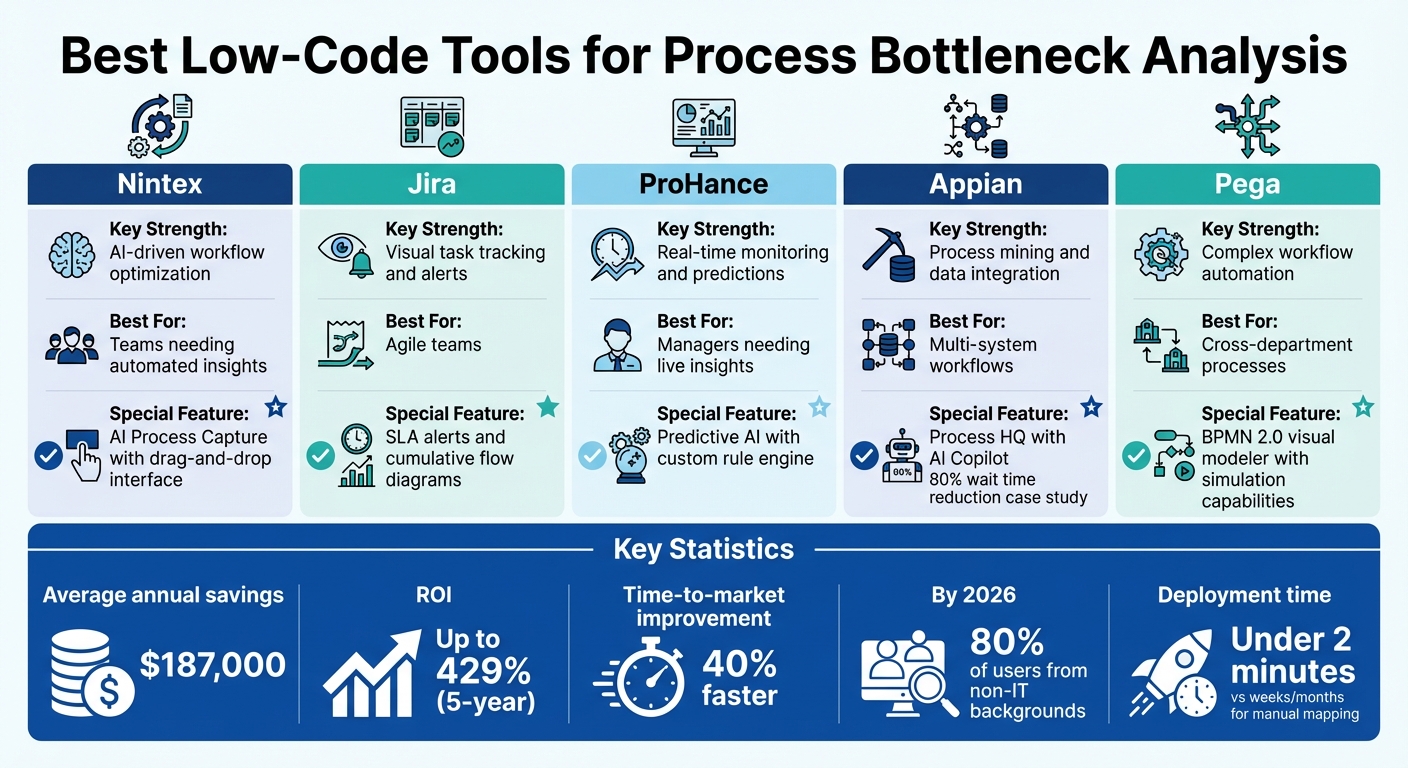
Low-Code Tools for Process Bottleneck Analysis: Feature Comparison Chart
Best Low Code Tools for Process Bottleneck Analysis
Nintex: AI-Powered Workflow Optimization
Nintex's AI Process Capture simplifies documenting process steps by automating the task, saving teams from manual investigation efforts. Its drag-and-drop interface makes it easy for users to build and tweak workflows without extensive technical skills. Powered by Agentic AI, the platform adjusts workflows dynamically and delivers real-time insights to clear roadblocks. A centralized hub ensures that documented processes align with ISO and other regulatory standards, keeping compliance intact throughout the optimization process.
Robert Walters, Chief Development Officer, highlighted: "The ease of use of Nintex software is what sets it apart. Once teams understand how it works and have a little bit of training, they can use it on their own".
Jira: Workflow Visualization and Customization
Jira takes a visual-first approach to workflow management, making it a strong complement to Nintex's AI capabilities. Through tools like visual boards and task trackers, Jira helps teams using Agile frameworks like Scrum or Kanban identify bottlenecks by tracking task progress across columns. SLA alerts notify teams when tasks are nearing or exceeding time limits, making delays easier to pinpoint. Additionally, Jira's reporting features - such as cycle time analysis and cumulative flow diagrams - provide actionable insights for better resource allocation and process adjustments.
ProHance: Real-Time Performance Monitoring
ProHance equips managers with unified dashboards that offer a live view of workforce performance and process health. Its custom rule engine identifies bottlenecks, whether they stem from overloaded queues or resource imbalances. With predictive AI, ProHance can even forecast potential disruptions before they occur. The platform also tracks productivity at both individual and team levels, helping managers determine whether delays are due to flawed process design or resource limitations.
| Feature | ProHance | Traditional Analytics |
|---|---|---|
| Detection Speed | Real-time alerts | Daily/weekly reports |
| Analytics Depth | Predictive AI with pattern recognition | Historical data review |
| Resource Insights | Individual and team-level performance tracking | Aggregated metrics only |
Appian: Process Mining and Optimization Integration
Appian combines process mining with machine learning to uncover inefficiencies automatically. Its Process HQ feature analyzes event logs to identify bottlenecks. The Data Fabric tool streamlines data preparation from multiple sources, reducing reliance on IT teams. Appian's AI Copilot offers intelligent suggestions on where to implement automation and estimates how much time can be saved by addressing specific inefficiencies. For instance, Alexianer, a healthcare organization, reduced a one-month process to under six days, cutting wait times by 80%.
A Product Owner at an investment management company shared, "Process HQ is so well thought out - it would've taken us hundreds of hours to find these insights without this product".
Pega: Low Code Workflow Automation for Complex Processes
Pega specializes in automating workflows that involve multiple departments and approval chains. Its trend analysis tools track the time spent at each stage of a process, making it easier to pinpoint delays in approval workflows. The platform's visual process modeler adheres to BPMN 2.0 standards, mapping out complex workflows to highlight where handoffs and transitions cause bottlenecks. Pega also allows organizations to simulate process changes - like adding approval tiers or reassigning tasks - before rolling them out. This makes it particularly useful for companies managing intricate processes involving compliance, customer interactions, and internal reviews.
These tools cover a wide range of needs, from automation and predictive analytics to real-time monitoring and visual workflow management, offering organizations diverse ways to tackle process bottlenecks effectively.
sbb-itb-3a330bb
Benefits of Using Low Code Tools for Bottleneck Analysis
Low-code platforms dramatically reduce deployment time, enabling businesses to get up and running in under two minutes. Compare that to the weeks - or even months - required for manual process mapping, and the advantage becomes clear. This speed not only accelerates insights but also makes it easier to integrate with existing business systems.
These tools also simplify integration with major enterprise platforms like SAP, Salesforce, and ServiceNow. Instead of spending heavily on custom API development, businesses can leverage pre-built connectors and AI-powered automated discovery. These features allow the reconstruction of actual process flows from event logs (in formats like CSV, XLSX, or XES) without needing specialized consultants or IT teams.
Timo Wielemakers, Solution Architect at Rabobank NL, shared his experience: "With Mendix Workflow, the average developer is more productive. The Workflow Toolkit is easy to pick up, requires less maintenance, and enables us to exceed the expectations of the business".
Visual process mapping is another standout feature. Tools like interactive BPMN 2.0 diagrams and "token animation" replays make bottlenecks easy to identify, even for non-technical stakeholders. Teams can literally watch how work flows (or stalls) within their organization. On top of that, simulation capabilities let businesses test different resource allocations or process changes in a virtual setting, helping them measure potential improvements before rolling them out.
These platforms are also built to scale. With cloud-native architectures, they can handle everything from small teams to thousands of users - and process over 100 million events. Financially, the impact is hard to ignore. On average, organizations save $187,000 annually by choosing top no-code tools over traditional custom development, which can cost between $75,000 and $500,000. Plus, companies using no-code AI platforms report a 40% faster time-to-market, delivering 80% of the functionality at a fraction of the cost - between 10 to 100 times less.
Beyond performance and cost savings, these tools excel at identifying the root causes of process delays. Whether the issue is resource constraints, specific process variants, or departmental inefficiencies, platforms like ProcessMind provide over 250 improvement guides. These guides turn dashboard insights into actionable strategies. Real-world examples include a 50% faster pricing approval rate and 33% faster customer call resolution through automated process orchestration.
How to Choose the Right Low Code Tool
Picking the right low-code tool means finding a balance between your business needs and the technical limitations you face. The goal is to address process bottlenecks effectively while staying aligned with your broader objectives. For example, if your focus is on documenting simple processes, diagramming tools can be set up in just a few days. On the other hand, if you're dealing with urgent operational issues, process intelligence platforms can deliver actionable insights in as little as 2-4 weeks. Traditional BPM suites, however, might take 6-12 months to implement. Hollard Insurance demonstrated the power of rapid deployment by achieving a 20% boost in productivity and saving 307 hours per month by late 2025. Another key factor? Your team's technical expertise.
Team Skill Level Matters
By 2026, Gartner estimates that 80% of low-code automation users will come from non-IT backgrounds. If your team primarily consists of business users rather than developers, you'll want a tool with an intuitive drag-and-drop interface. Platforms designed for "citizen developers" empower teams like product managers and operations staff to create solutions on their own, without having to rely on IT assistance. However, if your team has more technical expertise, tools requiring knowledge of JavaScript or React might still be a good fit.
Integration Depth Is Key
The ability of the tool to integrate seamlessly with your existing tech stack can make or break its long-term success. Look for platforms that connect natively with systems like SAP, Salesforce, or ServiceNow and support REST/GraphQL APIs and SQL databases. This eliminates the need for custom API development. For organizations already invested in ecosystems like Microsoft or Salesforce, tools such as Power Platform or Salesforce Flow provide native identity and data access, simplifying the deployment process. If security is a concern, prioritize platforms offering hybrid deployment options, where data stays on-premises while management operates in the cloud. Strong integration capabilities help ensure smoother operations and faster problem-solving.
Match Features to Workflow Complexity
The complexity of your workflows should guide the features you prioritize. Simple task automation might only require basic tools, but if you're dealing with multi-step processes that span numerous systems, you'll need advanced features like simulation capabilities and AI-driven root cause analysis. For instance, Alorica used advanced process analysis to uncover inefficiencies, leading to $2.5 million in yearly savings and an 18% increase in productivity. Before fully committing to any platform, test whether it allows you to run simulations using real process data.
Governance Features for Enterprise Use
Scalability often hinges on having robust governance features. Look for tools that support Role-Based Access Control (RBAC), Single Sign-On (SSO), and audit logging to ensure compliance and maintain control. Proper governance not only aids in scaling process improvements but also ensures the tool aligns with your technical and operational needs. Organizations using low-code platforms report development cycles that are 50-70% faster compared to traditional coding methods - provided the tool is well-suited to their team and technical requirements.
Conclusion
Low-code tools are changing the game by automatically reconstructing workflows from event logs. This approach uncovers inefficiencies that traditional manual mapping might miss, delivering actionable insights in just minutes - far faster than the weeks required by older methods.
The financial impact speaks volumes. Organizations leveraging advanced process intelligence have reported a 30% boost in efficiency, with some saving over $10 million. For example, Bizagi users have achieved a 429% five-year ROI and cycle times that are seven times faster. These improvements translate into real-world benefits like 50% faster pricing approvals and 33% quicker customer call resolutions.
Another standout feature is the ability to run simulations. These "what-if" scenarios allow businesses to test potential changes before implementation, reducing the risk of costly errors.
Tyson Hamblin from Conservice shared his perspective: "Using Decisions Process Mining, we found areas of concern that weren't strongly evident beforehand. It's a quick and easy way to gain insights into processes and to uncover dependencies and process blockers".
But the benefits don’t stop at speed or cost savings. These tools are empowering teams across the board. By 2026, it's predicted that 80% of low-code automation users will come from non-IT backgrounds. This shift means business users can now identify and address bottlenecks on their own, without waiting for IT support. Features like real-time dashboards and AI-driven recommendations make it easier to detect and resolve issues proactively, enabling teams to stay ahead rather than simply reacting to problems.
FAQs
What data do I need to find bottlenecks with low-code tools?
To find bottlenecks using low-code tools, you'll need to gather data on process flow, task durations, resource utilization, and transaction logs. This information makes it easier to spot inefficiencies and adjust workflows to improve overall efficiency.
How do I choose between process mining, dashboards, and workflow automation?
Choosing the right tool depends on what you're aiming to achieve. Process mining digs into your data to identify inefficiencies you might not see otherwise. Dashboards are great for keeping an eye on real-time KPIs and spotting bottlenecks as they happen. Workflow automation steps in to tackle these bottlenecks by automating repetitive tasks.
The best approach? Combine them. Use process mining to uncover problems, dashboards to monitor performance, and automation to fix issues effectively. Together, they create a powerful system for streamlining operations.
Can these tools integrate with SAP, Salesforce, or ServiceNow securely?
The information provided doesn't specifically confirm whether these low-code tools securely integrate with systems like SAP, Salesforce, or ServiceNow. That said, platforms such as SAP Build Process Automation, Bizagi, and ProcessMaker emphasize their ability to handle enterprise-level integrations. For precise details about secure connections to these systems, it's best to review the platform's documentation or reach out to their support teams directly.