When incidents occur, delays from disconnected tools can slow response times and add stress to teams. Low-code platforms help bridge this gap by automating workflows between tools like Slack, Jira, and PagerDuty, cutting response times by up to 40%. This guide explains how to integrate incident management tools using low-code solutions to minimize repetitive tasks, reduce context-switching, and centralize data for better post-incident reviews.
Key Takeaways:
- Automate Tasks: Use low-code workflows to handle repetitive steps like creating Slack channels, assigning roles, and updating Jira tickets.
- Centralize Response: Reduce tool-switching by managing the incident lifecycle in one interface, such as Slack.
- Improve Data Sync: Enable bi-directional updates between tools for consistent timelines and follow-ups.
- Ensure Security: Implement OAuth, RBAC, and encryption to protect sensitive data during integrations.
- Monitor and Refine: Regularly test workflows, track performance, and update integrations as systems evolve.
Low-code platforms make these integrations easier with drag-and-drop builders and pre-built connectors, empowering teams to streamline incident response without custom coding or heavy developer involvement.
What a Developer Portal Taught us About Incident Management
sbb-itb-3a330bb
Designing Integration Workflows
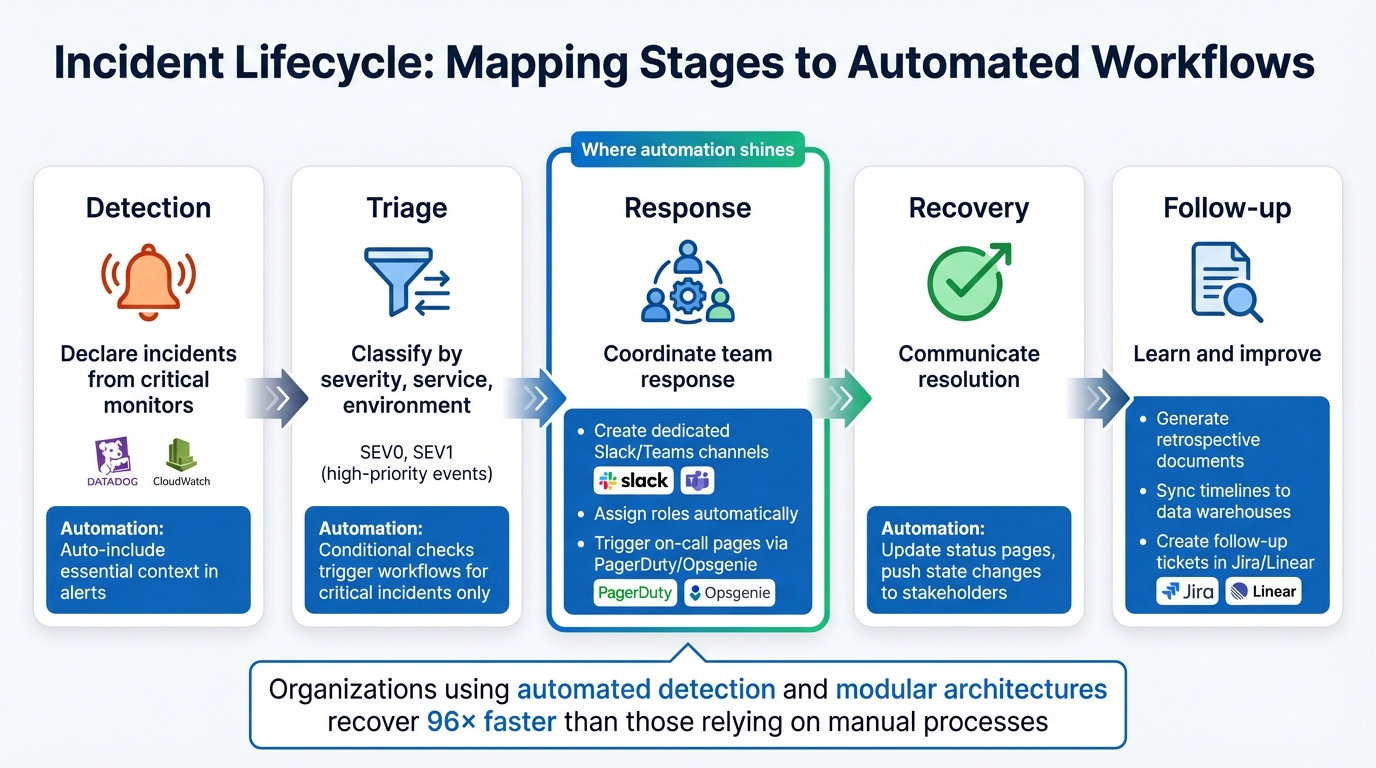
5-Stage Incident Lifecycle Workflow with Automation Opportunities
Low-code platforms make it easier to align automation with the actual flow of incidents, mapping each stage to specific actions - no custom scripts required. These workflows take the hassle out of repetitive tasks while keeping data consistent across your tools.
Mapping Incident Stages to Workflows
The incident lifecycle can be broken into five stages: detection, triage, response, recovery, and follow-up. Each stage offers opportunities for automation:
- Detection: Set workflows to declare incidents when critical monitors like Datadog or CloudWatch trigger an alert. Include essential context automatically in those alerts.
- Triage: Use condition checks to classify incidents by severity, service, or environment. This ensures automation kicks in only for high-priority events like SEV0 or SEV1.
- Response: This is where automation shines. Your workflow can create dedicated Slack or Teams channels, assign roles, and even trigger on-call pages through tools like PagerDuty or Opsgenie.
- Recovery: Automate updates to status pages and push state changes to stakeholders for smoother communication.
- Follow-up: Configure workflows to generate retrospective documents, sync timelines to data warehouses, and create follow-up tickets in tools like Jira or Linear.
Organizations using automated detection and modular architectures recover 96 times faster than those relying on manual processes. Plus, visual workflow design can cut application delivery timelines by 50% to 70% compared to traditional coding methods. To keep things running smoothly, set non-critical actions (like posting Slack messages) to bypass failures so minor issues don’t disrupt the entire response process.
These stage-specific automations form the backbone of reliable, event-driven integration workflows.
Integration Architecture Patterns
When it comes to efficient integrations, event-driven webhooks beat polling by a mile. Instead of constantly checking for updates, systems "push" data only when events occur, cutting unnecessary requests by over 98%.
For more complex setups, consider using an external orchestration layer as your integration hub. In this model, a low-code platform acts as the "nervous system", connecting all your tools while keeping your system of record from getting bogged down. As Hemanthrajg explains:
"ServiceNow remains the system of record, while n8n operates as the system of action".
To ensure reliability, adopt a queue-first ingestion pattern. Webhook receivers should acknowledge data within 5 to 10 seconds, then process it asynchronously via a queue. Providers like GitHub require this quick acknowledgment to avoid flagging delivery failures. Design for idempotency by using correlation IDs or content hashes - duplicate deliveries can account for up to 12% during peak times. Combine a "hot path" for immediate action with a daily "gap-fill" job to catch any missed webhooks.
| Integration Pattern | Best For | Key Advantage | Consideration |
|---|---|---|---|
| Built-in (Native) | Standard tool pairs | Low effort, vendor-supported | Limited customization options |
| Automation (Zapier-style) | Simple triggers | Easy for non-technical users | Not ideal for complex workflows |
| 2-Way Sync (Unito-style) | Cross-team collaboration | Real-time updates, field parity | May require specific connectors |
| External Orchestration | Complex, AI-ready stacks | Scalable, reduces platform load | Adds an extra management layer |
Creating a Single Source of Truth
Automation is only as good as the consistency of your data. To avoid issues like conflicting updates, bi-directional synchronization is essential. For example, if someone updates a Jira ticket, that change should reflect in your incident management tool - and vice versa.
Use stable correlation IDs to link records across systems. These IDs can be generated using SHA-256 hashes of key event fields (like Host, Program, and EventID) to ensure repeated alerts are tied to the same incident. To protect your data, implement timestamp windows (±5 minutes) to reject replay attacks.
Export incident data, action items, and follow-up tasks to a central data warehouse such as Snowflake or BigQuery. This makes it easier to analyze incident timelines alongside broader business metrics. Sync tags with your service catalog to ensure teams and services are consistently identified across all tools. As Kate Bernacchi-Sass from incident.io puts it:
"If alert details, decisions, and follow‑up tasks sync across systems, you avoid duelling updates and missing action items".
Security and Compliance in Integrations
Connecting incident management tools to low-code platforms involves handling sensitive operational data. Security isn’t just a feature - it’s the backbone of these integrations. While many modern platforms include built-in security controls, it’s up to you to configure them to meet the necessary standards. Let’s break down how robust authentication and access controls serve as your first line of defense.
Authentication and Access Control
Secure connections are non-negotiable when integrating incident management tools. Standard protocols like OAuth 2.0 (or 2.1), JWT, and mTLS are essential for securing communication between platforms. To streamline user access, implement Single Sign-On (SSO) using SAML or OpenID Connect (OIDC). This approach simplifies identity management and minimizes password-related risks.
Role-Based Access Control (RBAC) is another critical layer. Assign roles such as Incident Commander, On-Call Engineer, or Observer to manage permissions efficiently. Instead of granting rights to individuals, map Create, Read, Update, Delete, and Execute permissions to groups. This ensures scalability and clear audit trails. Tools like SCIM 2.0 can help by syncing user accounts and group memberships from identity providers like Okta or Azure AD during SSO logins.
Security should operate across multiple levels - workspace, application, data source, page, and even down to individual data fields. Set new applications and data sources to private by default, requiring explicit permissions for access. Reserve production deployment rights for admins only, and rotate API keys and access tokens regularly. To prevent denial-of-service attacks, implement rate limiting through API gateways. As Laurie Smith from Celigo notes:
"A single misconfigured or unmonitored API can provide a pathway into business logic, workflow engines, and sensitive infrastructure."
Beyond access controls, protecting the data itself is equally critical. Up next: encryption practices for keeping your data safe.
Data Protection and Encryption
When it comes to securing data, encryption is your best friend. Use TLS 1.2 or 1.3 to encrypt data in transit and AES-256 or field-level encryption for data at rest. For added security in webhook-based integrations, implement HMAC signature verification to guard against spoofing.
Adhering to compliance frameworks builds trust and ensures your systems meet industry standards. SOC 2 Type II is often considered the baseline for cloud platforms, requiring sustained proof of effective security controls. If your operations involve Protected Health Information (PHI), HIPAA compliance is a must. This includes administrative, physical, and technical safeguards, securing Business Associate Agreements (BAAs) with vendors, and applying the Minimum Necessary Principle to limit PHI exposure.
Real-world breaches highlight the importance of these measures. In February 2024, Change Healthcare suffered a ransomware attack that exposed data for 192.7 million individuals - the largest healthcare breach ever recorded. The root cause? A remote access portal without multi-factor authentication. This incident drove a proposed update to the HIPAA Security Rule in January 2025, requiring MFA and encryption of electronic PHI (ePHI) at rest and in transit. Adrien Laurent from Intuition Labs emphasized:
"Encryption of ePHI at rest and in transit would become explicitly required, as would multi-factor authentication (MFA) for all systems containing ePHI."
For global operations, ISO 27001 certification demonstrates a robust information security management system with 93 specific controls. Meanwhile, organizations working with U.S. government contractors need FedRAMP certification for compliance.
| Framework | Primary Focus | Key Requirement for Integrations |
|---|---|---|
| SOC 2 Type II | Security, Availability, Privacy | Independent audit of control effectiveness over time |
| HIPAA | Healthcare Data (PHI) | Technical safeguards, encryption, and BAAs |
| ISO 27001 | Global InfoSec Management | Comprehensive ISMS covering 93 specific controls |
| FedRAMP | U.S. Government Security | Standardized approach to security assessment for cloud |
Workflow Logging and Audit Trails
To ensure accurate incident reconstruction, tamper-proof logs are a must. Every action in your integration workflows - be it user actions, configuration changes, or data exports - should leave an immutable record. Platforms like ToolJet, for example, offer a 90-day audit log for self-hosted deployments by default.
Centralizing these logs in a SIEM (Security Information and Event Management) system ensures they remain secure and accessible for forensic analysis. Automated alerts can flag suspicious behavior, such as repeated failed login attempts or unusual data export volumes.
Legal retention requirements dictate how long logs must be stored. For U.S.-based integrations, ensure your low-code platform offers data center options within the United States to comply with data sovereignty laws.
When webhook deliveries fail, dead letter queues can catch integration items that exceed retry limits, allowing for manual review and troubleshooting without losing critical incident data. To fill any gaps caused by network outages, supplement real-time webhook processing with nightly polling jobs to capture missed events.
Maintaining Integrations Over Time
Building an integration is just the start; keeping it functional as systems evolve is where the real work begins. Without regular maintenance, even the best-designed workflows can falter. Here’s how to ensure your incident tool integrations remain reliable over time.
Testing and Staging Workflows
Always test updates in a staging environment that mirrors your production setup. This includes using the same software versions, database types, and configurations. Mock data can help you test edge cases, like handling empty values, special characters, boundary conditions, or malformed inputs. For complex transformations, data pinning ensures repeatable test scenarios, making debugging more efficient.
Simulating failures - like API errors, network delays, or rate limits (429 errors) - is crucial to validating error-handling mechanisms, including OAuth token refresh flows. Keep workflow exports (e.g., JSON files) under version control and use automated pipelines to check for syntax errors and credential issues. Catching bugs early is far less costly; fixing a bug in development takes about 45 minutes, compared to over 6 hours in production. Plus, production errors can lead to data loss and erode client trust.
Before activating any workflow, do a quick audit. Check for clear naming conventions, meaningful node labels, configured error workflows, HTTPS for webhooks, and appropriate timeout settings. Set up a dedicated "Error Workflow" that triggers alerts (via Slack or email) when failures occur, providing detailed execution logs for quick diagnosis.
Monitoring Integration Health
Once your testing protocols are solid, ongoing monitoring ensures everything runs smoothly. Keep an eye on API metrics like uptime, latency (p50, p95, p99 percentiles), error rates (4xx and 5xx), throughput, and resource usage. Setting alerts at around 70% resource utilization gives your team enough time to react before problems escalate. Application-level health checks can also catch issues like expired API keys or rate limits that might not show up on a vendor’s public status page.
Track webhook delivery metrics and use circuit breakers to avoid cascading failures. Pair real-time monitoring with nightly reconciliation to ensure data accuracy. Under heavy load, webhook delivery failures can spike to 27%, while duplicate events might range from 8% to 12%. Create symptom-based alerts that focus on user-facing problems, like flagging "zero successful requests in three minutes." As the API Status Check Blog wisely states:
"Every alert should require action. If an alert fires and the response is 'this is fine, ignore it,' delete that alert".
Beyond real-time monitoring, reviewing past incidents is key to improving workflows.
Learning from Incidents and Improving Workflows
The real insights come after an incident. Automate the collection of timelines, response details, and alert payloads so retrospectives are based on facts, not memory gaps. Export this data to BI tools or data warehouses to spot trends and link incident outcomes to engineering tasks. Root cause analysis can uncover weak spots and lead to updates in monitoring rules, workflows, and escalation paths.
Secure logging and audit trails, discussed earlier, are invaluable for post-incident analysis. Regular reviews of past incidents help refine response strategies and strengthen system resilience.
To avoid unnecessary noise, use severity filters to prevent low-priority issues from triggering alerts. As Kate Bernacchi-Sass from incident.io points out:
"If every low-priority blip creates an incident, responders tune out".
Smart silencing and aggregation logic can suppress duplicate alerts and focus attention on unique problems. Also, set up alerts for "zero events" scenarios - missing webhooks, for example, could signal a silent failure. Regularly review and update your integrations to ensure alerts remain accurate and workflows stay aligned as your systems evolve.
Choosing Platforms and Tools for Integration
Once you've secured and maintained your integrations, the next step is picking the right low-code platform and incident management tools. This decision is crucial for ensuring long-term efficiency. The global low-code market is forecasted to reach $187 billion by 2030, with a growth rate of 31% CAGR. With so many choices available, focus on features that directly enhance your incident workflows rather than getting distracted by trendy buzzwords.
What to Look for in Low-Code Platforms
When evaluating low-code platforms, prioritize those with native ITSM connectors. These connectors - pre-built for tools like Jira, ServiceNow, PagerDuty, Slack, and Microsoft Teams - can save you significant time and effort by handling API versioning and updates automatically. This eliminates the risk of custom script failures due to endpoint changes by vendors.
Another must-have feature is bidirectional synchronization. For example, if an engineer updates a Jira ticket, that change should immediately reflect in ServiceNow, and vice versa. This prevents data discrepancies and avoids the need for manual fixes. As Red River shared:
"The co-managed queue integration has been a game changer. Our clients use Jira, we use ServiceNow, and now we're all in sync without any manual handoffs."
Look for platforms with drag-and-drop workflow automation, conditional logic, and built-in SLA management tools. These features - like timers, automated escalation, and breach alerts - help you meet response targets efficiently.
Security is another critical factor. Ensure the platform supports Role-Based Access Control (RBAC), Single Sign-On (SSO), audit trails, and compliance certifications such as SOC 2, ISO 27001, and GDPR. Since integration failures can cost organizations an average of $12.9 million annually, choose platforms with features like real-time logs, retry mechanisms, and health checks to catch and resolve silent failures.
Evaluating Incident Management Tools
Your incident management tool must integrate seamlessly with your chosen low-code platform. Look for tools with robust API capabilities and webhook support that align with OpenAPI specifications and OAuth2 authorization. Weak APIs often lead to maintenance headaches and unnecessary workarounds.
Pay close attention to the tool's data transformation and mapping features. It should handle custom fields, attachments, and complex data structures effectively. For instance, specialized fields like "SLA Category" or "Root Cause" should remain synced across systems. Running a pilot test with real-world scenarios - such as a support-to-engineering escalation - can help you gauge the tool’s speed, usability, and overall performance.
Finally, consider deployment flexibility, especially if your incident tool operates on-premise while your low-code platform is cloud-based. Ensure the integration method can handle both environments without introducing security vulnerabilities or latency issues.
Using the Best Low Code & No Code Platforms Directory
The Best Low Code & No Code Platforms Directory is a valuable resource for comparing platforms based on integration features, security measures, and governance options. Instead of spending weeks researching vendors, you can filter results by categories like automation, development tools, and workflow management to find platforms specifically designed for incident tool integration.
The directory also breaks down pricing models - per-connection, task-based, seat-based, and enterprise tiers - so you can choose an option that fits your budget and incident volume. For instance, per-connection pricing works well for fixed tool sets like Jira and ServiceNow, while task-based pricing is better for low-volume workflows, though it may require monitoring during incident surges.
Additionally, you can submit your own low-code or no-code tools to the directory. This allows tool creators to connect with teams actively seeking integration solutions, creating a marketplace where users and vendors can find each other without wading through generic search results.
Conclusion
Integrating incident management tools into low-code environments is about more than just linking APIs - it’s about creating a seamless workflow that minimizes delays and consolidates critical data. As Kate Bernacchi-Sass from incident.io aptly put it:
"The problem isn't a lack of tools; it's that they aren't talking to each other."
A good starting point is bidirectional synchronization, ensuring your tools share accurate, real-time data. For example, when Intercom integrated PagerDuty, Slack, and Jira in March 2025, they saw a 40% reduction in the time it took to assemble a response team. That’s the kind of impact that comes from tools working in harmony.
Security is equally important. With 78% of Fortune 500 companies using low-code platforms in critical systems, you can’t afford to treat security as an afterthought. Look for platforms with SOC 2 Type II and GDPR certifications, along with features like role-based access control (RBAC) and audit trails. The cost of poor data quality caused by integration failures averages $12.9 million annually, making proactive investments in security a no-brainer.
Sustained success also hinges on continuous improvement. Integration isn’t a one-and-done task - it requires ongoing monitoring and refinement. Favor’s 37% reduction in mean time to resolution (MTTR) illustrates how regular adjustments can deliver real results. Start small with a pilot workflow involving 5–15 engineers, focus on automating the most frequent bottlenecks, and use resources like the Best Low Code & No Code Platforms Directory to evaluate platforms based on their integration capabilities - not just marketing promises.
With the right approach - careful planning, robust security measures, and thoughtful platform selection - you can transform incident response from a reactive scramble into a proactive, data-driven process. Low-code platforms, when used effectively, can help you build a system that’s not just functional but continuously improving.
FAQs
Which incident workflows should we automate first?
To get started, concentrate on automating workflows tied to incident detection, triage, and response. Begin by addressing high-severity alerts, ensuring incidents are classified correctly, and coordinating resolutions to enhance efficiency.
Here are some steps to consider:
- Integrate monitoring tools for automatic detection of issues.
- Automate escalation processes to ensure the right teams are notified without delays.
- Streamline communication using platforms like Slack or email for quicker collaboration.
Additionally, automating tasks such as root cause analysis, updating tickets, and sending team notifications can significantly cut down on manual work and speed up your response times.
How do we prevent duplicate or conflicting updates across tools?
Clear communication, proper scoping, and synchronization are essential to prevent duplicate or conflicting updates in incident management tools. Implementing methods like polling or webhooks can help trigger updates effectively, while thorough data mapping ensures accuracy.
Bidirectional integrations are particularly useful for keeping data consistent across platforms, as they allow seamless syncing. It's also important to monitor the reliability of your webhooks and manage rate limits carefully. These steps help ensure updates are consistent and free of conflicts.
What security controls are must-haves for these integrations?
To keep incident tool integrations safe in low-code environments, focus on a few essential controls. Start with role-based access control (RBAC) to ensure users only have access to what they need. Add an extra layer of protection with multi-factor authentication (MFA) for verifying user identities. Use secure API management to block any unauthorized access attempts.
On top of that, make sure to encrypt your data - both while it's stored and when it's being transmitted. Keep an eye on integration activities to spot any unusual behavior, and put governance policies in place. This helps reduce the risks of shadow IT and keeps your setup aligned with security standards.