API connectors make system integration faster and easier by eliminating the need for custom code by leveraging low-code development tools. They act as pre-built tools that connect different software systems, enabling seamless data exchange and automation. Here's why they matter:
- Time-Saving: Traditional integrations can take months and cost over $120,000. API connectors reduce this to weeks or even days.
- Ease of Use: Non-technical users can set up integrations using top no-code platforms with intuitive interfaces, reducing reliance on IT teams.
- Automation: They handle repetitive tasks, like syncing data between platforms, improving efficiency across departments.
- Data Accuracy: Real-time synchronization ensures consistent and reliable data across systems.
- Cost-Effective: Managed API connectors save businesses up to $150,000 annually on maintenance.
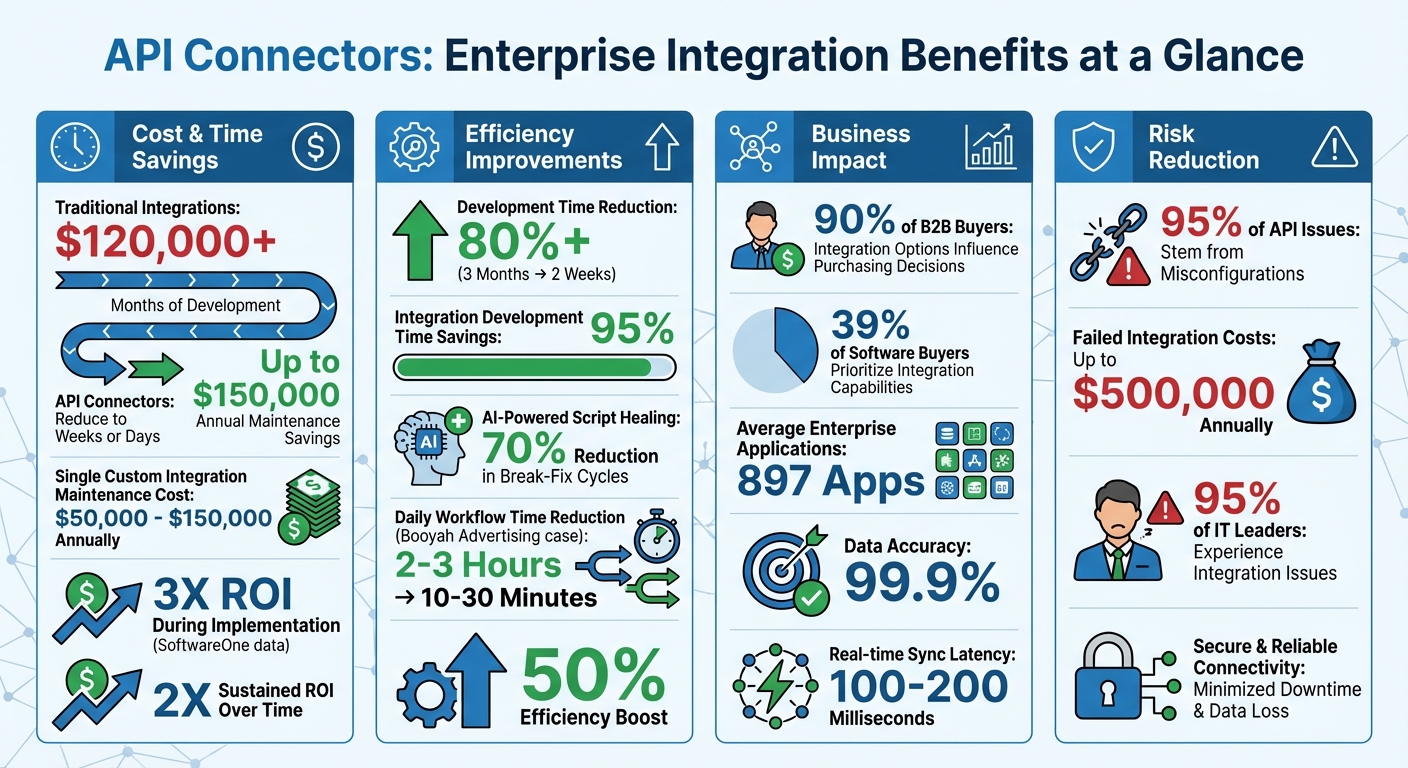
API Connectors ROI: Cost Savings and Efficiency Benefits for Enterprises
Key Benefits of API Connectors for Enterprises
System Connectivity
API connectors bridge the gap between older legacy systems and modern cloud-based applications by simplifying complex authentication protocols like OAuth 2.0, API keys, and endpoint management. This capability is crucial - 90% of B2B buyers report that a vendor's integration options heavily influence their purchasing decisions. The beauty of API connectors lies in their ability to separate the integration interface from the core application. This means you don't need to overhaul your legacy systems to connect them with newer platforms. Instead, these connectors eliminate data silos and create a smoother flow of information across departments and locations. Beyond just connecting systems, they also improve operational workflows through automation, often leveraging no-code and low-code resources to bridge technical gaps.
Automation and Efficiency
Building on their connectivity strengths, API connectors streamline operations by automating repetitive tasks. Take this example: when a customer places an order in a SaaS application, a connector can instantly create the corresponding record in Salesforce - no manual input required. This approach empowers teams, like support and onboarding, to design and implement these workflows using low-code tools — and pairs naturally with real-time B2B buying signals to trigger outreach at exactly the right moment. Plus, maintaining a single custom-built integration can cost anywhere from $50,000 to $150,000 annually. Managed connectors reduce this expense while also handling the grunt work of monitoring API updates and managing deprecations, such as HubSpot's planned sunset of its v1 Contact Lists API on April 30, 2026. This allows developers to focus their energy on creating new features rather than managing outdated integrations.
Data Consistency and Accuracy
Modern API connectors shine when it comes to keeping data accurate across systems. They enable real-time synchronization with minimal latency - often as low as 100–200 milliseconds. These tools also handle data translation seamlessly, such as converting Salesforce's PascalCase format into HubSpot's nested objects, ensuring a unified data structure. This automated normalization reduces errors often caused by manual transfers or batch imports. Features like automated retries, health checks, and audit logs further protect data integrity during system hiccups. This reliability is critical, as 95% of API issues stem from misconfigurations, and failed integrations can cost businesses up to $500,000 annually due to lost productivity and compliance risks. AI-powered tools, like automated "script healing", can even cut down on break-fix cycles by 70%.
sbb-itb-3a330bb
What Is An API Connector? - Next LVL Programming
How API Connectors Work
API connectors make system integration more manageable by simplifying how data is handled and workflows are managed. They act as translators, ensuring data moves smoothly between systems while also managing authentication, formatting, and structuring. This allows for efficient data mapping, orchestration, and format handling.
Data Mapping and Transformation
Integration starts with mapping and transforming data fields. For example, a field like "user_id" might be converted to "employee_ref" to align with a consistent schema. Modern connectors rely on tools like JSONata to define these transformations as data rather than relying on hard-coded scripts. This approach can save up to 95% of the time typically spent on integration development.
But it doesn’t stop at basic mapping. API connectors handle more complex transformations, such as joining or splitting strings, applying regex for pattern matching, changing text case, or performing calculations like currency conversions based on specific dates. These capabilities address a common challenge: only 29% of HR tech users report smooth integration between their software components. Once the data is transformed and mapped accurately, the connector orchestrates the entire workflow.
Workflow Orchestration and Execution
Connectors oversee the entire communication process between systems. They handle HTTP requests like GET, POST, and PUT, and transform responses - turning raw JSON or XML into structured, usable data. Workflows can be triggered by events, such as a webhook notifying of a new order, or by scheduled tasks like hourly data syncs.
Additionally, connectors enable logical operations, branching workflows based on conditions, and performing calculations before sending data. They’re built to handle errors effectively, with features like automatic retries and rate limit normalization across different APIs. Low code and no code platforms with pre-built connectors can slash development time by over 80%, reducing what would typically take three months into just two weeks.
Handling Different Data Formats
API connectors also resolve format mismatches, often converting JSON to XML or vice versa to ensure smooth communication. For binary data, like PDFs or images, they use multi-part upload protocols with form-data encoding.
The parsing engine within connectors deserializes raw API payloads, restructuring them into formats ready for use. This includes flattening nested objects, promoting custom fields to top-level schemas, and aligning structures through declarative transformations. With 39% of software buyers prioritizing integration capabilities when selecting a provider, this flexibility is crucial.
| Pagination Type | Mechanism | Common Users |
|---|---|---|
| Cursor | Uses a unique pointer for the next data set | HubSpot, Stripe |
| Offset | Skips a specific number of records | Zendesk |
| Page | Requests specific numbered pages | Legacy APIs |
| Link Header | Follows URLs provided in HTTP headers | GitHub, GitLab |
Step-by-Step Guide to Implementing API Connectors
Assess Your Integration Needs
Start by mapping out your data strategy. Identify the systems that serve as your primary "sources of truth" and determine where that data needs to go. Pinpoint the specific business questions your integration must address - this will help you avoid building unnecessary connections.
Next, dive into the technical details. Check which authentication methods your target APIs support - whether it's OAuth 2.0, API keys, or Basic Authentication. Also, consider your data volume and how frequently updates are required. Does your business need real-time updates through webhooks, or will scheduled batch processing suffice?
Think about ongoing maintenance, too. The 2023 State of the API Report highlighted that 26% of developers spend over 20 hours weekly working with APIs. If your team doesn’t have the capacity to maintain these integrations, opting for a vendor-managed connector might be a better choice. Once your integration requirements are clear, you’re ready to select the right connector tool.
Select the Right API Connector Tool
With your needs defined, the next step is choosing the right tool. Your decision will depend on whether you’re automating internal workflows or creating customer-facing integrations. For internal workflows, enterprise iPaaS solutions are usually the best fit. On the other hand, customer-facing integrations often call for an embedded iPaaS.
Pre-built connectors can save a lot of time, reducing implementation from weeks or months to just hours. If you’re exploring options, the Best Low Code & No Code Platforms Directory (https://lowcodenocode.org) is a helpful resource. It compares platforms offering pre-built API connectors across categories like automation, development tools, and web app builders. These tools are designed to be user-friendly, making them accessible even to teams without deep technical expertise.
The benefits of pre-built connectors can be significant. SoftwareOne’s analysis revealed a 3X ROI during implementation and a sustained 2X ROI over time. For instance, AdCellerant saved $120,000 in engineering costs per integration by adopting a platform with over 500 pre-built API connectors.
Configure, Test, and Deploy
Once you’ve chosen your API connector tool, it’s time to set up the integration. Start by thoroughly reviewing the API documentation, paying close attention to endpoints, HTTP methods, and authentication protocols. Define your triggers - whether they’re event-based (via webhooks) or scheduled - and configure the actions needed to automate your workflows. You’ll also need to set up data mapping for tasks like string joins, text case changes, and format conversions (e.g., XML to JSON).
Before deploying, test your configuration in a staging environment that closely mirrors your production setup. This ensures that data formats and authentication methods are correctly implemented. Tools like Postman or Insomnia can help you verify API calls and responses. Don’t forget to include error-handling measures, like exponential backoff logic, to manage API rate limits effectively.
Once everything checks out, deploy your integration. Make sure connector visibility settings limit access to the intended applications. For example, Booyah Advertising transitioned from manual Excel workflows to API-driven pipelines, reducing daily update times from 2–3 hours to just 10–30 minutes. Tyler Corcoran, Marketing Analytics Manager at Booyah Advertising, highlighted the importance of trust in the deployment process:
"If we don't trust the data, the agency won't trust the reports and won't give them to the client... With [API connectors], we now trust the data. It's 99.9% accurate" - Tyler Corcoran, Marketing Analytics Manager, Booyah Advertising
Common Challenges and Best Practices
Challenges and Their Solutions
API connectors, while efficient, come with their own set of challenges. With enterprises averaging 897 applications, it's no wonder 95% of IT leaders experience integration issues. Tackling these obstacles head-on can make a significant difference in your integration strategy.
One major headache is API sprawl, which complicates maintenance. Developers spend about 33% of their week - roughly 13.4 hours - addressing technical debt instead of focusing on new features. To simplify, consider using Unified APIs that standardize data across entire categories. For example, instead of creating separate connections for Salesforce, HubSpot, and Pipedrive, a single endpoint can handle all CRM integrations.
Another common issue is poor documentation, which frustrates developers and leads to wasted time. To avoid this, validate API documentation with tools like Postman. This "documentation-first" approach helps catch errors early by testing real API calls.
Silent failures are another tricky challenge. These occur when integrations return a "200 OK" success code but fail to properly map fields or drop records without notice. Implementing integration observability is key to monitoring data health, webhook delivery, and field mapping accuracy.
Here’s a breakdown of common challenges and their solutions:
| Challenge | Impact | Solution | Strategy |
|---|---|---|---|
| API Sprawl | 897 apps per enterprise | Unified APIs | Use category-specific endpoints (e.g., one CRM endpoint) |
| Rate Limiting | HTTP 429 errors, failed syncs | Circuit Breakers + Exponential Backoff | Add retry logic with jitter to prevent overload |
| Data Semantic Mismatch | Silent data corruption | Canonical Data Models | Create a unified schema for core entities; use thin adapters for vendor-specific formats |
| Security Risks | Credential exposure | OAuth 2.0 + Secrets Vault | Automate token refresh and avoid hardcoding credentials |
| Silent Failures | 47% reach production undetected | Real-time Monitoring | Track field mapping and sync completion rates |
Rate limiting policies vary significantly by provider. For instance, Salesforce uses a rolling 24-hour limit per organization, while HubSpot allows 100 requests every 10 seconds per app. QuickBooks, on the other hand, caps requests at 500 per minute but doesn’t provide a Retry-After header, instead returning 403 errors. To manage these differences, implement circuit breakers with exponential backoff to avoid cascading failures.
Data semantic mismatches can also wreak havoc. For example, "Time Spent" might mean billable hours in one system but total project duration in another. This misalignment can lead to reports that look correct but are fundamentally flawed. The solution is to establish canonical data models, which define a single internal schema for core entities like customers or orders, with lightweight adapters translating vendor-specific formats.
By addressing these challenges thoughtfully, you can lay the groundwork for smoother API integration.
Best Practices for API Integration
To navigate these challenges effectively, follow these best practices.
Start with strong security measures. Use OAuth 2.0 for authentication and enforce the principle of least privilege, granting access only to the data required. Secure data with TLS encryption during transit and AES-256 encryption at rest. For workloads involving sensitive data, platforms with field-level encryption and user-controlled key rotation, such as AWS KMS, can add an extra layer of security.
Centralize your integration logic by using an API gateway. Tools like Apache APISIX can handle tasks like data transformation (e.g., XML-to-JSON), enforce security policies, and manage rate limiting from a single hub. This avoids scattering logic across multiple connectors, streamlining your processes.
Documentation is critical. Keep a comprehensive catalog of all connections, detailing what data is transferred, the owners of the business processes, and the sync schedules. This documentation proves invaluable for troubleshooting and onboarding new team members. Jonathan Hemnes, EVP of Engineering at AdCellerant, highlights this point:
"Every hour spent building connectors is an hour we don't spend deepening our data analysis or working on truly meaningful things in the market." - Jonathan Hemnes, EVP of Engineering at AdCellerant
Design for adaptability. Modular APIs and standardized schemas allow you to replace applications without overhauling your data infrastructure. Modern platforms often rely on declarative architectures, where integration logic is stored in JSON configurations rather than hardcoded scripts. This setup ensures that updates and bug fixes cascade across all integrations without requiring code changes.
Lastly, evaluate your vendor's support model before committing. Review their SLAs and track their handling of API deprecations. For example, Slack will retire files.upload for new apps in May 2024, with a migration deadline of March 2025. Similarly, Microsoft Office 365 connectors for Teams will sunset on March 31, 2026, and HubSpot's v1 Contact Lists API will be deprecated on April 30, 2026. Vendors who manage these transitions proactively can save you from last-minute crises.
Conclusion
API connectors have become the backbone for enterprises managing today’s intricate web of top no-code tools and software. With businesses averaging 112 SaaS applications, the ability to seamlessly link systems isn’t just a perk - it’s a necessity for staying competitive. These connectors transform what used to be months-long development efforts into quick configuration tasks, allowing engineering teams to shift their focus from upkeep to innovation.
The benefits are clear. Companies like AdCellerant saved both time and money by opting for pre-built connectors instead of developing their own. Similarly, SoftwareOne reported a 3X ROI during implementation compared to the costs of custom development. And Booyah Advertising? They cut their daily budget pacing updates from hours to mere minutes, achieving a 50% boost in efficiency - a change that directly enhances client service.
Beyond saving time and reducing costs, API connectors empower teams across an organization. Marketing, finance, and sales departments can access the data they need without relying on IT, fostering a culture where decisions are driven by data. These tools also align with the "composable enterprise" approach, enabling businesses to swap out applications without disrupting their entire tech ecosystem.
The move from custom integrations to managed connector platforms marks a significant shift in how companies handle system integration. With their reliability and ability to deliver substantial time and cost savings, API connectors are more than just a technical tool - they’re a key business strategy.
For companies aiming to thrive in an increasingly connected world, investing in API connector platforms isn’t just smart - it’s essential for building scalable and efficient operations in the digital age.
FAQs
When should we use managed API connectors instead of custom integrations?
Managed API connectors are perfect when you’re looking for a fast, dependable, and hassle-free solution without needing advanced technical skills. These prebuilt, provider-hosted tools make setup and management straightforward, offering a quicker way to deploy and cutting down on the complexity often associated with custom integrations.
How do API connectors prevent silent data sync failures?
API connectors help avoid silent data sync failures through strong error handling mechanisms. This includes features like detailed logging, categorizing errors, and providing clear, actionable messages. They also use techniques such as retries, circuit breakers, and data validation to catch and address problems early. This ensures that any data discrepancies are identified and resolved promptly, reducing the risk of unnoticed issues.
What should we check before choosing an API connector platform?
When choosing an API connector platform, it's important to check if it works well with your current systems and APIs. Make sure it supports the applications and data sources you rely on. Look into how user-friendly the platform is and whether it requires advanced technical knowledge to operate. Additionally, evaluate its ability to manage API updates and maintain compliance with security standards. Don't forget to consider its scalability and the range of integrations it offers, ensuring it can handle your current needs while accommodating future expansion.