Interactive prototypes make product development faster and more efficient. By simulating the functionality of a final product, they help teams test ideas, gather user feedback, and fix issues before coding begins. This approach reduces costs, shortens timelines, and improves collaboration between designers, developers, and stakeholders.
Key Takeaways:
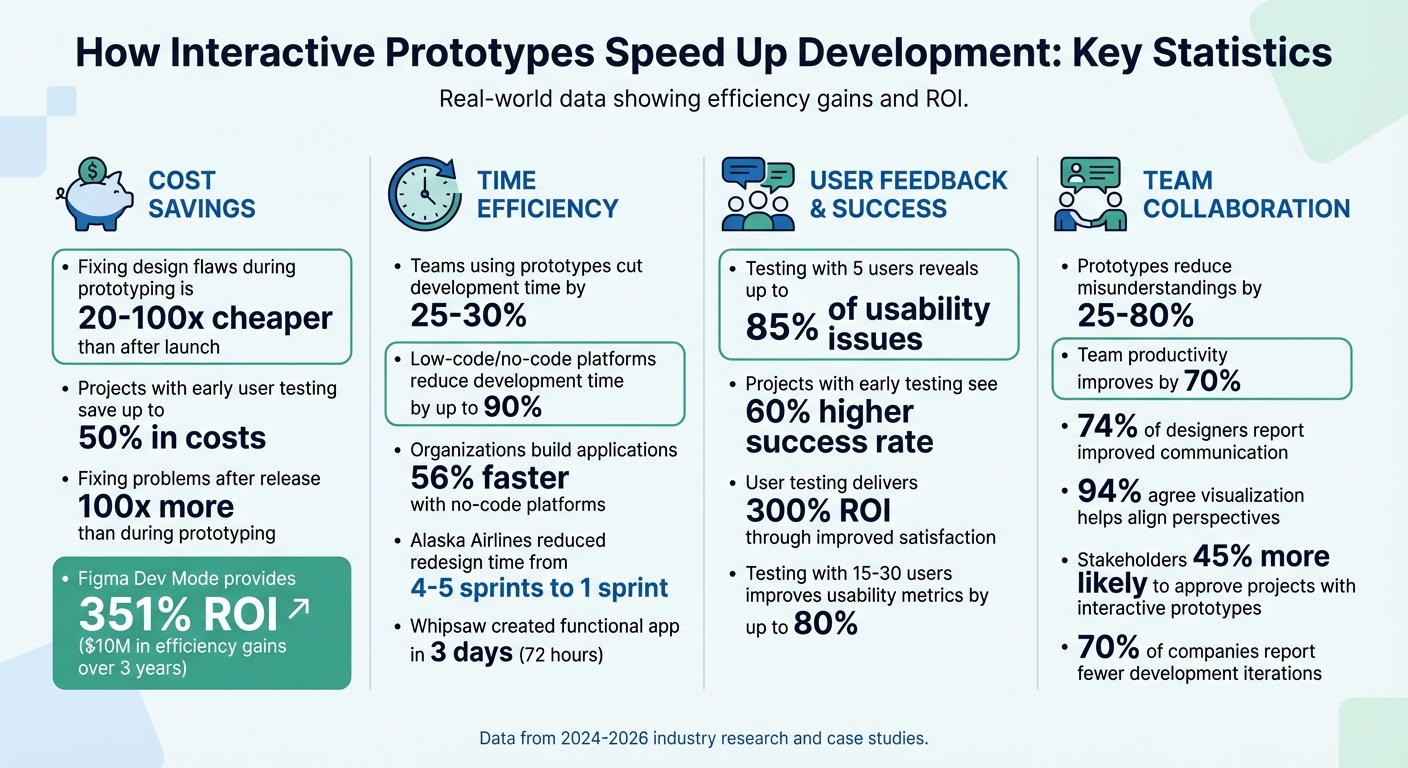
- Cost Savings: Fixing design flaws during prototyping is 20–100x cheaper than after launch.
- Time Efficiency: Teams using prototypes cut development time by 25–30%.
- Improved Feedback: Testing with just five users reveals up to 85% of usability issues.
- Better Collaboration: Prototypes reduce misunderstandings by 25% and improve team productivity by 70%.
- Real Examples: In 2025, a design team created a functional app in 3 days using AI-powered no-code and low-code tools.
Interactive prototypes are changing how products are built by focusing on real user behavior and rapid iteration. They’re not just tools - they’re a smarter way to develop products faster and with fewer errors.
Interactive Prototypes ROI: Cost Savings and Time Efficiency Statistics
Build For Speed: How to Prototype and Test Any Product in 5 Days
sbb-itb-3a330bb
How Interactive Prototypes Reduce Development Time
Interactive prototypes help teams make critical decisions earlier, streamlining the development process and cutting down on costly fixes after launch. Instead of debating abstract ideas, teams can observe how users interact with a prototype, uncovering pain points like state changes, error cases, and edge conditions well before coding begins.
The numbers back this up: Teams using prototypes for rapid iteration have cut development time by 25–30%. Projects that incorporate user testing early on see a 60% higher success rate and can save up to 50% in costs by addressing issues before production. Fixing a design problem after release can cost up to 100 times more than resolving it during prototyping. These early insights allow for faster iterations and keep teams aligned throughout the project.
AI tools have made this process even faster. In April 2025, Whipsaw's design team created a fully functional coffee-ordering app in just three days using V0.dev, going from concept to user-tested prototype in a 72-hour sprint.
Early Testing and Feedback Collection
Collecting feedback early can change the trajectory of a project. Stakeholders are 45% more likely to approve a project when presented with an interactive prototype rather than static wireframes.
Interactive prototypes create an "instant feedback loop." Many modern platforms allow prototypes to be deployed to live URLs, enabling engineers and stakeholders to provide feedback directly within their workflows, often through tools like GitHub Pull Requests. For example, in February 2026, Dust's design team, led by Édouard Wautier, used a React-based monorepo and Vercel for instant deployments. Engineers reused components from the prototype, turning it into a functional slice of the final product.
"The conversation shifts from opinions to behavior." - Édouard Wautier, Lead UX/UI Designer, Dust
This approach reveals problems that static designs often miss, such as multiple functional states. Teams can test different versions of a flow and let user behavior guide the final design, often combining the best aspects of each version.
AI-driven tools have further compressed the feedback cycle. Platforms like V0.dev, Lovable, and Replit can generate functional prototypes from simple text prompts or sketches in hours instead of weeks . Teams can quickly validate risky ideas by mapping them on a "Certainty vs. Impact" matrix and testing low-certainty, high-impact concepts early.
Faster Testing and Changes
Top no code tools and modern prototyping platforms make rapid iteration possible. Collaborative platforms can reduce design iteration cycles by up to 35%, while AI-powered tools have cut development time by 50–90% in some cases.
Code-based prototyping environments allow designers to use components and tokens that will appear in the final product. This seamless design-to-code workflow lets engineers directly reference or reuse prototype logic. Dust’s team, for instance, significantly reduced "implementation waste" by enabling engineers to pull components directly from prototype branches.
"Design is moving from planning experiences to modeling them - closer to reality, earlier, and with tighter feedback loops." - Édouard Wautier, Lead UX/UI Designer, Dust
Testing on real devices adds another layer of validation. By sharing prototypes through QR codes or links, users can test them on their actual devices. This real-world testing uncovers issues with tap targets, screen sizes, and interaction patterns that desktop simulations might miss. Prototypes can even include realistic data - like actual names or file lists - to test designs at full scale.
Early testing doesn’t just save time; it also saves money. Identifying issues early can cut project costs by up to 50%, and regular user testing can deliver a 300% return on investment through improved user satisfaction.
Better Team Communication
Interactive prototypes act as a shared visual reference, bridging the gap between designers, developers, and stakeholders. When everyone interacts with the same working model, conversations shift from abstract ideas about "how it should work" to concrete discussions about "how it does work." This approach reduces misunderstandings by up to 80% when prototypes are introduced early.
The communication benefits are clear. Seventy-four percent of designers report that collaborative prototyping platforms improve communication between teams and stakeholders, and 94% agree that visualizing concepts helps align perspectives and supports better decision-making. Including annotations and descriptions within prototypes can reduce delays caused by miscommunication by 25%.
Collaboration tools also boost productivity. Teams using these tools can see productivity increases of up to 70%, thanks to fewer back-and-forth discussions and clearer expectations. Engineers benefit from seeing exactly how features should behave, including transitions, loading states, and error handling, which minimizes the need for clarification and allows them to focus on building.
| Strategy | Impact | Source |
|---|---|---|
| Regular Cross-Disciplinary Meetings | 30% increase in project completion rates | Stanford Graduate School of Business |
| Standardized Collaboration Tools | Higher productivity in project execution | Project Management Institute |
| Visualization Methods (Journey Maps) | 25% reduction in misunderstandings | Nielsen Norman Group |
This behavior-driven approach also changes how decisions are made. Instead of debating aesthetic details, teams observe user interactions to determine what works best. This objective testing often resolves approval concerns in a single session. Seventy percent of companies report fewer development iterations because interactive prototypes help identify potential issues early.
Modern workflows integrate prototypes directly into engineering environments. Designers can push prototype branches to GitHub, enabling engineers to provide feedback without leaving their tools. This integration addresses technical feasibility early, ensuring resources aren’t wasted on features that might not work as intended. These streamlined processes lead to lower costs, faster development, and happier users.
Case Studies: Measured Results from Interactive Prototypes
Real-world examples highlight how interactive prototypes can speed up development and cut costs, building on earlier insights.
AI-Powered Prototyping Tools
In April 2025, Whipsaw's design team showcased the power of AI in prototyping by creating a coffee-ordering app in just 72 hours. Led by Senior Experience Designer Mike Dong, the team used V0.dev during a sprint at "Foamcore", their in-house community lab. The result? A functional app complete with Slack notifications, user interface, and a 3D swag shop gallery. By pulling typography and layout directly from Figma, they moved from concept to a user-tested version in only three days.
"We moved from idea to user-tested version in three days... V0 allowed us to build, test, and evolve ideas in ways that traditional workflows can't match." - Mike Dong, Senior Experience Designer, Whipsaw
Figma Variables and Dynamic States
Figma's variable features played a key role in redesigning Alaska Airlines' flight status page. In April 2024, Product Designer June Lee and Principal Engineer Dale Sande used the "Auro" design system to complete the redesign in just one sprint, a process that previously took four to five sprints. The updated page led to a 761% increase in average user time spent, jumping from 36 seconds to over 5 minutes.
Similarly, in January 2024, Lab Zero's Product Designer Annah Amici created a shipping manifest prototype for a client. By leveraging five Figma variables, the team tracked attribute removals across packages and moved from concept to user testing in just 3 days. This approach bypassed the need for weeks of engineering resources to create an HTML prototype.
"Compared to the weeks we would've waited for an engineer to find time to code an HTML prototype, we saved an enormous amount of time by using variables." - Annah Amici, Product Designer, Lab Zero
Another example comes from Globaldev, which streamlined a login prototype from 19 screens to 5 frames in April 2025. By eliminating redundant interactions, they were able to test the design before development, significantly reducing revision cycles.
These examples highlight how interactive prototypes save both time and resources while improving design workflows.
Data on Time Savings from Prototyping
Between March 2018 and March 2019, FM Global used rapid code-based prototyping to digitize "Country Sheets", their repository for insurance regulations. Designer and front-end developer Ben Szermer employed React and MS Fabric to create interactive prototypes, allowing the team to demonstrate a responsive layout to the C-suite. This method completed the project 4x faster than their usual UX research and development timeline.
Fixing design flaws during testing is 15 times more expensive than addressing them in the design phase. Research by Forrester Consulting, commissioned by Figma, revealed that Figma's Dev Mode provided a 351% ROI by streamlining developer workflows. For a composite organization, this translated into $10 million in developer efficiency gains over three years. Additionally, Alaska Airlines designers save an average of 11 hours per week by utilizing Figma variables.
These case studies underscore how interactive prototypes not only streamline development but also deliver measurable cost and time savings.
Low Code & No Code Prototyping Tools
Low-code and no-code platforms take the convenience of interactive prototyping to the next level, enabling faster product development with fewer technical hurdles.
Advantages of Low Code & No Code Platforms
These platforms simplify the development process by replacing manual coding with visual tools like drag-and-drop builders and pre-made templates. Instead of diving into complex code, users can arrange visual elements to create functional designs. This makes it possible for non-technical individuals - often called citizen developers - to turn their ideas into working products without needing advanced programming knowledge or specialized tools.
The time and cost savings are impressive. Development timelines can shrink by as much as 90% compared to traditional coding methods. Additionally, the reduced need for custom coding translates into significant cost reductions. Organizations using no-code platforms report building applications 56% faster than with traditional approaches, and these tools have been linked to a 58% increase in revenue.
"No-code platforms speed up development by eliminating the need for manual coding and offering pre-built components, templates, and automation tools. This allows users to test and validate their ideas or deploy MVPs faster without waiting for extensive coding or debugging." – Volodymyr Shchegel, VP of Engineering at MacKeeper
Unlike static wireframes, no-code prototypes can replicate real user workflows, connect to live databases, and even automate processes to showcase functional product features. Many platforms also streamline the deployment process, offering one-click publishing to web and mobile servers by handling backend tasks like server configuration and database management. By 2024, projections suggested that 80% of non-IT professionals would take part in IT product development, with citizen developers expected to outnumber professional IT developers by a 4-to-1 ratio by 2025.
Using the Best Low Code & No Code Platforms Directory
The Best Low Code & No Code Platforms Directory (https://lowcodenocode.org) is a valuable resource for teams and developers looking to find tools tailored to their project needs. This directory allows users to filter platforms by categories such as web design, mobile apps, or enterprise-level solutions, making it easier to identify tools that align with specific goals.
Filters for flexibility, scalability, integration options, and pricing models help teams pinpoint the best tools for their technical expertise and timelines. The directory even highlights whether platforms require building from scratch or support modern solutions like capturing live web apps for faster iterations. This feature ensures that teams can maintain the efficiency of interactive prototyping while selecting the most suitable tools for their projects.
Conclusion
Main Points
Interactive prototypes help teams catch issues early, gather feedback quickly, and align stakeholders before writing a single line of code. Fixing problems during the prototyping phase is 20 times cheaper than addressing them post-launch. Plus, incorporating user testing early can boost project success rates by 60%.
Case studies show how early testing and rapid iterations make a difference. These methods can cut overall development time by 25–30%, while stakeholders are 45% more likely to approve projects when they engage with interactive prototypes instead of static wireframes. Using standardized collaboration tools can improve team productivity by up to 70%, and visualizing concepts effectively reduces misunderstandings by 25%. Testing with real users - ideally 15 to 30 per phase - improves usability metrics by up to 80% and provides actionable insights to guide better product decisions.
All of this reinforces why interactive prototyping is a game-changer for modern product development.
Getting Started with Prototyping Tools
Getting into interactive prototyping has never been easier, thanks to low-code and no-code use cases. These tools can slash development time by up to 90%, allowing teams to focus on what users actually need instead of getting bogged down in code. Organizations using no-code platforms report building applications 56% faster and cutting development costs to about 30% of traditional methods.
If you're ready to dive into prototyping, check out the Best Low Code & No Code Platforms Directory (https://lowcodenocode.org). This resource helps you find tools tailored to your specific needs - whether you're creating web apps, mobile experiences, or enterprise solutions - while considering your team's skills and project timelines.
FAQs
What should an interactive prototype include before development starts?
An interactive prototype mimics the functionality of the final product by incorporating user interactions that evaluate critical aspects such as user flows, interface behavior, and the overall experience. This approach helps uncover potential issues early, allowing the design to be fine-tuned before development starts - saving both time and resources.
How many users should I test an interactive prototype with?
It's generally a good idea to test interactive prototypes with 5 to 15 users. This range strikes a balance - it’s enough to spot usability problems and gather valuable feedback to refine both the design and functionality.
When should I use low-code or no-code tools for prototyping?
Low-code and no-code tools are perfect for prototyping when speed, iteration, and testing take center stage. They let you build functional prototypes quickly, skipping the need for deep coding expertise. This means you can gather feedback and make improvements faster. These tools shine when you need to showcase ideas to stakeholders, test out concepts, or create a minimum viable product (MVP) in record time - shrinking development timelines from months to just weeks or even days. They’re the go-to option when time, cost-efficiency, and adaptability are top priorities.