Role management in low-code platforms is all about controlling access - deciding who can do what, when, and how. It ensures users only have the permissions they need, reducing risks like data breaches or errors. This is critical as low-code adoption grows, with 80% of users predicted to come from outside IT departments by 2026.
Key points:
- Role-Based Access Control (RBAC) assigns permissions to roles (e.g., Admin, Developer) instead of individuals.
- It enforces the Principle of Least Privilege, limiting access to only what's necessary.
- Clear roles improve security, accountability, and compliance with regulations like GDPR and HIPAA.
Why it matters: Poor role management can lead to incidents like the 2019 Capital One breach, caused by overly broad permissions. Establishing a governance framework with defined roles, environment-specific access, and regular audits helps mitigate these risks.
For organizations, implementing role management involves:
- Mapping roles to job functions (e.g., Viewer, Maker, Admin).
- Automating role assignments with identity providers (e.g., SSO).
- Setting up a Center of Excellence (CoE) to oversee governance.
- Regularly auditing permissions and monitoring user activity.
Multiuser And User Roles | Low-Code For Real Developers | Five.Co
sbb-itb-3a330bb
Core Components of Role Management
In low-code platforms, effective role management revolves around four key elements: Users (individuals interacting with the system), Roles (authority levels tied to job functions), Permissions (specific rights such as read, write, or delete), and Sessions (instances where roles are activated). Together, these elements create a framework that balances innovation with control, ensuring secure and efficient development.
User Access Control
User access control simplifies permissions by assigning them to roles rather than individual users. Typically, low-code platforms categorize users into three main personas:
- Citizen Developers: Focused on basic configuration and maintenance.
- Business Technologists: Build complex business applications.
- Low-Code Developers: Handle platform customization and support for other builders.
The system incorporates permission inheritance, where access rights flow from parent resources to child components. For example, if a user has permissions on a parent application, they automatically inherit those permissions for its underlying components - unless explicitly overridden. It also uses permission composition, which combines access rights from various sources (e.g., individual accounts, teams, or roles) through a union operation.
Role hierarchies are designed to reflect real-world organizational structures. Higher-level roles, such as Admin, inherit all permissions from lower-level roles like Viewer. This approach enforces the Principle of Least Privilege, ensuring users only have the access necessary for their tasks. These granular controls also support stronger authentication methods, safeguarding access points across the system.
Authentication and Data Security
Authentication determines who the user is, while role management defines what actions they can perform. In modern low-code platforms, roles are often embedded in authentication tokens, with multi-factor authentication (MFA) adding an extra layer of security.
However, security cannot rely solely on frontend controls. For example, even if certain buttons are hidden in the user interface, the backend must validate every API request against the user's role to block unauthorized access. To maintain consistency, permissions should be managed through a central authoritative source, such as a database or configuration file. This approach prevents discrepancies between different application layers or services. Once identity and permissions are secured, segregating environments further reduces risks.
Environment-Specific Access
Separating development, testing, and production environments helps isolate untested changes from live systems, reducing the likelihood of errors. This practice becomes increasingly important as the low-code market is projected to exceed $47.3 billion by 2025, with 78% of enterprises concerned about losing agility when implementing governance frameworks.
Environment-specific access ensures that less-secure environments, like development, cannot access sensitive production resources such as databases or secrets. In production, access should operate in a "restricted" mode using granular Role-Based Access Control (RBAC). Most users should default to "Viewer" (read-only) access. For automated deployment pipelines, programmatic identities (service users) should be assigned specific environment roles, avoiding broad permissions for human users.
As Tamer Badr, Founder of Singleclic, aptly puts it:
"Think of low-code components as industrial-grade Lego blocks. They're powerful only when you snap them together under clear guardrails".
How to Implement Role Management
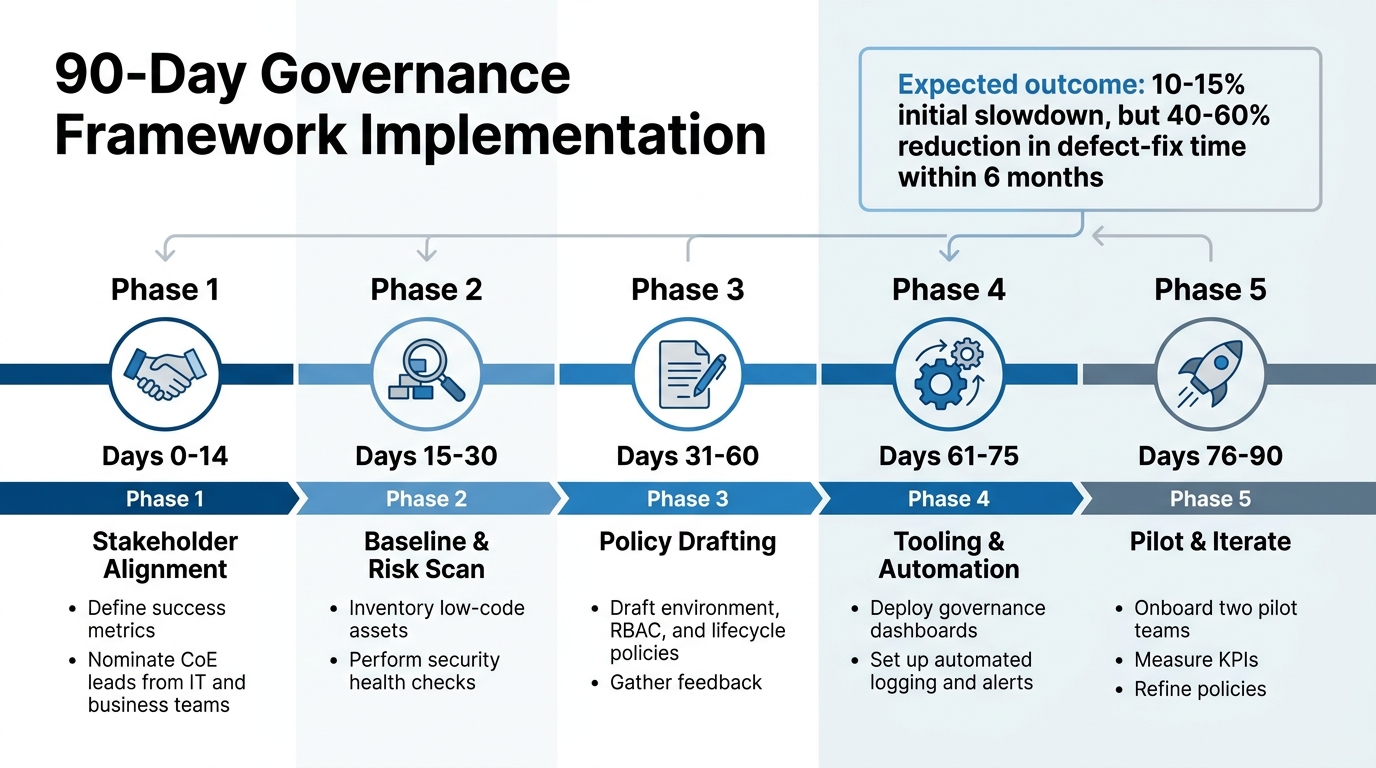
90-Day Low-Code Governance Implementation Timeline
Defining and Aligning Roles
Start by mapping roles to job functions rather than specific individuals. Think of roles like "Analytics Viewer", "Billing Administrator", or "Makers" - these reflect common responsibilities within an organization. This approach simplifies management and ensures a clear audit trail.
Use descriptive names for roles to make their purpose and scope immediately clear. For instance, a title like "Environment Manager" is far more informative than a generic label. Avoid creating broad, catch-all roles like "Admin." Instead, break permissions into focused, reusable roles such as "Theme Manager" or "SSO Manager."
Organize permissions into logical groups, such as User Management, Organization Settings, Customization (e.g., branding/themes), and Configuration (e.g., environments/AI). Stick to the Principle of Least Privilege - only grant the minimum permissions needed for each task. For example, restrict "Makers" (users who build apps) to development and testing environments, while reserving production deployment rights for a select group of trusted administrators.
Integrate your system with identity providers like Google LDAP, SAML, or OIDC to automate user provisioning. Just-In-Time (JIT) provisioning can automatically create accounts and assign roles when users log in via Single Sign-On. This eliminates manual setup and keeps role assignments aligned with organizational changes.
Structured frameworks can further reinforce these role definitions, ensuring consistency and compliance across the organization.
Setting Up a Governance Framework
Establish a Center of Excellence (CoE) - a team that includes IT, business leaders, and compliance officers. This group sets standards, reviews applications, and provides guidance to citizen developers. Surprisingly, only 31% of companies using low-code platforms have governance measures in place, leaving many vulnerable to security and compliance risks.
For example, in 2025, a major bank in the MENA region launched a Power Apps Center of Excellence, cutting shadow-IT incidents by 42% within six months. Similarly, Nsure.com, an insurtech firm, implemented a governance strategy combining AI automation and strict data validation. This reduced manual processing by over 60% while maintaining compliance across more than 50 carriers. These examples show how aligning roles and establishing governance can directly improve security and compliance outcomes, similar to other low-code use cases across various industries.
Classify applications by risk level - low, medium, or high - based on factors like data sensitivity and business impact. High-risk apps should undergo manual security reviews before deployment, while low-risk apps can rely on automated scans. Require peer reviews or IT security checks for any app moving to a production environment.
To encourage safe innovation, provide pre-approved templates with built-in security and role-management guardrails.
| Phase | Timeline | Key Activities |
|---|---|---|
| Stakeholder Alignment | Days 0-14 | Define success metrics and nominate CoE leads from IT and business teams. |
| Baseline & Risk Scan | Days 15-30 | Inventory low-code assets and perform security health checks. |
| Policy Drafting | Days 31-60 | Draft environment, RBAC, and lifecycle policies; gather feedback. |
| Tooling & Automation | Days 61-75 | Deploy governance dashboards and set up automated logging and alerts. |
| Pilot & Iterate | Days 76-90 | Onboard two pilot teams, measure KPIs, and refine policies. |
Regular Audits and Monitoring
Once a governance framework is in place, continuous monitoring becomes essential for maintaining security and compliance. Use real-time monitoring tools to track user activities, access patterns, and potential security anomalies. Automation can simplify access reviews, reducing manual effort while ensuring accurate tracking of user permissions.
Keep detailed audit trails to log significant actions, such as changes to permissions, data access events, and app modifications. Integrate these logs with Security Information and Event Management (SIEM) tools or identity governance platforms for centralized oversight.
Schedule regular reviews - whether quarterly, semi-annually, or annually - to ensure users only have the permissions they need. Automated alerts can flag unusual activity, like unauthorized access attempts, so you can respond quickly.
While implementing governance frameworks might initially slow delivery by 10–15%, organizations often see a 40–60% reduction in defect-fix time within six months. Additionally, maintaining version histories provides a clear record of changes, helping teams resolve issues efficiently.
Benefits and Challenges of Role Management
Building on the governance framework mentioned earlier, role management brings clear advantages but also comes with specific hurdles that organizations need to address.
Key Benefits of Role Management
Role management improves security, operational efficiency, and regulatory adherence. By assigning permissions based on roles rather than individuals, users are limited to accessing only the data and tools necessary for their responsibilities. This approach reduces potential vulnerabilities and minimizes the damage caused by account compromises or accidental errors - an issue often highlighted in major security breaches.
This system also simplifies processes like onboarding and offboarding. By automatically tailoring interfaces to display only relevant options, role-based permissions reduce clutter and lower the chance of user mistakes [3,11]. Clear role definitions make it easier to prove compliance with industry standards, as auditors can quickly verify who has access to sensitive information [3,11]. Plus, as organizations grow, role management adapts well, allowing for the addition of users and more complex low-code applications without requiring significant manual adjustments [3,11]. This leads to fewer accidental changes to data and a cleaner, more traceable audit trail.
While these benefits enhance both security and operational processes, there are challenges that must be addressed to fully leverage role management.
Common Challenges and Solutions
One of the most common challenges is role sprawl, where too many overlapping roles are created without clear distinctions. This can lead to a fragmented and confusing permission structure. A practical solution is to maintain a centralized source of truth for role definitions, use hierarchical structures where higher-level roles inherit permissions from lower ones, and limit users to a single role whenever possible to prevent conflicts.
Another issue is environment drift, which occurs when security settings differ between staging and production environments. Routine audits can help identify and resolve these inconsistencies before they create problems. Similarly, some teams face difficulties with mixing development and production roles, which can allow the same users to edit application logic and execute production tasks. To address this, it’s crucial to restrict developers to non-production environments and reserve production deployment rights for a smaller group of administrators. Automating role assignments through predefined rules can further reduce manual errors and ensure uniformity across the organization.
Conclusion
Role management is a cornerstone of secure and efficient low-code development. By limiting user access, organizations can reduce risks and ensure accountability. As Aniket Singh from Procedure aptly puts it:
"Would you hand the keys of the vault to everyone in the company?"
This highlights how proper role management safeguards innovation while fostering trust on low-code platforms.
Applying the principle of least privilege and maintaining a centralized source of truth for permissions allows systems to grow alongside your organization. Predefined roles ensure that new hires or role changes automatically receive the correct permissions. This structured approach minimizes risks tied to overly broad access, reinforcing the security measures discussed in this guide.
Strengthening your governance framework involves regular audits, environment-specific access controls, and multi-factor authentication. Naresh from Infizo emphasizes this point:
"RBAC provides a clear framework for compliance, making it easier to demonstrate adherence to standards during audits."
Although challenges like role sprawl, environment drift, or mixing development and production roles may arise, these can be addressed with hierarchical role structures, routine reviews, and automated role assignments. Role management goes beyond restricting access - it empowers teams to operate confidently within well-defined boundaries. When done right, it transforms low-code platforms into secure, scalable tools that drive long-term success.
For more guidance on low-code governance or to explore platforms with advanced role management features, check out the Best Low Code & No Code Platforms Directory.
FAQs
How do I decide which roles my low-code platform needs?
To get started, pinpoint the specific job functions and responsibilities within your organization that will interact with the platform. These might include roles like administrators, application builders, or security managers. Once identified, outline the permissions and access levels each role needs to carry out their tasks efficiently and securely.
By implementing role-based access control (RBAC), you can systematically assign roles and permissions. This approach ensures users only access what’s necessary for their work, minimizing risks such as data breaches while also promoting smoother collaboration across teams.
What’s the best way to keep dev, test, and prod access separated?
To keep development, testing, and production environments separate in low-code platforms, it’s crucial to implement strict environment controls and role-based access control (RBAC). Assign distinct roles with carefully defined permissions to ensure only the right people have access to sensitive areas. For instance, developers might work within development and testing environments, while access to production is restricted to release managers who have the necessary approvals. This approach follows the principle of least privilege, minimizing risks and helping maintain compliance.
How often should roles and permissions be audited in a low-code platform?
Roles and permissions within a low-code platform should be reviewed on a regular basis - ideally, at least once a year. This practice is essential for maintaining security, ensuring compliance, and confirming that access control measures are functioning as intended. Routine audits can uncover outdated or incorrect permissions, helping to minimize risks and strengthen governance practices.