Low-code platforms are transforming how teams manage backlogs by reducing development time, empowering non-technical users, and improving task prioritization. Here's what you need to know:
- Faster Development: Low-code tools automate repetitive tasks like creating APIs and UI components, cutting development time by 40%-60%.
- Citizen Developers: Business users can create tools themselves, reducing IT backlogs and allowing engineers to focus on complex projects.
- Better Prioritization: Built-in features like AI-driven backlog grooming and integration with tools like Jira streamline task management.
- Proven Impact: 90% of developers using low-code platforms report fewer than five backlog requests per month.
These platforms address the growing gap between IT demand and capacity while ensuring security and compliance through IT oversight. By shifting to configuration-driven workflows, organizations reduce bottlenecks and improve delivery speed.
Want to make backlog management easier? Start by auditing your backlog, choosing the right platform, and leveraging automation tools to focus on what matters most.
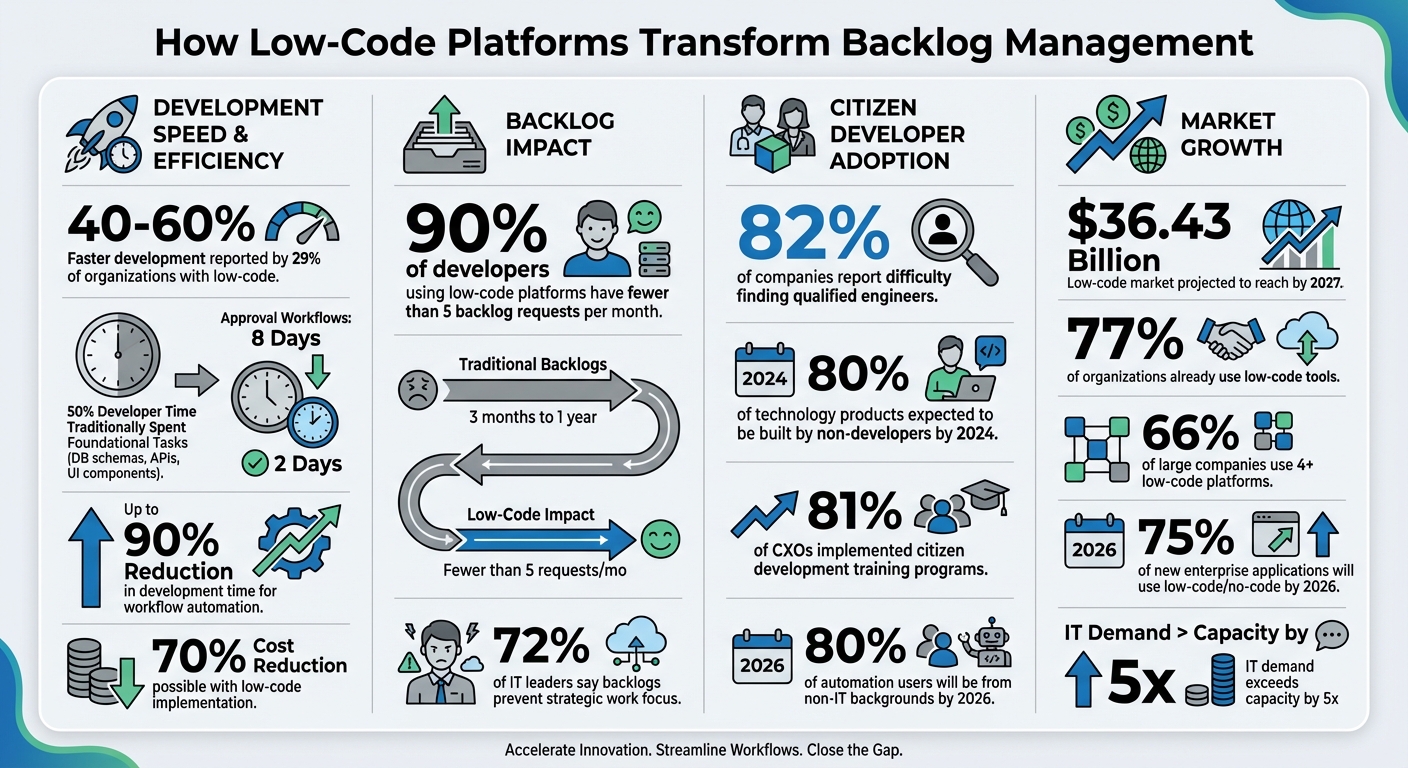
Low-Code Platform Impact on Backlog Management: Key Statistics
How Low-Code Platforms Simplify Backlog Management
Faster Development Cycles
Low-code platforms cut through the technical hurdles that often slow down development. In traditional coding, developers spend nearly 50% of their time on foundational tasks like creating database schemas, setting up API endpoints, and designing UI components. Low-code platforms handle these essentials automatically, significantly reducing the workload. For example, approval workflows that used to take eight days can now be completed in just two.
Here's the kicker: 29% of organizations report that low-code development is 40% to 60% faster than traditional methods. As Satya Nadella explains, tools like Power Apps transform weeks of coding into days of configuration. This visual, drag-and-drop approach enables teams to quickly prototype and refine requirements early in the process, saving time and effort while empowering non-technical contributors.
Enabling Citizen Developers
Low-code platforms shift the development landscape by allowing business users, often called "citizen developers", to create their own tools. Instead of waiting on IT teams, these users can deploy simple workflows on their own. This shift reduces IT backlogs, letting developers focus on more complex, high-value projects that require their expertise.
This approach addresses a pressing issue: 82% of companies report difficulty finding qualified engineers. By enabling employees to build their own departmental tools, companies make better use of their existing workforce. In fact, by 2024, 80% of technology products and services were expected to be created by non-developers. Organizations are already preparing for this shift - 81% of CXOs and directors have implemented citizen development training programs. To make this work, IT teams provide oversight to ensure security and compliance, while business users manage operational needs.
Better Task Prioritization and Tracking
Low-code platforms don’t just speed up development or empower citizen developers - they also simplify backlog management. Built-in tools help teams organize tasks visually, using value-versus-effort matrices and prioritization frameworks. Advanced features like AI-driven backlog grooming, effort estimation, and splitting user stories make decision-making faster and more precise. Some platforms even incorporate scoring models like RICE to objectively assess task importance.
Integration with tools like Jira, Azure DevOps, and GitHub ensures seamless two-way synchronization, so teams can track progress without juggling multiple systems. This leads to better visibility into priorities and faster action on the most critical tasks.
sbb-itb-3a330bb
Step-by-Step Guide to Using Low-Code Platforms for Backlog Management
Step 1: Review and Prioritize Your Backlog
Start by taking a hard look at your backlog to understand what’s in there. Categorize items into groups like user value, business value, technical debt, bugs, and enhancements. This step gives you a clear idea of where your team's focus should be.
Next, figure out which tasks are a good fit for low-code development. Tasks like workflow automation, approval processes, and data collection forms are great candidates for low-code tools. On the other hand, complex integrations or high-performance systems might still require traditional development. Mark each item as either "low-code ready" or "needs IT expertise."
Clean up your backlog by removing duplicates, outdated items, or ideas that no longer align with your goals. For example, you could archive user stories that have been untouched for over six months. To keep things in check, calculate your "Backlog Stagnation Rate" - the percentage of items older than a year. If that number is high, it’s a sign you need to cut down aggressively.
Use a scoring framework to make prioritization more objective. The RICE model (Reach, Impact, Confidence, Effort) works well for teams with multiple stakeholders. Alternatively, the Value-Effort Matrix can help you quickly identify low-hanging fruit. Also, consider reserving 10–20% of your team’s time for tackling technical debt, which can free up as much as 50% of engineering time for more impactful work.
"Most product organizations... are churning out features and products that fail to deliver any value." – Marty Cagan, Author of Inspired
Once your backlog is streamlined and prioritized, you’re ready to move on to selecting a platform.
Step 2: Choose the Right Low-Code Platform
With a refined backlog in hand, the next step is selecting a low-code platform that meets your needs. Considering that 77% of organizations already use low-code tools and 66% of large companies rely on four or more platforms, choosing wisely is crucial.
Start with a "One-Hour Productivity Test." Try building something useful within an hour, without formal training, to see how steep the learning curve is. Determine whether the platform is designed for citizen developers or requires more technical expertise.
Integration is key. Make sure the platform works seamlessly with your existing tools like Jira, Azure DevOps, and GitHub, as well as any proprietary systems. Look for pre-built connectors and APIs that simplify integration. Security is another must-have - features like data encryption, multi-factor authentication, and compliance with standards like FedRAMP or GDPR are non-negotiable.
Don’t overlook governance and scalability. IT teams need tools to maintain oversight, while business users should have enough autonomy to work efficiently. Also, plan an exit strategy early on to know how data can be exported and applications maintained if you decide to switch platforms. Resources like the Best Low Code & No Code Platforms Directory (https://lowcodenocode.org) can help compare options across categories like automation, workflow management, and integration tools.
"Too often, a low- or no-code solution is chosen to solve a single problem for one project or workflow, making it hard to collaborate across the organization without adding technical debt or creating shadow IT." – Debbi Roberts, SVP of Product Management, Quickbase
Once you've chosen a platform, it's time to deploy and scale your solutions.
Step 3: Deploy and Scale Solutions
Deployment starts with identifying the workflow, designing visually, configuring automation, testing, and monitoring. This process takes advantage of low-code benefits like faster development cycles and better task prioritization. Begin with quick wins - use pre-built templates for tasks like approval workflows or dashboards to deliver immediate results.
To scale effectively:
- Assign tasks to either citizen developers or IT experts based on complexity.
- Train business units in high-demand areas like Finance or HR.
- Set up a Center of Excellence to manage security, data access, and application lifecycles.
Incorporate low-code tasks into your existing Scrum or Kanban boards, and adjust your "Definition of Done" to include platform-specific quality and security checks. Also, create clear escalation paths so citizen developers know when to involve IT for more complex projects.
Track deployment metrics to gauge success. Monitor how quickly tasks move from backlog to production and measure how much IT capacity shifts toward strategic work. Interestingly, 90% of developers using low-code platforms report having fewer than five application requests in their monthly backlog, showing how effective deployment can significantly reduce bottlenecks.
"It's one thing for employees to use the tool, but it's another question of how they use the tool." – Wayson Vannatta, CIO, Nintex
Blitz Your Backlog with Low Code
Key Features to Look for in Low-Code Platforms
Once you've started deploying solutions, you might notice that not all low-code platforms deliver the tools you need to effectively tackle your backlog. The right features can mean the difference between a platform that truly simplifies your workflow and one that just shifts the problem around. Based on deployment experiences, the following capabilities will help ensure your chosen platform speeds up development while managing your backlog more effectively.
Task and Workflow Automation
A key element of any robust low-code platform is its visual drag-and-drop builder. This feature allows you to design workflows by arranging components rather than writing lengthy code blocks. Platforms with triggers and actions are especially useful - they can automatically initiate workflows and notify the right team members at the right time. This kind of automation directly addresses the issue of wasted time, as teams often spend up to 50% of their work hours on non-essential tasks.
Conditional logic and decision rules further enhance efficiency by routing tasks based on priority, department, or category. Pre-built templates and components for approvals and notifications make it easier to digitize manual processes. With the low-code market projected to hit $36.43 billion by 2027, and 80% of automation users expected to come from non-IT backgrounds by 2026, the shift toward accessible automation is undeniable.
Platforms that allow for code extensibility, such as Python or JavaScript, are essential for solving more complex problems beyond the capabilities of visual tools. Some platforms even incorporate AI features, like summarizing backlog descriptions, analyzing sentiment in support tickets, or automating lead scoring.
"Low-code automation lets you build apps by drawing a process model instead of writing code." – Appian
Integration with Existing Tools
A low-code platform should integrate effortlessly with your current tools. Pre-built connectors for ERP, CRM, and cloud applications are crucial, as they eliminate the need for manual API development. This is especially important as the demand for applications continues to outpace IT's ability to deliver.
Event-based synchronization through REST APIs and webhooks ensures real-time data exchange. For instance, when a task is updated in tools like Jira or Azure DevOps, the backlog status updates automatically. This unified data flow reduces manual errors and keeps everything in sync. By 2026, 75% of new enterprise applications are expected to be built using low-code or no-code platforms, with organizations reporting up to a 90% reduction in development time for workflow automation when using strong integration features.
Before choosing a platform, review your existing tech stack to confirm it has native connectors for your essential tools. If you rely on legacy systems without standard connectors, look for platforms that support custom coding options, like JavaScript or Python, for advanced API calls. Resources like the Best Low Code & No Code Platforms Directory (https://lowcodenocode.org) can help you compare integration capabilities.
"With low-code, it's not IT vs. Business. It's IT and Business." – Dinesh Varadhrajan, Chief Product Officer, Kissflow
Once your tools are seamlessly connected, the next step is tracking performance.
Reporting and Analytics Dashboards
Tracking performance is critical. Real-time dashboards provide insights into essential metrics like backlog age - how long application requests sit in the IT queue. This is a significant issue, as 72% of IT leaders say backlogs prevent them from focusing on strategic work.
After integrating your tools, robust dashboards can help you measure and refine your backlog management. Analytics let you track IT capacity allocation, showing how much time shifts from routine tasks to higher-value projects. They also highlight bottlenecks within workflows. By automating data extraction and integration across multiple sources, these platforms eliminate manual data handling, allowing you to measure ROI through metrics like development speed, application deployment counts, and cost savings. Dashboards ensure you meet performance benchmarks while keeping your backlog under control.
| Metric | Purpose in Backlog Management |
|---|---|
| Backlog Age | Measures how long requests stay in the queue |
| IT Capacity Allocation | Tracks time spent on strategic versus routine tasks |
| Deployment Counts | Compares output from citizen developers and IT professionals |
| Workflow Velocity | Identifies where tasks are stalling in workflows |
By segmenting metrics, you can see how many applications are developed by citizen developers versus professional IT teams. This information helps refine your backlog and supports agile decision-making, ensuring your workflow remains optimized.
"IT backlogs lead enterprises to a place where all the great application ideas that could potentially improve employee efficiency and streamline customer experiences get left at the table." – Dinesh Varadhrajan, Chief Product Officer, Kissflow
These features set the stage for effective and ongoing backlog management practices.
Best Practices for Long-Term Backlog Management
After rolling out your low-code platform and tackling the initial backlog, it's crucial to adopt strategies that ensure smooth operations over time. These tips leverage the strengths of low-code platforms to maintain effective backlog management.
Maintain an Agile Approach
Keeping your backlog manageable requires flexibility. Low-code platforms make it easier to implement changes, allowing teams to quickly adapt to feedback from sprint reviews or shifts in business needs. Focus on delivering small, frequent updates to gather feedback faster. Aim to always have at least two sprints' worth of refined user stories ready for development. As Phil Spadaro, Delivery Director at Emids, explains:
"Low-Code moves quickly; very quickly! A well-populated backlog ensures that the team has a clear roadmap... Without this roadmap, development can become chaotic".
Before each sprint, review and clean up your backlog using a value-versus-effort matrix. Remove low-priority or irrelevant items and ensure every task aligns with a strategic goal or user need.
Use Citizen Developers Effectively
Involve business users in creating simple apps, but make sure to assign tasks appropriately. Identify areas where citizen developers can excel - like Finance for approval workflows, Operations for dashboards, or HR for employee portals. Regularly review your backlog to separate tasks that citizen developers can handle from those requiring IT expertise. Set clear guidelines to minimize risks. This lets professional developers focus on complex tasks, such as building core models or secure custom APIs, while IT shifts to supporting controlled self-service environments.
Here’s a quick guide to assess task suitability:
| Task Category | Suitable for Citizen Developers? | Reason |
|---|---|---|
| Workflows & Approvals | Yes | Simple routing and business rule enforcement |
| Data Collection/Forms | Yes | Basic database entry and reporting |
| Departmental Tools | Yes | Internal utilities like calendars or trackers |
| Core System Integrations | No | Requires advanced API and security expertise |
| High-Transaction Apps | No | Needs professional optimization for performance |
Track and Improve Performance
Empowering users is just the start - tracking performance ensures continuous improvement. Set clear criteria to automatically route new requests to either a no-code channel or the IT queue. Keep an eye on backlog age to see how long tasks sit in the queue, and monitor how much IT time goes toward tactical tools versus strategic platform development.
Use AI tools to detect workflow inefficiencies and avoid technical debt. Establish a Center of Excellence to oversee low-code projects and enforce standardized security and compliance measures. Additionally, track the gap between estimated and actual story points to measure your platform's efficiency.
A noteworthy stat: 90% of developers using low-code platforms maintain fewer than five application requests in their monthly backlog. If your team isn’t hitting this benchmark, revisit your governance structure and task classification process to identify bottlenecks.
Conclusion
Low-code platforms are reshaping how organizations handle backlog management by redistributing development efforts and reducing technical overhead. With these tools, solutions can be deployed in days rather than weeks. According to developer feedback, low-code platforms consistently keep application requests manageable, unlike traditional backlogs that can extend anywhere from three months to a year.
By converting coding tasks into configuration steps, low-code platforms speed up development significantly. Tasks like setting up database schemas, API endpoints, and UI components become streamlined, enabling development to be completed up to 60% faster while reducing costs by as much as 70%. This shift allows professional developers to focus on more complex projects and system architecture rather than routine tasks like approval workflows or department dashboards. These efficiencies lay the groundwork for a more agile and sustainable approach to backlog management.
However, success with low-code platforms requires more than just adopting the technology. A solid governance framework, clear task prioritization, and consistent performance monitoring are essential. Start by auditing your backlog to determine which tasks can be handled by citizen developers and which require IT expertise. Establishing a Center of Excellence early on can ensure security and compliance as your usage scales.
Selecting the right platform is equally critical. With over 85 low-code and 364 no-code platforms available, it’s important to evaluate your specific needs - whether for HR workflows, finance automation, or field operations. Resources like the Best Low Code & No Code Platforms Directory (https://lowcodenocode.org) offer detailed comparisons across analytics, automation, and development tools, helping you choose platforms that align with your business goals, security needs, and existing tech stack.
Organizations adopting low-code today are meeting demands that exceed IT capacity by at least five times.
FAQs
Which backlog items should we build with low-code first?
Start by focusing on backlog items that streamline internal operations, handle routine tasks, or are perfect for quick automation and prototyping. Low-code platforms are especially effective for building internal tools, automating workflows, and tackling operational challenges. For example, prioritize projects like support ticketing systems or repetitive processes. These types of tasks can be built, tested, and rolled out quickly, helping to clear your backlog while boosting overall efficiency.
How do we prevent security and compliance risks with citizen developers?
To reduce security and compliance risks tied to citizen developers, it's crucial to set up a strong security governance framework. This framework should include clear policies for app development, comprehensive review processes, and training programs to tackle potential security weaknesses.
Incorporate tools like role-based access controls, authentication mechanisms, and continuous monitoring to safeguard against risks such as data breaches. Additionally, adopting best practices - like those outlined in OWASP’s guidelines - can help pinpoint and resolve vulnerabilities efficiently.
What metrics best prove low-code is reducing our backlog?
Key metrics to watch are cycle time reduction, IT backlog reduction, and cost savings - like cutting development costs by 50%. These figures showcase more efficient workflows and quicker application delivery, illustrating how low-code platforms simplify backlog management.