Managing databases in microservices is becoming easier with low-code tools. These platforms replace manual coding with visual interfaces, automated workflows, and AI-driven schema generation. Here’s what you need to know:
- Key Features: Real-time data syncing, visual schema design, and instant API generation.
- Popular Platforms: Integrate.io, Fivetran, MuleSoft, and Coupler.io.
- Automation Benefits: Tools like Prisma eliminate manual migrations, saving hours of work.
- Scalability and Integration: Look for support across databases (PostgreSQL, MySQL, etc.) and hybrid environments.
Quick Comparison:
| Tool | Skill Level | Setup Time | Maintenance | Key Use Case | Pricing Model |
|---|---|---|---|---|---|
| Integrate.io | No-code | Fast | Low | Data workflows for analysts | Connector-based |
| Fivetran | Low-code | 5 minutes | Very Low | Schema drift automation | Monthly Active Rows |
| MuleSoft | Technical | 6–12 months | High | Enterprise API management | Custom quotes |
| Coupler.io | No-code | Instant | Low | Reporting and analysis | Volume-based |
These tools streamline database management, reduce development time, and improve data reliability. Choose based on your team’s skills, budget, and project scale.
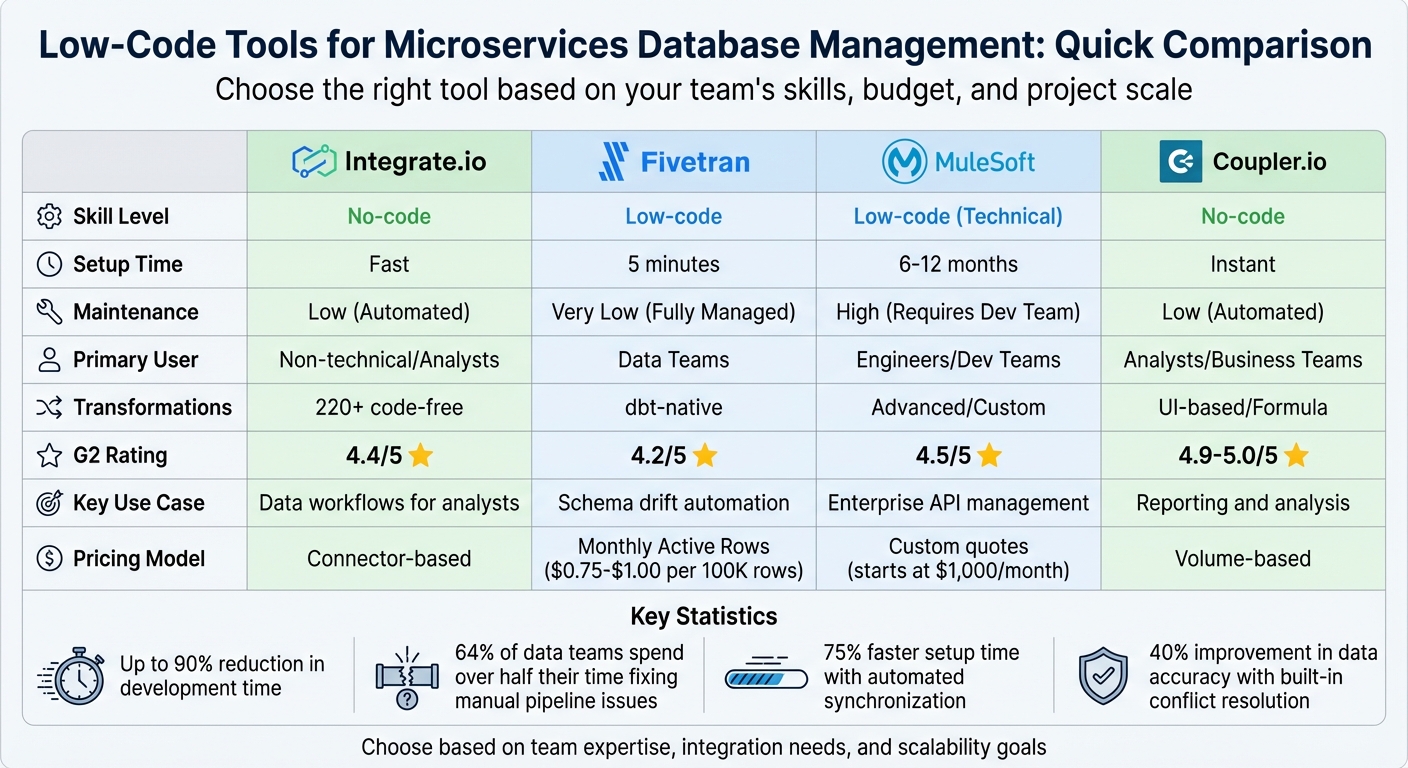
Low-Code Tools for Microservices Database Management Comparison Chart
API-driven development and low-code REST APIs | CloudWorld 2022
sbb-itb-3a330bb
What to Look for in Low Code Database Tools for Microservices
When choosing low-code tools for microservices, prioritize features like real-time data synchronization, instant API generation, and visual schema design. These capabilities are crucial for managing distributed systems effectively. Industry reports suggest that low-code backend generators can reduce development time by up to 90%.
The most effective tools avoid vendor lock-in by offering native support for over 15 database types, including PostgreSQL, MySQL, MongoDB, and Oracle. They should also allow hybrid connectivity between on-premise and cloud environments, giving you the flexibility to adapt as your system grows. Security is another key area - look for features like Row-Level Security (RLS) and Role-Based Access Control (RBAC) to safeguard distributed data across services.
Visual Interface and Ease of Use
A user-friendly interface can make a world of difference, especially for developers who aren't SQL experts. Features like drag-and-drop interfaces for building tables, defining fields, and setting relationships (1:1, 1:N, N:M) simplify database management. Some platforms even include spreadsheet-like table editors and auto-arranging ER diagrams, giving you a clear view of your schema.
"You don't have to be a database expert to use Microgen. Our table editor is easy to use, even for non-technical users."
Modern tools are also leveraging AI to streamline the process. AI assistants can convert plain English descriptions into production-ready schemas, removing the need to manually write CREATE TABLE statements or memorize SQL syntax. For instance, Fluxstack offers these features for free during early access, with unlimited projects and visual schema design included.
Once your schema is set up, the tool should ensure efficient real-time synchronization and data transformation.
Data Synchronization and Transformation
Keeping data consistent across microservices is a challenge, but low-code platforms simplify this with real-time syncing. They use mechanisms like automated replication and Change Data Capture (CDC) to track row-level changes and convert them into event streams. This approach eliminates the need for custom scripts or manual ETL processes.
Built-in conflict resolution can improve data accuracy by up to 40% compared to manual methods. Automated schema mapping further reduces setup time, while visual transformation workflows allow you to reshape data without writing complex SQL. These features lead to a 75% faster setup time for synchronization compared to traditional methods.
"DBSync saved us a lot of development time when performing data transfers between Salesforce and our servers. The tool is also easy to maintain, and the failure rate to backup Salesforce objects fell significantly." - Samuel Tang, Senior Developer, Scotiabank
This level of synchronization ensures data reliability, setting the stage for smooth API interactions.
API Integration Capabilities
Strong API functionality is non-negotiable for microservices. A good platform should automatically generate REST and GraphQL APIs by analyzing your database schema. These APIs should support advanced querying options like SQL-driven search, pattern matching, numeric ranges, and aggregate functions such as SUM, AVG, and COUNT.
Real-time subscriptions via WebSockets are another must-have, as they keep all services updated whenever data changes. For custom logic beyond standard CRUD operations, look for tools that support plugins (JavaScript, Python, Go) or integrate with serverless platforms like AWS Lambda.
"Our team was looking for an API builder that could be extensible. Apito was the perfect choice because it supports AWS Lambda functions to write logic." - Koushik Ambani, App Developer
Other helpful features include OpenAPI (Swagger) documentation generation and built-in REST consoles for testing and debugging. To ensure performance under heavy loads, the platform should offer options like data paging, API throttling (rate limiting), and Redis caching.
Best Low Code Tools for Microservices Database Management
Choosing the right low-code tool can completely change how your team handles distributed databases. Below are some platforms that showcase visual interfaces, real-time syncing, and API integrations designed for microservices.
Integrate.io
Integrate.io combines ETL and ELT processes to simplify microservices data management, making integration smoother. Its drag-and-drop interface includes over 220 pre-built transformations and supports more than 200 native connectors. With real-time Change Data Capture (CDC), it can replicate data in just 60 seconds, allowing for incremental updates while reducing the strain on source systems. Its fixed-fee pricing model, based on connectors, ensures predictable costs as your data scales. Plus, it can generate REST APIs from any data source in seconds, a key feature for microservices architectures.
In 2025, Grofers, an online grocery retailer, used Integrate.io to unify data across multiple microservices. This allowed their analysts to create their own data flows without relying on engineering teams, saving over 480 engineering hours monthly - the equivalent of four full-time engineers. Ben Nickerson, Senior Manager of CRM, reported a 15% boost in inbound ticket conversions within eight months of implementation.
"The Integrate.io Platform is a great ETL & Data Transformation Solution! Connecting Salesforce, Hubspot, Google Analytics, Facebook Ads, etc... has never been easier." - Meir Gold, Growth | Analytics Manager
With a 4.7/5 rating from more than 200 reviews, users often highlight its excellent customer support and ability to create smooth integrations with minimal coding.
Fivetran
Fivetran takes a hands-off approach to data synchronization, automating ELT from over 700 sources. Built for warehouse-first analytics, it handles schema changes automatically and uses log-based CDC for databases like PostgreSQL and MySQL, improving data reliability for microservices. Most connectors sync every five minutes and come with a 99.9% uptime guarantee. Its fully managed infrastructure reduces manual tasks, but the pricing - based on Monthly Active Rows (MAR) - is something to consider. Costs typically range from $500 to $1,000 or more per month, depending on data volume, with MAR priced at $0.75–$1.00 per 100,000 rows.
"Fivetran's ease of use is definitely its standout feature. The platform is simple to navigate and doesn't require much manual intervention, which is great for streamlining data workflows." - Maris P., DataOps Engineer
With a 4.2/5 rating from over 400 reviews, Fivetran is praised for its simplicity. However, since transformations are done within the destination warehouse, teams may need SQL or dbt skills for data shaping.
MuleSoft
MuleSoft's Anypoint Platform is tailored for enterprise-level microservices. It combines iPaaS, API management, and ESB technologies into a single solution, supporting both cloud and on-premise setups. Its API-led connectivity approach helps build integrated application networks, while the Anypoint Exchange offers pre-built connectors and supports custom integrations in various programming languages. While powerful, it comes with a steeper learning curve and is best suited for teams with skilled developers. Pricing starts at $1,000 per month for small teams. MuleSoft is particularly beneficial for organizations using Salesforce or requiring advanced API lifecycle management across distributed services. With a 4.5/5 rating on G2.com, it’s recognized for handling complex integration needs that simpler tools may not address.
Coupler
Coupler.io takes a no-code approach to data integration, offering access to over 400 sources. It’s ideal for Finance, Marketing, and Sales teams looking to sync data into spreadsheets, BI tools, or AI agents effortlessly. Users can transform data using formulas, filters, and joins through a visual workflow interface. The platform also integrates with AI tools like ChatGPT and Claude, making it easier to analyze data and streamline microservices reporting. Coupler.io provides a free plan for basic needs and paid plans for advanced features.
In 2025, Bulungula Incubator cut its reporting time by 70% after adopting Coupler.io to automate data flows. Ryan Banks, their Data Manager, highlighted the time savings. Similarly, Tradezella, a trading journal, reported retaining 2.5 times more customers by leveraging insights gained through the platform.
"Improved our reporting speed by 60%. The interface is user-friendly, even for team members with no technical background." - Vincent V., Founder of Iguality
With ratings ranging from 4.9/5 to 5.0/5, Coupler.io is celebrated for its simplicity, making it easy for non-technical teams to access integrated data for reporting and analysis efficiently.
Tool Comparison
When deciding which tool to use in microservices environments, it’s essential to weigh factors like team expertise, budget, and how quickly the tool can be implemented. Here's a breakdown of how these low-code platforms stack up in these areas.
For non-technical teams, Integrate.io and Coupler.io are excellent choices. They both offer no-code environments, enabling analysts and business users to create data workflows quickly without needing technical expertise. Fivetran is geared toward teams with some coding knowledge, providing a “set-and-forget” system that handles schema drift automatically and ensures 99.9% uptime. Meanwhile, MuleSoft is designed for enterprise-level organizations with complex API management needs. However, it requires a dedicated development team and can take 6–12 months to implement.
Cost Structures and Maintenance
Pricing models vary across these platforms:
- Integrate.io charges based on connectors.
- Fivetran uses a Monthly Active Rows model.
- Coupler.io applies volume-based pricing.
- MuleSoft provides custom quotes.
Maintenance requirements also differ significantly:
- Fivetran automates connector updates and schema changes, making it almost maintenance-free.
- Integrate.io and Coupler.io also offer low-maintenance, automated systems.
- MuleSoft, however, demands ongoing support from a development team, making it the most resource-intensive option.
Notably, industry research shows that 64% of organizations report their data teams spend over half their time fixing manual pipeline issues rather than focusing on analysis.
Comparison Table
| Feature | Integrate.io | Fivetran | MuleSoft | Coupler.io |
|---|---|---|---|---|
| Skill Level | No-code | Low-code | Low-code (Technical) | No-code |
| Setup Time | Fast/Instant | 5 minutes | 6–12 months | Instant |
| Primary User | Non-technical/Analysts | Data Teams | Engineers/Dev Teams | Analysts/Business Teams |
| Maintenance | Low (Automated) | Very Low (Fully Managed) | High (Requires Dev Team) | Low (Automated) |
| Transformations | 220+ code-free | dbt-native | Advanced/Custom | UI-based/Formula |
| G2 Rating | 4.4/5 | 4.2/5 | 4.5/5 | 4.9–5.0/5 |
Real-World Impact
Coupler.io stands out for non-technical users, with reports of a 60% boost in reporting speed. For example, in 2024, ClaritySeed saved over 40 hours monthly on manual data tasks by adopting Coupler.io. Similarly, SellThru accelerated client onboarding by 5–7x and improved tracking accuracy to over 95%.
Integrate.io is praised for its 220+ code-free transformations, simplifying integrations with platforms like Salesforce, HubSpot, and Google Analytics. Meanwhile, Fivetran users value its automation of schema drifts and its reliable uptime.
Each platform offers distinct strengths, so the best choice ultimately depends on your team's needs and priorities.
How to Choose the Right Low Code Tool
Choosing the right low-code tool for managing microservices databases depends on understanding your team’s skills, functionality needs, and budget. A misstep here can lead to delays and expensive migrations.
Assessing Team Skills and Technical Requirements
Start by identifying who will build and maintain your database workflows. If your team isn’t highly technical, top no-code tools might be a better fit since they simplify data connections. However, low-code platforms like Retool and Appsmith - which often require JavaScript or SQL skills - offer more flexibility and customization, making them ideal for professional developers.
"Choosing a low-code platform isn't just about features - it's about fit."
For projects with complex business logic or custom algorithms, no-code tools can quickly hit their limits. Additionally, if your work involves regulated industries, self-hosting options for data security might be crucial. Platforms like ToolJet, Budibase, and Appsmith support self-hosting, while many SaaS-only tools do not.
Test the platform with realistic data volumes. Some tools that perform well with small datasets may falter when handling thousands or millions of records. By 2026, it’s expected that 75% of new applications will use visual development tools, but it’s worth noting that 25–30% of no-code projects are rewritten in custom code within two years due to scalability challenges.
Scalability and Integration Requirements
Once you’ve assessed your team’s capabilities, focus on how well the tool integrates with your current systems. For microservices, compatibility with various databases and APIs is critical to maintaining service independence. Look for native connectors to your databases (both SQL and NoSQL), authentication systems, and APIs. The tool should also support microservices patterns like "Database per Service" and polyglot persistence, which allow services to use the most appropriate database technology. For example, Netflix employs a polyglot persistence approach using Cassandra, DynamoDB, and Elasticsearch to ensure independent scaling.
Enterprise-grade features such as Role-Based Access Control (RBAC), audit logs, and environment management (e.g., staging vs. production) are equally important. Don’t forget to test query performance to ensure the tool can handle large datasets - ranging from 50,000 to over a million rows - without performance issues.
Finally, consider how the platform’s pricing aligns with your long-term needs.
Budget and Pricing Considerations
Instead of focusing solely on monthly fees, calculate the total cost of ownership over three years. For instance, building a simple app on Bubble might cost around $4,284 over three years, while a low-code platform like Retool for five users could cost approximately $11,700. In microservices environments, balancing cost efficiency with technical fit is critical. Be cautious with usage-based pricing models, as costs can spike as your project scales. Always check record limits and automation caps; for example, Softr’s starter plan caps at 50,000 records.
"The most expensive decision in low code no code is not the monthly fee. It is the migration cost when you outgrow the platform." – DesignRevision
Some platforms, such as Caspio (starting at about $100/month), use data volume-based pricing rather than charging per user. Keep in mind that migrating from a no-code platform to a custom solution can cost anywhere from $50,000 to $250,000. To avoid vendor lock-in, prioritize tools that allow for easy data export or provide full source code. Open-source solutions like Baserow and NocoBase can help you avoid per-user fees and maintain full control over your data.
Conclusion
Low-code tools have reshaped how developers approach microservices database management. Instead of spending hours writing repetitive SQL queries or CRUD boilerplate, these platforms let you focus on what really matters: business logic. With features like visual schema builders and auto-generated REST or GraphQL APIs, they streamline workflows while ensuring consistency. One standout advantage is their ability to maintain centralized control, preventing schema drift across distributed services - a game-changer when managing dozens (or even hundreds) of microservices.
Choosing the right tool comes down to your team's expertise, integration needs, and scalability goals. Platforms like Retool and Supabase are great for developer-heavy teams familiar with SQL and JavaScript. On the other hand, tools designed for business users cater to non-technical stakeholders. For microservices, prioritize tools that align with "Database per Service" principles and support polyglot persistence.
"The way you design, expose, and scale your data layer - and the API that sits on top of it - shapes how fast your team can ship, how cleanly your systems integrate, and how much operational overhead you carry as you grow." – Kelly Weaver, Author, Xano
Security features like RBAC, SSO, and compliance with standards like SOC 2 and GDPR are non-negotiable for enterprise use. In regulated industries or cases with strict data residency needs, self-hosting may also be a critical requirement.
For an in-depth comparison of tools, check out the Best Low Code & No Code Platforms Directory (https://lowcodenocode.org). It’s a valuable resource for filtering platforms based on features like auto-generated APIs, messaging queues, and CQRS patterns. Whether you’re looking for Schema-as-Code to fit into GitOps workflows or a spreadsheet-like interface for rapid prototyping, this guide helps you identify the best low-code solution tailored to your microservices setup.
FAQs
Do low-code database tools lead to vendor lock-in?
Low-code database tools often come with a hidden downside: vendor lock-in. These platforms typically use proprietary features and data management systems that are unique to their ecosystem. This creates a dependency, making it tough to transition to a different tool or platform later on.
How can I maintain data consistency across microservices without using a shared database?
To maintain data consistency without relying on a shared database, you can use patterns like Saga and CQRS.
The Saga pattern manages distributed transactions by breaking them into smaller, local transactions. These transactions are coordinated through messages or events, ensuring that consistency is eventually achieved across the system.
Meanwhile, CQRS (Command Query Responsibility Segregation) enables services to update data replicas or views asynchronously using domain events. This approach allows for consistent data queries without requiring direct access to a shared database.
Both patterns are ideal for building decoupled microservices architectures, ensuring services remain independent while maintaining data integrity.
What security controls should I require for microservices data access?
To secure data access in microservices, several measures are essential:
- Strong authentication and authorization: Ensure that only verified and permitted users or services can access sensitive data.
- Centralized access proxies or gateways: Use these to enforce permissions consistently across all services.
- Encryption: Protect data both in transit and at rest to prevent unauthorized access.
- Continuous monitoring and logging: Track access activities to detect and respond to potential security incidents.
These practices work together to maintain secure and controlled access to critical information.