Choosing between prebuilt workflow templates and custom workflows depends on your business needs, budget, and timeline. Here's the breakdown:
- Prebuilt Templates: Best for quick setup and standard tasks like lead management or onboarding using top low-code platforms. They are cost-effective, starting at $3,000 to $12,000, and can be deployed in minutes to days. However, they lack flexibility and may lead to vendor lock-in or scalability issues.
- Custom Workflows: Ideal for complex or unique processes requiring full control and scalability. While they demand higher upfront costs ($10,000 to $30,000+) and development time (3–16 weeks), they are tailored to fit your specific needs and can save costs in high-volume operations.
Quick Comparison
| Factor | Prebuilt Templates | Custom Workflows |
|---|---|---|
| Setup Time | Minutes to 2 days | 3 to 16 weeks |
| Cost | $3,000–$12,000 | $10,000–$30,000+ |
| Flexibility | Limited to standard use cases | Fully tailored to business needs |
| Scalability | Limited by platform constraints | No performance ceiling |
| Maintenance | Managed by provider | Requires technical expertise |
| Best For | Standard tasks, quick solutions | Complex, high-volume processes |
Templates work well for speed and simplicity, while custom workflows excel in handling specialized, large-scale operations. Many businesses combine both approaches to balance efficiency and customization.
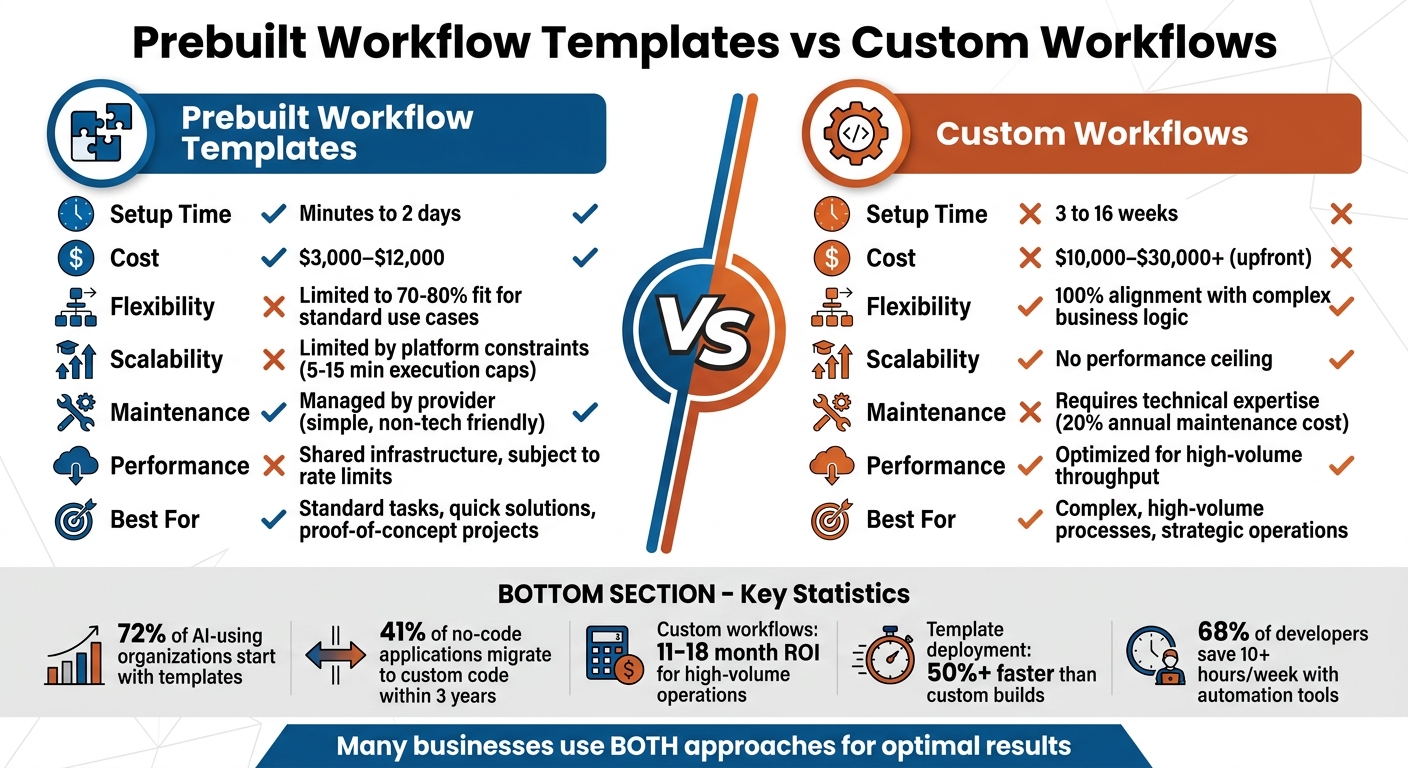
Prebuilt Workflow Templates vs Custom Workflows: Cost, Time, and Feature Comparison
How to Use Free n8n Templates Without Breaking Everything – Beginner Tutorial

sbb-itb-3a330bb
What Are Prebuilt Workflow Templates?
Prebuilt workflow templates are essentially ready-to-use frameworks designed to automate business processes. These templates outline a sequence of tasks, decision-making rules, and system integrations, allowing businesses to implement automation without diving deep into coding. All it takes is importing a configuration file, adjusting a few settings to match your environment, and deploying the prebuilt logic.
What makes these templates so handy is that they often come with essential features already included, like error handling, retry mechanisms, fallback paths, and circuit breakers - elements that are sometimes overlooked in custom-built solutions. For instance, deploying an AI-powered customer support ticket classifier using a template can take just 12 minutes, compared to the 40–80 hours typically required for a custom development project. This speed is a big reason why 72% of organizations that use AI in their operations start with templates rather than building from scratch. For social publishing, start with workflow templates that already bundle skills and MCP steps, then customize instead of building a custom agent stack from scratch.
These templates are versatile, covering a range of use cases such as sales pipelines, employee onboarding, invoice approvals, and IT incident resolution. They also address technical complexities - like managing authentication between CRM systems and AI tools - so even non-technical users can create functional automation without relying on engineering teams.
"A workflow template is a reusable, parameterized blueprint that codifies a multi-step automation process, decoupling workflow definition from execution." – NoOps School
From a cost perspective, the difference is striking. Template-based solutions generally cost between $3,000 and $12,000 to implement, while custom development starts at $25,000 and can climb past $150,000. Organizations using templates for internal tools often see deployment times improve by 50% or more compared to custom builds.
The sections below explore the key advantages and drawbacks of using prebuilt workflow templates.
Benefits of Prebuilt Workflow Templates
The standout benefit of prebuilt templates is speed. They eliminate the need for complex architectural decisions and extensive debugging, enabling businesses to roll out automation in days rather than months. For example, Jasper (formerly Jarvis) used Webflow templates to build its marketing site during a period of rapid growth, scaling from zero to $1 million in monthly recurring revenue. The marketing team was able to publish over 200 pages independently, saving an estimated 400–600 hours of engineering time. This freed up developers to focus on the core product instead.
Another major advantage is cost efficiency. Take Dividend Finance, a residential solar lending company, as an example. They used Bubble templates to create a customer-facing loan application platform for around $85,000. Over 18 months, the platform processed $400 million in loan applications - a project that would have cost $1.2–$1.8 million and taken 12–18 months to develop from scratch. Over a three-year period, template-based development costs are estimated to be 4.6 times lower than custom solutions.
Prebuilt templates also come with built-in best practices, including tested methods for handling API timeouts, managing rate limits, and ensuring graceful system degradation. These features can take months to develop from scratch but are ready to use with templates. This is especially helpful for teams without deep technical expertise, enabling managers in operations or sales to create functional tools without heavy reliance on developers.
Moreover, templates encourage standardization and governance. As versioned artifacts, they ensure consistency across teams and environments, reducing human error in critical operations like production migrations. For instance, Linear, a developer productivity company with $35 million in annual recurring revenue, opted for Webflow templates for its marketing site. This allowed the growth team to work independently while keeping their engineering team small, with fewer than 20 members.
Drawbacks of Prebuilt Workflow Templates
Despite their advantages, prebuilt workflow templates do have limitations. Flexibility is a key concern. Templates are designed for common use cases, making it challenging - or sometimes impossible - to customize them for unique or highly specific needs. As Forrester analyst John Rymer puts it:
"The economics of no-code are compelling until they are not, and the trigger point is consistently the moment when the application requires capabilities the platform was not designed to provide." – John Rymer, Forrester
This lack of flexibility becomes a major issue when business requirements evolve beyond the template’s capabilities. In fact, 41% of no-code applications end up being migrated to custom code within three years as they outgrow the template’s limitations.
Another drawback is the potential for technical debt. Some templates may include hardcoded API endpoints or lack robust handling for rate limits. While these setups might work fine with sample data, they can fail under real-world conditions. It’s a good idea to test templates thoroughly with production data before fully committing to them.
Lastly, there’s the issue of vendor lock-in and ongoing costs. While templates have a lower upfront cost, relying on a platform provider for updates, security patches, and new features can lead to expensive migrations or the need to maintain parallel systems as workflow needs evolve. This dependency can become a long-term challenge for businesses.
What Are Custom Workflows?
Custom workflows are personalized solutions designed to meet specific business needs. Unlike prebuilt templates that come with standard configurations, custom workflows are built from the ground up, tailored to align perfectly with your organization's data structure, systems, and processes.
With custom workflows, you gain full control over intricate tasks like multi-step API calls, advanced conditional logic, and stateful orchestration. For instance, Superhuman opted for custom development from the start to achieve lightning-fast response times (under 100ms) and unique keyboard shortcuts - features that no prebuilt platform could support.
These workflows also boost performance by optimizing processes. They can batch API calls, cache resource-intensive operations, and eliminate unnecessary steps. A B2B distributor, for example, transitioned from a template-based system and managed to cut daily API calls from 2,500 to just 750, all while handling the same order volume.
Another advantage is full data ownership, which helps you avoid vendor lock-in. By hosting the source code on your own infrastructure, you can meet strict industry compliance standards, such as HIPAA in healthcare or PCI DSS in finance. Unlike templates that often route data through third-party infrastructure, custom workflows can operate entirely within your private cloud environment.
"Your competitive advantage lives in the details templates can't capture. How you score leads, route support tickets, or prioritize outreach sequences reflects business knowledge that generic workflows miss." – Jonathan Stocco, Founder, ForgeWorkflows
These tailored solutions pave the way for a range of benefits, which we'll explore next.
Benefits of Custom Workflows
Custom workflows provide exceptional adaptability, performance improvements, and long-term cost savings.
The standout benefit is flexibility. Custom workflows integrate seamlessly with existing systems - whether it's a legacy CRM, proprietary database, or internal software - without forcing you to compromise on your unique business logic. This is especially critical if your processes rely on specialized algorithms or routing sequences that generic templates can't handle.
Performance and scalability are also key strengths. Custom workflows surpass the limitations of template-based systems, enabling faster and more scalable operations. For example, Syntora implemented a custom automation system using FastAPI and AWS Lambda, slashing employee onboarding times from 45 minutes to just 10 seconds per hire.
These solutions excel in managing complex processes. If your workflows require memory persistence, deeply nested conditional logic, or AI-driven orchestration, custom development is often the only viable route. One construction management company, generating $25 million in annual revenue, moved from a $1,098/month Zapier/Make setup to a custom-built system in 2025. This $11,200 investment eliminated 8 hours of manual error correction weekly, yielding an annual benefit of $27,376.
From a cost-efficiency standpoint, custom workflows often prove to be more economical in high-volume scenarios. While template platforms charge per task or operation, custom solutions usually run on serverless infrastructure like AWS Lambda, costing under $20 per month compared to $500–$1,000+ for premium template subscriptions. For businesses processing large volumes of data daily, the long-term savings often outweigh the initial development costs.
Drawbacks of Custom Workflows
Despite their advantages, custom workflows come with notable challenges, starting with the upfront cost. Building a custom workflow typically requires 40 to 80 hours of professional development, with costs ranging from $10,000 to $30,000 for mid-sized projects. Complex enterprise systems can exceed $150,000. By comparison, template-based solutions generally cost between $3,000 and $12,000 to implement.
Ongoing maintenance is another factor to consider. Maintaining a custom codebase typically costs about 20% of the initial development budget annually for updates, security patches, and new features. This requires either an in-house team or external developers, whereas templates handle updates automatically.
Custom workflows also demand technical expertise. While templates allow non-technical users to create functional automations, custom builds require developers skilled in API integration, error handling, and production-level engineering. As Parker Gawne, Founder of Syntora, explains:
"A visual workflow builder is fine for simple alerts, but coordinating a new hire's access across five different SaaS applications needs production-grade engineering to be reliable"
Another drawback is the longer time to value. While templates can be deployed in hours, custom workflows typically take 3 to 16 weeks to develop and test. This delay can be a hurdle when you need quick solutions or want to validate a concept rapidly. Interestingly, 41% of businesses that start with no-code templates eventually transition to custom workflows within three years as their needs evolve. However, the initial use of templates often provides valuable insights for crafting a more effective custom solution later on.
Prebuilt Workflow Templates vs. Custom Workflows: Side-by-Side Comparison
This section breaks down how prebuilt templates and custom workflows stack up across key business considerations, focusing on speed, cost, and alignment with specific needs.
The main trade-off here is speed versus customization. Prebuilt templates are ready to go in minutes to days, while custom workflows can take anywhere from 3 to 16 weeks to develop. That quick deployment, however, comes at the cost of flexibility and scalability. On the flip side, custom workflows are tailored to align perfectly with unique business requirements but demand more time and resources upfront.
Prebuilt templates typically address about 70–80% of standard business needs. Custom workflows, on the other hand, are designed to meet 100% of your specific logic and processes. As NorthStarNomad from the Latenode Community explains:
"Templates cover 70-80% of needs typically. We budget 2-5 days for modifications vs 3-6 weeks building from scratch."
When it comes to cost, the differences are stark. Prebuilt templates often come with a low subscription fee ranging from $19.99 to $799+ per month. Custom workflows, however, require a hefty initial investment of $10,000–$30,000 or more, with ongoing hosting and maintenance costs of $100 to $600 per month. Despite the higher upfront cost, custom workflows often pay for themselves in high-volume operations within 11 to 18 months.
Here’s a quick breakdown of these comparisons:
Comparison Table
| Factor | Prebuilt Workflow Templates | Custom Workflows |
|---|---|---|
| Development Time | Minutes to 2 days | 3 to 16 weeks |
| Flexibility | Limited to 70–80% fit | 100% alignment with complex business logic |
| Upfront Cost | Low (subscription-based) | High ($10,000–$30,000+) |
| Long-Term Cost | Can increase with usage | Lower ongoing fixed costs |
| Maintenance | Simple; manageable by non-tech teams | Requires developer expertise |
| Performance | Shared infrastructure; subject to rate limits | Optimized for high-volume throughput |
| Scalability | Limited by execution caps (5–15 min) and API quotas | No performance ceiling |
| Best For | Standard operations or proof-of-concept projects | Strategic processes with proprietary logic |
For businesses operating at scale, performance can be a dealbreaker. Prebuilt templates often face constraints like execution time caps and API quotas. Custom workflows overcome these hurdles with advanced techniques like batching, caching, and dedicated infrastructure, ensuring they can handle high-demand scenarios effortlessly.
How to Choose the Right Workflow for Your Needs
Deciding between prebuilt templates and custom workflows comes down to evaluating factors like speed, available resources, and how unique your business processes are. Templates are a great starting point for quick validation, but when they start holding you back, it might be time to switch to custom workflows.
Here’s a simple rule: if more than 20% of your development time is spent overcoming a template’s limitations, it’s probably time to move to a custom solution. Similarly, if your workflow involves handling thousands of records daily or requires lightning-fast response times, custom optimization can make the investment worthwhile.
Many businesses take a hybrid approach, using templates for less critical areas like HR tools or marketing platforms, while reserving custom workflows for their core operations. You can explore various no-code and low-code tools to find templates for these non-core tasks. This strategy ensures that workflow complexity aligns with business priorities. Below are some guidelines to help you decide which option suits your needs best.
When to Use Prebuilt Workflow Templates
Prebuilt templates shine when you’re managing standard processes that don’t rely on proprietary logic. Tasks like document classification, lead enrichment, expense tracking, or basic customer onboarding are perfect examples.
Templates are also ideal for proof-of-concept projects where speed is more critical than perfection. Research from Stanford d.school supports this, noting that getting functional software out quickly - even if it’s not perfect - leads to better learning and results. For instance, you could create a working prototype for $3,000–$12,000 to test a business model before committing to a custom build that might cost $50,000 or more.
To ensure a template meets your needs, test it with real production traffic for at least a week. This trial run helps expose any limitations that could become major roadblocks down the line.
When to Use Custom Workflows
Custom workflows are the go-to choice when your business requires highly tailored solutions. As Jonathan Stocco, Founder of ForgeWorkflows, puts it:
"Your competitive advantage lives in the details templates can't capture. How you score leads or prioritize outreach reflects business knowledge that generic workflows miss".
Take the example of Superhuman, an email productivity app. Founder Rahul Vohra opted for custom development right from the start to achieve sub-100ms response times and custom rendering - features that were critical to the app’s value but impossible to achieve with no-code platforms.
Custom workflows are also crucial when integrating legacy systems or working with proprietary databases that use non-standard authentication protocols. Templates are built around standard API patterns, so adapting them for unique systems often takes more effort than building from scratch.
John Rymer, an analyst at Forrester Research, highlights this challenge in his Forrester Wave insights:
"The economics of no-code are compelling until they are not, and the trigger point is consistently the moment when the application requires capabilities the platform was not designed to provide".
This limitation often becomes apparent within three years, as 41% of no-code applications eventually require migration to custom code to accommodate growing business needs.
For high-volume operations, the efficiency gains from custom workflows can be game-changing. For instance, custom processing can reduce task completion times from 45 minutes to under 10 seconds. If your business processes thousands of records daily, the time and cost savings of custom optimizations can far outweigh the initial development effort.
Using Low Code/No Code Platforms for Workflow Development
Low-code and no-code platforms are changing the way workflows are designed, making it easier to create both prebuilt and custom solutions. These platforms replace traditional coding with visual drag-and-drop builders, where users can map out triggers and actions on a simple interface. Instead of writing lines of code, you connect apps and services visually, which works whether you're customizing a workflow from scratch or using a prebuilt template.
Many platforms now include AI-powered tools like "AI Copilots" and "Blueprints", which take automation a step further. These tools can generate workflows based on natural language instructions, voice commands, or even diagrams. For example, you might say, "Send a Slack notification when a new lead scores above 80 in Salesforce", and the platform will build the workflow for you. This feature opens the door to more intuitive and efficient workflow creation.
These platforms also provide flexibility. They come with a library of templates for processes like lead management, client onboarding, or invoice approvals, which you can use as-is or tweak to fit your needs. For more complex scenarios, low-code platforms like Mendix allow users to add small bits of Python or JavaScript to handle advanced logic or API integrations. This hybrid approach means you can rely on templates for most of the work while customizing specific parts to meet unique requirements.
The benefits are clear: 68% of developers report saving over 10 hours per week by using AI-driven automation tools. Additionally, most companies see a positive return on investment within 6 to 12 months of adopting no-code workflow tools. With the no-code automation market expected to hit $24.8 billion by 2029, it’s evident these platforms are becoming essential for businesses of all sizes.
Finding Platforms with the Best Low Code & No Code Platforms Directory
With so many options available, choosing the right platform can be daunting. The Best Low Code & No Code Platforms Directory (https://lowcodenocode.org) simplifies this process by offering detailed comparisons of top platforms based on factors like scalability, ease of use, customization, and integration capabilities.
The directory organizes platforms into categories such as Frontend Development, Backend Development, Workflow Automation, and Rule Engines, helping users find tools tailored to their specific needs. Each platform is scored by experts through hands-on testing, evaluating aspects like build speed, scalability, and integration depth. For example, Airtable (8.8/10, ideal for structured data), Retool (8.6/10, great for internal tools), and Bubble (8.4/10, best for full web apps) are all highlighted for their strengths.
One standout feature of the directory is its "Tech Heaviness" rating, which helps match platforms to the skill level of your team. If you're a non-technical user, platforms like Cflow (rated 4.7/5 on G2) or Pipefy (4.6/5 on G2) are recommended for their user-friendly templates. Meanwhile, for teams requiring more advanced customization, the directory points to platforms with robust low-code capabilities.
The directory also highlights critical enterprise features, such as audit trails, role-based access control, SOC 2 compliance, and GDPR readiness. These are particularly important for businesses in regulated industries. Additionally, it identifies open-source platforms like n8n or Activepieces, which allow self-hosting to eliminate per-execution costs - an important factor for keeping expenses manageable at scale.
Conclusion
Finding the right solution depends on your business's unique needs. Templates are a great choice when speed is crucial, such as validating ideas quickly or managing straightforward processes like client onboarding or invoice approvals. They save both time and money for common workflows. As Forrester analyst John Rymer points out:
"The economics of no-code are compelling until they are not, and the trigger point is consistently the moment when the application requires capabilities the platform was not designed to provide".
On the other hand, custom workflows shine when your process is a key differentiator - whether it’s proprietary logic, unique data handling, or intricate business rules that give you an edge. If you're dealing with high volumes, operating within regulated industries like healthcare or finance, or need functionality beyond what templates can offer, investing $10,000 to $200,000+ upfront can be worthwhile. Many businesses outgrow templates as their needs become more complex.
A balanced approach often delivers the best results. Combining templates for non-essential tasks with custom solutions for critical operations can maximize both efficiency and flexibility. Companies like Jasper and Linear are great examples of this hybrid strategy. They use platforms like Webflow for marketing sites, while reserving custom development for core products, saving hundreds of engineering hours for more impactful work.
Before making a decision, evaluate your operational priorities. Test templates under real-world conditions for a week to uncover limitations. If a template meets 70–80% of your needs, it’s likely a good fit. However, if your customization requirements exceed 30–40%, building from scratch may be the smarter route .
For more help selecting a platform, check out the Best Low Code & No Code Platforms Directory (https://lowcodenocode.org). It’s a helpful resource for comparing platforms based on your team’s technical skills and workflow needs.
The key is to align your workflow strategy with your business goals. Sometimes, deploying functional software quickly - even if it’s not perfect - delivers better results than waiting for a flawless solution. Whether you choose templates, custom builds, or a mix of both, ensure your approach evolves alongside your business.
FAQs
How do I know when a template is holding my team back?
Templates can become a roadblock for your team when they no longer align with your needs or stifle growth. Some red flags to watch for include workflows that feel unnecessarily complicated, an inability to manage unique or unexpected scenarios, or the need for constant, time-consuming adjustments. If your templates are causing bottlenecks or limiting your ability to scale, it may be worth considering custom solutions that offer more adaptability. Spotting these challenges early can help you stay efficient and open to new opportunities.
What hidden costs should I expect with templates vs. custom workflows?
When it comes to templates, hidden costs can sneak up in various ways. These might include inefficiencies in how they function, missing features that demand extra customization, licensing fees, or even vendor lock-in. This lack of flexibility can make adapting to future needs more expensive than expected.
On the other hand, custom workflows, while they often come with a higher upfront price tag, can also bring their own set of challenges. These might include ongoing maintenance, debugging, or scaling costs as your business grows.
Both options carry the potential for unforeseen expenses as your business evolves. However, templates may carry a greater risk since their limited ability to adapt can create more complications down the line.
Can I start with templates and migrate to a custom workflow later?
Templates are a fantastic starting point when you're looking for quick implementation. They often come equipped with helpful features like error handling and integration examples, making it easier to hit the ground running.
As your requirements evolve, transitioning to a custom workflow can give you the flexibility and control needed to fine-tune and tailor processes to your specific needs. This approach allows you to validate your initial workflows before refining them further.