Deploying AI models comes with unique challenges - failures often appear hidden, unlike traditional software. Without proper rollback strategies, these issues can lead to costly disruptions. A rollback plan ensures you can quickly revert to a stable version when problems arise, minimizing downtime and financial loss.
Key Takeaways:
- AI failures can be subtle: Models may degrade silently, causing inaccurate predictions or inefficiencies.
- Rollback is critical: 92% of Fortune 500 companies had formal rollback procedures by 2025.
- Common strategies: Blue-Green deployment, Canary releases, and Shadow testing offer varying levels of speed, risk, and cost.
- Automation matters: Tools like MLflow, CI/CD pipelines, and Kubernetes streamline rollback processes, reducing recovery times to minutes.
- Post-rollback checks: Monitoring metrics like latency, error rates, and user feedback ensures stability after recovery.
This guide outlines challenges, strategies, and best practices to handle AI rollbacks effectively, saving time and preventing system failures.
Model Rollback Mechanisms Explained Top Tools and Techniques
sbb-itb-3a330bb
Rollback Challenges in AI Systems
AI systems differ significantly from traditional software in how they operate. Instead of deterministic behavior, they rely on probabilistic models. This means failures often occur subtly, without the obvious signs like error messages or crashes you might see in traditional systems. The real challenge lies in managing the intricate network of dependencies - everything from model weights and training data versions to preprocessing logic, hyperparameters, cached embeddings, and vector stores must align perfectly. Without this synchronization, rollbacks can become a minefield.
"Traditional CI/CD deploys deterministic code. MLOps deploys probabilistic behavior shaped by data." - Semaphore
Zen van Riel, Senior AI Engineer at GitHub, highlights a key issue: the conflict between "model state" and "code state". Rolling back code without syncing the correct model version can lead to degraded or outright incorrect results.
Detecting these failures isn't straightforward. While traditional software bugs often trigger immediate alerts like latency spikes, AI quality issues can degrade quietly over time. This delay can be costly - deploying a subpar model in production could raise costs by up to 10 times per request.
Data Dependency and Model Versioning
AI systems demand version control across the entire pipeline. This includes not just the model architecture but also training data, preprocessing scripts, feature engineering logic, and evaluation datasets. A real-world example illustrates the risks: a preprocessing bug in a new model version caused a recommendation system to fail for 12% of users, returning no results.
Schema changes are another major risk. Rolling back a model without reverting its input/output schema can break downstream systems. Cached artifacts like vector stores, embeddings, and computed features are tightly linked to specific model versions. Reverting a model might mean re-indexing an entire vector database - a process that could take over 45 minutes. However, with a well-structured model registry and proper versioning, this can be reduced to about 3 minutes.
"A model in the registry without documented validation results is a trap." - EngineersOfAI
To avoid mismatched rollbacks, assign immutable, Git-style hashes to every model configuration. These identifiers should cover the entire context - training data snapshots, hyperparameters, environment configurations, and preprocessing code. Additionally, maintain a compatibility matrix that maps which versions of code, models, and data work together. Without these measures, rollbacks risk introducing new problems instead of solving existing ones.
Real-time systems add even more complexity to the rollback process.
Impact on Real-Time Decision-Making
Stateful AI systems face unique challenges during rollbacks. For example, rolling back mid-session can disrupt context, leaving older versions unable to interpret ongoing interactions. This can fracture user experiences and lead to higher support demands.
Model drift is another major issue, accounting for 40% of production failures in AI agents. In agentic systems, version changes often happen silently, sometimes with disastrous consequences.
"In agentic systems, version changes happen silently and catastrophically." - NJ Raman, Researching Quantum AI and building AI-native platforms
For multi-model pipelines, the risks multiply. A failure in one upstream component can cascade through the entire system. To mitigate this, many teams use the "timebox rule": if the root cause of an issue isn't identified within 15–30 minutes, initiate a rollback immediately to minimize further damage.
Addressing these challenges requires robust rollback strategies. Key approaches include:
- Pinning model versions explicitly: Use specific identifiers like
gpt-4-0613instead of generic aliases. - Implementing memory snapshotting for stateful agents: Ensure schema versioning allows rolled-back agents to interpret stored context.
- Using feature flags: Toggle AI features or switch model versions at runtime without redeploying the entire codebase.
- Maintaining kill switches for critical paths: Provide the ability to disable AI features entirely and revert to static responses when necessary.
These strategies are essential for minimizing risks and ensuring a smoother rollback process in AI systems.
Core Rollback Strategies for AI Deployments
When it comes to AI deployments, having a solid rollback strategy can make all the difference in minimizing risks and ensuring smooth operations. Time is critical when a deployment goes sideways, and three common patterns - Blue-Green, Canary, and Shadow - offer different ways to balance speed, cost, and risk.
Blue-Green Deployment for AI Models
Blue-Green deployment involves running two identical environments side by side. One (Blue) handles live traffic, while the other (Green) hosts the new model. When you're ready to switch, a load balancer or Kubernetes selector redirects traffic to the Green environment. If something goes wrong, you simply switch back - this rollback process takes less than a minute.
In October 2024, Thomas Wilson, SRE Manager at Burst SMS, used the Harness platform to implement this approach. His team slashed potential downtime from two hours to under five minutes. During a critical update failure, the service was restored so quickly that even his CEO was impressed.
"My CEO was next to me when an update brought our whole service down. He was shocked at how calm I was. Using Harness, we had everything back up in a couple of minutes." - Thomas Wilson, SRE Manager, Burst SMS
The downside? Cost. Running duplicate infrastructures doubles your compute resources, which can get expensive, especially with GPU-heavy AI workloads. However, for applications where downtime is unacceptable, the cost is often justified. To make this strategy work, ensure database schema changes are backward-compatible so both environments can share the same data source during the switch. Additionally, use readiness probes like /readyz endpoints to confirm that AI containers are fully loaded and operational before they start handling traffic.
Canary Releases for Gradual Rollback
Unlike Blue-Green deployments, Canary releases take a more gradual approach by introducing the new model incrementally. You start by directing a small percentage of traffic - say 1% - to the new model, then increase it to 5%, 25%, and so on. This limits the impact if something goes wrong. Rollbacks typically take 5–30 minutes, as telemetry data is monitored to detect issues before rolling back to the stable version.
For high-risk models, initial traffic splits can be as low as 0.1%, with automated systems gradually increasing exposure. Common rollback triggers include a 5% error rate or P99 latency exceeding 500 ms. Tools like Kayenta or Prometheus can automate this process by comparing metrics like JS divergence or feature histograms to identify regressions without manual intervention. While Canary releases are slower than Blue-Green deployments, they are ideal for iterative rollouts and latency-sensitive services. For large language models (LLMs), it’s best to keep ongoing conversations on their original model version and only direct new sessions to the updated model to maintain context.
If you need to test without any risk to users, Shadow deployments might be the better choice.
Shadow Deployments for Testing
Shadow deployments allow you to test a new model in parallel with the live model by running it against real production traffic. However, the shadow model’s predictions are discarded before reaching users, ensuring zero user impact. This method is great for validating latency, memory usage, and prediction drift under real-world conditions. Since users don’t interact with the shadow model, there’s no traditional rollback involved.
"Shadow mode testing answers a different question: 'Does this model behave correctly on production traffic without breaking anything?'" - EngineersOfAI
While shadow deployments require additional computing resources, they are less costly than Blue-Green setups. Sampling 10–20% of requests for shadow testing can cut costs by 5–10× while still offering enough coverage. To get a full picture of traffic patterns, it’s recommended to run shadow models for at least seven days. Always isolate shadow models on separate compute quotas to prevent failures in the shadow environment from affecting live systems.
| Feature | Blue-Green Deployment | Canary Release | Shadow Deployment |
|---|---|---|---|
| Rollback Speed | < 1 minute | 5–30 minutes | N/A (Zero user impact) |
| Infrastructure Cost | Highest (2× capacity) | Low to Medium | Medium (Mirroring overhead) |
| Blast Radius | Very Low (Atomic switch) | Low to Medium | Zero (To users) |
| Best Use Case | High-risk releases needing instant reversal | Iterative rollouts; latency-sensitive services | Validating logic, drift, and latency |
Automated Rollback Tools and Techniques
Automated tools have revolutionized rollback processes, tackling complex challenges with speed and precision. While manual rollbacks can drag on for over 45 minutes, automation can shrink recovery times to under five minutes.
Model Versioning with MLflow
MLflow's Model Registry simplifies model versioning and metadata management, making rollbacks seamless. Production systems rely on stable URIs (e.g., models:/fraud-detector/Production) to access models. If a rollback is necessary, you can reassign the "Production" alias to a previous version using the API or UI - no need to restart containers. The registry organizes models into lifecycle stages: None (unvalidated), Staging (testing), Production (live), and Archived (available for rollback). Systems polling the registry every 60 seconds can hot-reload models without causing downtime.
To ensure traceability, always tag versions with metadata like validation scores, Git commits, and dataset hashes.
CI/CD Pipelines for AI Rollbacks
Automated pipelines take rollbacks a step further by integrating with model registries and deployment systems. Tools like GitHub Actions automate rollback workflows, running evaluation tests to check metrics such as accuracy, latency, and bias before a model goes live. If a deployment fails safety checks or shows performance issues post-deployment, GitOps workflows can revert the production manifest to its previous state.
For instance, automated triggers can initiate rollbacks if accuracy drops below 0.85 or P99 latency exceeds 200 ms. Companies excelling in MLOps report 90% fewer production incidents, and Amazon's canary deployments have prevented 73 customer-impacting failures.
"Make every low-code change produce the same evidence set you'd expect from a developer-led deploy: tests, metrics, approval, and an auditable trail." - Unknown, Senior Editor, Next-gen.Cloud
Using deployment markers (e.g., in CircleCI) helps track releases and revert to stable states quickly. For added security, Kubernetes init containers can verify model files via checksums before the serving container starts.
Kubernetes Rollback for AI Containers
Kubernetes-native tools bring even more flexibility to rollbacks. Tools like Flagger and Argo Rollouts enable automated canary and blue-green deployments by monitoring real-time metrics from Prometheus. If error rates or latency exceed thresholds during a rollout, traffic is automatically redirected to the stable container.
Spotify's blue-green strategies have achieved zero-downtime for 99.7% of model updates, while Uber's Michelangelo platform - handling 10 million predictions per second - resolves 89% of issues without human intervention through automated monitoring. LaunchDarkly's use of feature flags for model rollouts has cut mean time to recovery (MTTR) by 85%.
For GitOps workflows, tools like ArgoCD treat Git as the source of truth. Instead of storing large model weights in Git, ConfigMaps can reference specific model versions and artifact URIs stored in systems like Amazon S3 or Google Cloud Storage. A simple git revert updates the infrastructure accordingly.
Best Practices for AI Rollback Implementation
To keep your AI systems running smoothly, having a solid rollback strategy is just as important as automation. Without proper planning, recovery times can balloon from a few minutes to nearly an hour, disrupting operations. Below are some essential practices to ensure your rollback approach is reliable and efficient.
Version everything as a single unit. Keep all components - code, model weights, datasets, hyperparameters, and prompts - tied together with linked metadata. This ensures you can recreate any deployment exactly as it was. For example, when Spotify faced an issue with a recommendation model suggesting inappropriate content during a canary deployment in late 2024, their automated rollback system kicked in within 30 seconds, saving the company an estimated $750,000.
Maintain fallback models for critical systems. Always have a simpler, dependable model ready to take over if your primary model fails or behaves unpredictably. JPMorgan showcased this in late 2024 when their trading bot experienced severe model drift. The system seamlessly switched from a Transformer-based model to a simpler logistic regression model, allowing operations to continue while the main model was fixed. This approach pairs well with disciplined version control.
Practice under pressure with quarterly fire drills. Simulate failure scenarios - like model drift, prompt injection, or data corruption - every quarter through tabletop exercises. These drills prepare teams to handle real-world rollbacks effectively.
"If your team hasn't practiced rolling back under pressure, they won't do it right when it counts." – Dr. Jane Chen, Microsoft
Teams that regularly train with structured playbooks can recover from failures in less than five minutes, compared to nearly an hour for unprepared teams.
Design for idempotency and immutability. Make sure rollback actions are idempotent, meaning they can be repeated without causing unintended changes. Use immutable deployment artifacts - static versions of your system - so rollback simply redirects traffic to a trusted, stable artifact. For complex workflows in AI agents, adopt the Saga pattern, which ensures every action can be undone. This is especially important since roughly 30% of autonomous agent runs encounter exceptions that require recovery.
Monitoring and Validation After Rollback
Rolling back a system might stop immediate issues, but the real challenge lies in ensuring the system is stable and fully recovered afterward. This step is critical to avoid lingering problems.
Start by comparing key metrics - like P99 latency, error rates, and model accuracy - against the last known stable baseline. For instance, if the rollback was triggered because the model's accuracy dropped below a 0.85 threshold, confirm that it has now recovered above this benchmark.
It’s not just about the primary metric, though. Keep an eye on secondary indicators like fallback usage, output distributions, and user complaints to ensure the system is back to normal. Additionally, check operational metrics such as support ticket volume to verify that everything is running smoothly again. These checks help pinpoint any remaining issues and guide immediate follow-up actions.
Organizations should aim to complete a thorough assessment within 15 minutes of the rollback to minimize any further disruption. Once the system is validated, it’s time to address any leftover issues.
"A rollback that ignores queued side effects is only half a rollback." – Hash Block
Take steps to clear out any residual effects. Flush poisoned caches, clean up derived states, and quarantine outputs from the failed model to ensure they don’t cause further problems. Similarly, block asynchronous tasks - like pricing updates or automated emails - that were triggered by the faulty model to prevent unintended consequences.
Run smoke tests on critical features using standardized metrics (e.g., BLEU, ROUGE, perplexity) to confirm the system’s quality is back to acceptable levels. Automated verification tools can also be helpful here, comparing current logs and performance metrics against the stable baseline. Don’t forget to validate the entire "model bundle", including model weights, feature schemas, environment variables, and business rules, to rule out hidden configuration errors.
Finally, keep an eye out for unusual resource usage or cost spikes. For example, a sudden jump in token usage or API costs could indicate infinite loops or inefficient configurations that might not show up in standard error logs. If stability remains elusive, consider using a kill switch to disable AI features entirely, reverting to static responses until the issue is fully resolved.
Rollback Strategy Comparison
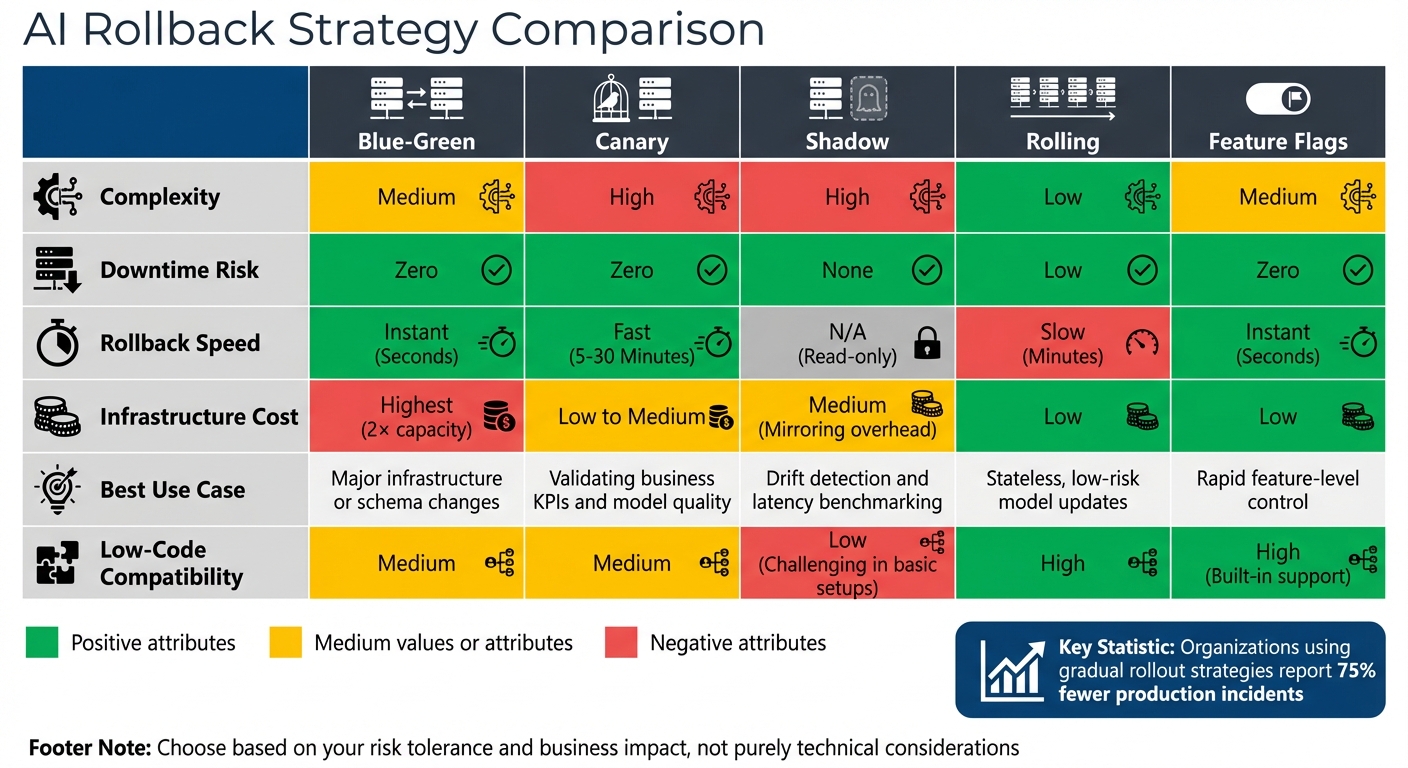
AI Rollback Strategies Comparison: Blue-Green vs Canary vs Shadow Deployment
Selecting the right rollback strategy for your AI application depends on balancing factors like complexity, downtime risk, speed, and costs. Each method has its strengths and trade-offs, so understanding these nuances helps align your choice with your operational needs and risk tolerance.
Blue-green deployments allow recovery in under a minute by directing traffic between two identical environments. The trade-off? Doubling infrastructure costs and carefully managing database compatibility.
Canary releases take 5–30 minutes for rollback but reduce risk by exposing only a small portion of traffic to the new model. However, they require advanced traffic-splitting tools and automated monitoring systems to identify issues quickly.
"The goal of deployment strategy is not to prevent all failures - it is to limit blast radius and accelerate recovery." - Authoritative Source, When Notes Fly
Shadow deployments replicate production traffic without affecting users. While this approach avoids direct risks, it demands extra compute resources to run parallel systems.
Organizations that adopt gradual rollout strategies report 75% fewer production incidents compared to those sticking with simpler methods.
Comparison Table
Here’s a breakdown of key trade-offs, including rollback speed, complexity, and suitability for different scenarios:
| Strategy | Complexity | Downtime Risk | Rollback Speed | Model Suitability | Low-Code Compatibility |
|---|---|---|---|---|---|
| Blue-Green | Medium | Zero | Instant (Seconds) | Ideal for major infrastructure or schema changes | Medium |
| Canary | High | Zero | Fast (5–30 Minutes) | Great for validating business KPIs and model quality | Medium |
| Shadow | High | None | N/A (Read-only) | Best for drift detection and latency benchmarking | Low (Challenging in basic setups) |
| Rolling | Low | Low | Slow (Minutes) | Suitable for stateless, low-risk model updates | High |
| Feature Flags | Medium | Zero | Instant (Seconds) | Excellent for rapid feature-level control | High (Built-in support) |
For teams working in low-code environments, feature flags and blue-green deployments are easier to implement, especially with managed services like SageMaker and Vertex AI simplifying the process. On other platforms, additional tools like Kubernetes or service meshes may be necessary. If you're new to continuous deployment, starting with rolling deployments and progressing to canary releases as your monitoring systems improve can be a practical approach.
For further insights into low-code platforms, check out the Best Low Code & No Code Platforms Directory.
Conclusion
Rollback strategies play a crucial role in preventing small issues from spiraling into major disruptions. As Chinedu Ekuma aptly put it, "Rollback is not an admission of defeat. It is the system telling you the truth."
Data reveals that many enterprises struggle with AI deployment challenges. However, teams equipped with structured playbooks recover in under 5 minutes, while those without can take nearly an hour. These numbers highlight the importance of having a well-thought-out rollback plan. Choose a strategy - whether it's blue-green for immediate recovery, canary for gradual risk mitigation, or feature flags for precise control - based on your organization's risk tolerance and business impact, rather than purely technical considerations. Ekuma also cautioned, "If rollback requires permission, it will happen too late."
Equally important is robust post-rollback monitoring. AI failures can sometimes appear successful at first glance, so monitoring should go beyond basic metrics. Incorporate behavioral observability to track output quality, detect bias drift, and measure alignment with key business goals. To strengthen your defenses, implement shadow mode testing, automated kill switches, and regular fire drills. These practices ensure your team is ready to respond quickly and effectively to any hidden failures that may arise.
FAQs
What needs to be versioned together for a rollback to work?
To carry out a smooth rollback, make sure to version these components as a single unit: the model artifact (including weights and code), model configuration, inference environment, and any related data such as embeddings or cached artifacts. Keeping these elements synchronized ensures everything remains consistent and works seamlessly during the rollback process.
How do I choose between blue-green, canary, and shadow for my model?
When deciding between blue-green, canary, and shadow deployments, it’s all about matching the approach to your specific needs:
- Blue-green deployments use two identical environments, allowing you to switch between them instantly. This makes it perfect for critical applications where fast rollback is essential.
- Canary deployments gradually introduce the new version to a small subset of users. This approach minimizes user impact while providing an opportunity to test the changes in a live environment.
- Shadow deployments run the new version in parallel with the current one, capturing data without affecting users. It’s a great way to test non-intrusively.
Your decision should consider factors like how much risk you're comfortable with, the quality of your monitoring tools, and how quickly you need to roll back if issues arise.
What checks should I run in the first 15 minutes after a rollback?
In the first 15 minutes following a rollback, the priority is to ensure the system is stable and functioning as expected. Here’s what to focus on:
- Monitor error rates and latency: Look for any unusual spikes or patterns that might indicate lingering problems.
- Verify system state: Make sure the system has reverted to its intended configuration and is running as expected.
- Check key metrics: Ensure critical performance indicators are within acceptable ranges.
- Review logs and feedback: Analyze system logs and user reports to spot any anomalies or unexpected issues.
These steps help confirm the rollback was successful and that the system is operating smoothly.