Personalization in no-code platforms allows you to create tailored web and app experiences without needing to write code. By using tools like drag-and-drop editors and AI, businesses can quickly adjust content, messaging, and layouts based on user behavior and preferences. This approach saves time, reduces reliance on developers, and boosts engagement and conversion rates.
Key benefits of no-code personalization:
- Improved user experiences: 84% of customers prefer brands that treat them as individuals.
- Higher ROI: Personalized experiences can deliver a $70 return for every $1 spent.
- Increased conversions: Websites see up to a 30% boost in conversion rates with personalization.
Top tools for no-code personalization include:
- ConvertFlow: Adjust CTAs and site messages based on behavior.
- OptiMonk: AI-driven product page updates for e-commerce.
- ActiveCampaign: Personalized email, SMS, and WhatsApp campaigns.
- Guideflow: Custom product demos for B2B.
- Contentful: Targeted content delivery for enterprise teams.
- Zapier: Workflow automation triggered by user actions.
To get started, define your goals, choose the right platform, and focus on high-impact changes like personalized headlines or CTAs. Use A/B testing to measure results and refine your approach. For detailed comparisons and platform recommendations, check out the Best Low Code & No Code Platforms Directory (https://lowcodenocode.org).
Hyper-Personalized Outreach at Scale | No-Code Tutorial
sbb-itb-3a330bb
Tools for Personalization in No Code
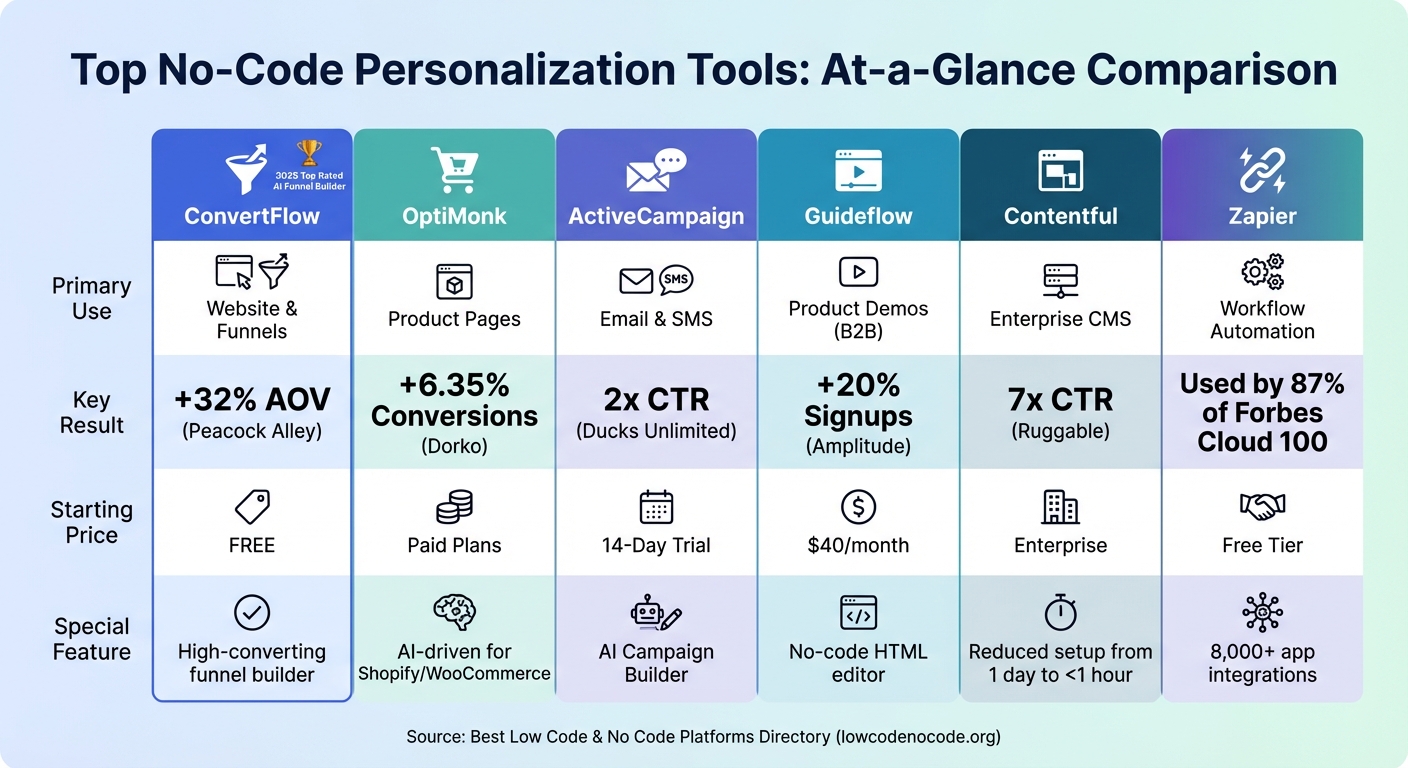
Top 6 No-Code Personalization Tools Comparison: Features, Results & Pricing
Top No-Code Platforms for Personalization
The world of no-code personalization offers a variety of tools tailored to specific needs, making it easier to achieve results without complex technical setups.
ConvertFlow is a standout for website and funnel personalization. Marketers can adjust CTAs, popups, and site messages based on visitor behavior and location - no coding required. With a 4.9/5 rating and recognition as the 2025 Top Rated AI Funnel Builder, ConvertFlow is a favorite among users. Chachi Flores, Head of Ecommerce at Peacock Alley, shared that using ConvertFlow increased their average order value by 32%. Plus, they offer a free account with no credit card needed.
For e-commerce businesses with extensive product catalogs, OptiMonk uses AI to craft and test impactful product page content. Designed for platforms like Shopify and WooCommerce, it automates seasonal updates, saving time on manual edits. Levente Csernak, Head of Growth at Dorko, reported a 6.35% boost in their conversion rates after adopting OptiMonk's tools.
ActiveCampaign is perfect for personalized communication across email, SMS, and WhatsApp. The platform uses AI to optimize both content and timing, helping Ducks Unlimited Canada double their click-through rate in just three months. A 14-day free trial lets teams explore its AI Campaign Builder, which can generate entire campaigns from simple prompts.
For B2B companies, Guideflow simplifies creating personalized product demos. Its no-code HTML editor allows teams to adjust text, images, and variables within interactive walkthroughs. Amplitude's growth marketing team saw a 20% increase in account signups after implementing Guideflow. Rachel Whitehead, VP of Marketing at ChartMogul, praised the tool, saying:
Our teams have gained a lot more confidence in communicating new features because Guideflow gives everyone the power to demonstrate our product - no matter the technical expertise.
Contentful offers a personalization toolkit that enables teams to segment audiences and deliver targeted content across mobile and web platforms. According to Dylan Feiner, Senior Product Manager at Ruggable, Contentful reduced the time needed to create personalized experiences from a full day to under an hour. The tool was instrumental in achieving a sevenfold increase in click-through rates and a 78% jump in conversion rates for Kraft-Heinz.
Lastly, Zapier connects over 8,000 apps, enabling personalized actions triggered by customer behavior. As of 2023, 87% of Forbes Cloud 100 companies rely on Zapier, and 93% of users say it has improved their job performance.
| Tool | Primary Use Case | Key Result | Starting Price |
|---|---|---|---|
| ConvertFlow | Website & Funnels | +32% AOV for Peacock Alley | Free |
| OptiMonk | Product Pages | +6.35% conversions for Dorko | Paid plans |
| ActiveCampaign | Email & SMS | 2x CTR for Ducks Unlimited | 14-day trial |
| Guideflow | Product Demos | +20% signups for Amplitude | $40/month |
| Contentful | Enterprise CMS | 7x CTR for Ruggable | Enterprise |
| Zapier | Workflow Automation | Used by 87% of Forbes Cloud 100 | Free tier |
Using the Best Low Code & No Code Platforms Directory
The tools outlined above are impressive, but finding the right one for your specific needs can be time-consuming. That’s where the Best Low Code & No Code Platforms Directory (https://lowcodenocode.org) comes in handy. This directory organizes platforms into categories like analytics, automation, content management, and marketing tools, making it easy to compare features, pricing, and use cases in one place.
For example, if you're looking to build personalized email campaigns, you can filter by marketing tools and explore options like ActiveCampaign. For website personalization, you can browse web app builders to compare platforms like ConvertFlow and CustomFit.ai. Each listing provides key details, including pricing, features, and integrations, to help you make quick, informed decisions.
The directory also keeps you updated on new tools in the no-code personalization space. As platforms evolve and new solutions emerge, the directory remains a central hub for tracking these developments. It’s not just a resource for discovery - it’s also a platform for tool creators to showcase their solutions, ensuring users have access to the latest innovations in personalization.
How to Implement Personalization
Choosing the Right Platform
The first step is to define your needs. No-code platforms typically focus on three main areas: design (the user interface), data (the backend database), and logic (workflows and triggers). Match your requirements to the platform's strengths in these areas.
Integration is key. If your platform doesn't connect well with tools like your CRM or analytics software, you risk creating data silos that can weaken your personalization efforts. For instance, in 2025, Code42 successfully integrated Webflow Optimize with 6sense and Marketo, enabling them to create 76 customized homepage variations. This effort increased form conversions by 15%.
Your current level of personalization expertise also matters. If you're just starting with basic segmentation, simpler tools will suffice. However, advanced personalization, like hyper-segmentation, requires a platform that can scale. A great example is Pets Deli, which used Contentful Personalization to deliver real-time tailored content. In just one week, they saw a 51% increase in conversion rates.
Testing the waters is a smart move. Use free trials to ensure the platform aligns with your needs. For example, McKinley Hancock of Impact Dog Crates used Webflow's AI tools to create a seamless ad-to-homepage experience. This strategy doubled their sales and maintained a 2% homepage conversion rate. Starting small helps you confirm the platform is a good fit before committing.
Here’s a quick comparison of platform types:
| Platform Type | Best For | Setup Time | Primary User |
|---|---|---|---|
| No-Code Tools (e.g., Mutiny, Right Message) | Small to mid-sized businesses | 1–3 days to 2 weeks | Marketers and Designers |
| Low-Code/Enterprise (e.g., Dynamic Yield, Adobe Target) | Large enterprises with heavy traffic | 4–8 weeks | Marketing Ops and Developers |
Once you’ve chosen your platform, the next step is to focus on designing workflows that effectively target your audience segments.
Designing Personalized Workflows
Personalized workflows begin with segmenting your audience. Group users based on factors like demographics, behaviors, or preferences. This segmentation lays the groundwork for everything else. Use data from web analytics, CRM systems, and behavioral tracking tools to create detailed profiles.
Next, pinpoint triggers that activate personalized workflows. These could include actions like clicking a button, scrolling a certain percentage of a page, or showing exit intent. For instance, if a user scrolls 75% down your pricing page but doesn’t convert, you could trigger a personalized offer or a chat prompt.
Conditional logic brings personalization to life. Many no-code platforms use simple "if-then" rules to customize the user experience. For example:
- If a user is tagged as "Vegetarian" in your CRM, show vegetarian menu options.
- If they’re located in California, display shipping times tailored to the West Coast.
Focus on high-impact areas first. Personalizing every detail can be overwhelming, so start with elements like headlines or social proof sections that often deliver quick results. For example, 91% of consumers prefer brands that provide relevant offers, and personalized CTAs can perform 202% better than generic ones.
The workflow design process typically unfolds in three stages:
- Foundation: Define your audience segments and audit your data.
- Quick Wins: Launch straightforward use cases, such as personalized headlines.
- Scale: Expand personalization to include CTAs, social proof, and exit-intent modals.
This phased approach ensures you can learn what works without feeling overwhelmed.
Testing and Optimizing Personalization
Once your workflows are live, it’s crucial to validate their performance through testing. Use A/B testing to compare personalized experiences against a control group. Without this step, you’re essentially guessing whether your efforts are effective. Set aside 10–20% of visitors as a holdout group who see the original, non-personalized site. This allows you to measure the true lift personalization provides.
Focus on testing major elements like value propositions, storytelling, and layout, rather than minor tweaks. Personalizing website content can lead to a 14% sales increase, but only if you’re testing elements that resonate with your audience.
AI tools can help streamline this process by identifying segments and automatically allocating traffic to the best-performing variations in real time. This reduces manual effort and can uncover patterns that might otherwise go unnoticed.
Set clear KPIs before testing. Metrics like revenue, conversion rates, and qualified leads show whether personalization is driving business results. Meanwhile, tactical metrics like click-through rates and time on site provide insight into specific campaigns. During the first two months, review performance weekly to make quick adjustments.
Use tools like heatmaps, scroll maps, and session recordings to gain behavioral insights. These tools reveal where users hesitate or drop off, offering clues for what to test next. Personalized emails, for example, achieve 29% higher open rates and 41% higher click-through rates, and similar principles apply to web personalization when you analyze user behavior.
Finally, take advantage of your platform’s AI features to continuously refine and enhance your personalized experiences.
Best Practices and Common Challenges
Best Practices for Personalization
Start small and focus on quick wins rather than trying to personalize everything at once. Target high-impact elements like subject lines, first-name personalization, and basic segmentation before diving into more complex strategies like behavioral triggers.
Quality over quantity is the golden rule when it comes to data. Interestingly, only 25% of marketers have the data they need for effective personalization. This makes regular data audits essential. Clean up your databases and update customer profiles at least once a year. It’s worth noting that 69% of consumers appreciate personalization only when it’s based on data they’ve willingly shared.
Create a modular content library filled with reusable blocks - think hero banners, call-to-actions, and footers - that can be dynamically swapped based on user signals. This approach saves time while maintaining consistency. And when first-party data isn’t available, lean on contextual signals like location, device type, time of day, or referral source to deliver relevant experiences.
Always have fallback options to avoid embarrassing mistakes. For instance, if a user’s name is missing, use a default like "Hi there" or something playful like "Hi burger-lover" instead of showing a broken tag like "Hello [fname]". These small precautions protect your brand’s image while keeping things personal.
Privacy compliance is non-negotiable. Follow regulations like GDPR and CCPA by being transparent about how you collect and use customer data. In fact, 71% of consumers say they trust companies more when data usage is clearly explained. Display security badges prominently and give users control through opt-in/opt-out options.
By sticking to these practices, you can avoid many of the common pitfalls.
Common Mistakes and How to Avoid Them
Avoiding mistakes is just as important as following best practices.
Over-personalization can backfire. Using data that customers didn’t explicitly share - like health details or personal tragedies - can feel invasive. Use A/B testing to find the right balance between helpful and intrusive.
The "set-and-forget" mindset is a major trap. A great example: In May 2025, Sarah Bartlett and Sarah Good from Code42 created 76 homepage variations using Webflow Optimize. Their success wasn’t just in the setup - it came from continuous monitoring and tweaking. For the first two months, review performance data weekly to catch and fix issues early.
Over-segmentation is another common issue. Creating too many micro-segments can leave you with groups too small to yield meaningful insights. Start with 2–3 broad, impactful segments and ensure each has at least 1,000 visits before refining further.
Broken personalization tags can ruin your credibility. Always set fallback text and regularly check for missing or incorrect data.
Organizational silos are another hurdle. When marketing, sales, and development teams don’t align, it leads to inconsistent user experiences and fragmented data. Establish clear communication channels and shared KPIs to keep everyone on the same page.
"Good email personalization is like salt in cooking: when it's missing, everything tastes flat; when it's overdone, it ruins the dish." - Nathan Ojaokomo
Lastly, don’t over-rely on AI without human oversight. While AI can simplify personalization, leaving it unchecked can result in awkward or tone-deaf messaging that alienates your audience. Combine automation with human judgment to ensure your messaging stays authentic and relatable.
With consistent monitoring and a healthy dose of human oversight, your personalization efforts can remain effective and trustworthy.
Conclusion and Next Steps
Personalization has shifted from being a competitive edge to a basic expectation. A striking 71% of consumers now anticipate personalized interactions, and businesses that deliver these tailored experiences can see revenue boosts of up to 40%. The exciting part? No-code platforms allow marketing teams to dive into advanced personalization strategies without waiting on lengthy development timelines.
Key Takeaways
Getting started with personalization means picking the right tool for your current expertise. If you're new to this, start small - use simple rule-based segmentation based on easily accessible data like location, device type, or time of day. As you grow more comfortable, you can move to AI-powered predictive personalization, which identifies top-performing variations and adjusts traffic dynamically in real time.
Focus on speed rather than perfection. Zero in on three high-impact elements on a high-traffic page - like the homepage headline, hero image, or call-to-action - and test three variations of each. For instance, when Code42 tested 76 homepage variations using Webflow Optimize in May 2025, they achieved a 15% boost in conversions for their contact and trial forms.
If you're ready to take your personalization efforts further, check out a curated list of top platforms below.
Exploring the Best Low Code & No Code Platforms Directory
Choosing the right personalization tool depends on your specific goals, technical setup, and budget. The Best Low Code & No Code Platforms Directory (https://lowcodenocode.org) is a great resource, offering an in-depth comparison of platforms tailored for marketing, automation, and web app building. These tools integrate smoothly with popular CMS and CRM systems, making implementation easier.
Whether you're looking for beginner-friendly tools starting at $29/month or enterprise-level platforms, the directory provides options to suit your technical needs, personalization expertise, and industry demands.
FAQs
What data do I need to start no-code personalization?
To get started with no-code personalization, focus on collecting data about your users' behavior, preferences, and interactions. This could include details like browsing history, purchase records, search queries, and engagement metrics such as click-through rates or time spent on specific pages. Once you have this information, segment users based on factors like demographics, location, or behavioral trends. These segments allow you to deliver more customized experiences. Make sure to verify the accuracy of your data before using it to craft dynamic, personalized content - no technical coding skills needed.
How do I choose the right no-code personalization tool for my goals?
When picking a no-code personalization tool, it’s important to start with a clear idea of what you want to achieve. Are you aiming to increase engagement, drive conversions, or improve the overall customer experience? Having well-defined goals will guide your decision.
Next, consider your budget and the specific features you need. Does the tool need to integrate seamlessly with your existing platforms? Make sure it checks those boxes. Look for options that emphasize ease of use, offer customization capabilities, and provide dependable customer support.
For the best results, focus on tools that include AI-powered personalization, real-time data analysis, and the ability to grow with your needs. These features ensure the tool not only fits your team’s skillset but also enhances the experience for your users in a meaningful way.
How can I measure personalization lift without bias?
To accurately measure the impact of personalization, compare personalized experiences against non-personalized (control) ones for the same audience and time frame. An A/B test is ideal for this, as it lets you track key performance indicators (KPIs) like conversion rates or revenue per visitor.
The formula to calculate lift is:
Lift (%) = ((KPIpersonalized − KPIcontrol) ÷ KPIcontrol) × 100
For reliable results, make sure to:
- Assign groups randomly.
- Minimize external influences.
- Stick to a well-structured experiment design.
These steps help ensure your findings are unbiased and trustworthy.