No-code data pipelines simplify the process of moving and transforming data without requiring programming skills. These tools use drag-and-drop interfaces and pre-built connectors, making them accessible for non-technical users. By automating tasks like API integration, data cleaning, and error handling, they reduce development time by up to 90% and save organizations significant resources.
Key benefits include:
- Faster data integration and reduced reliance on IT teams.
- Real-time data syncing with features like Change Data Capture (CDC).
- Improved data quality and governance with built-in compliance tools.
- Reduced maintenance through automated updates and error handling.
For example, companies like Alshaya Group and Integrate.io have successfully used no-code platforms to streamline operations and improve decision-making. Whether you're managing customer data, building dashboards, or automating workflows, these platforms offer a faster, more efficient way to handle data integration.
Want to get started? Focus on:
- Mapping data sources and destinations.
- Using visual tools for data transformation.
- Automating workflows with monitoring and error-handling mechanisms.
No-code platforms are transforming how businesses handle data, making integration faster, simpler, and more cost-effective.
Building a Data Pipeline with Express - No Coding Required
sbb-itb-3a330bb
Core Components of No-Code Data Pipelines
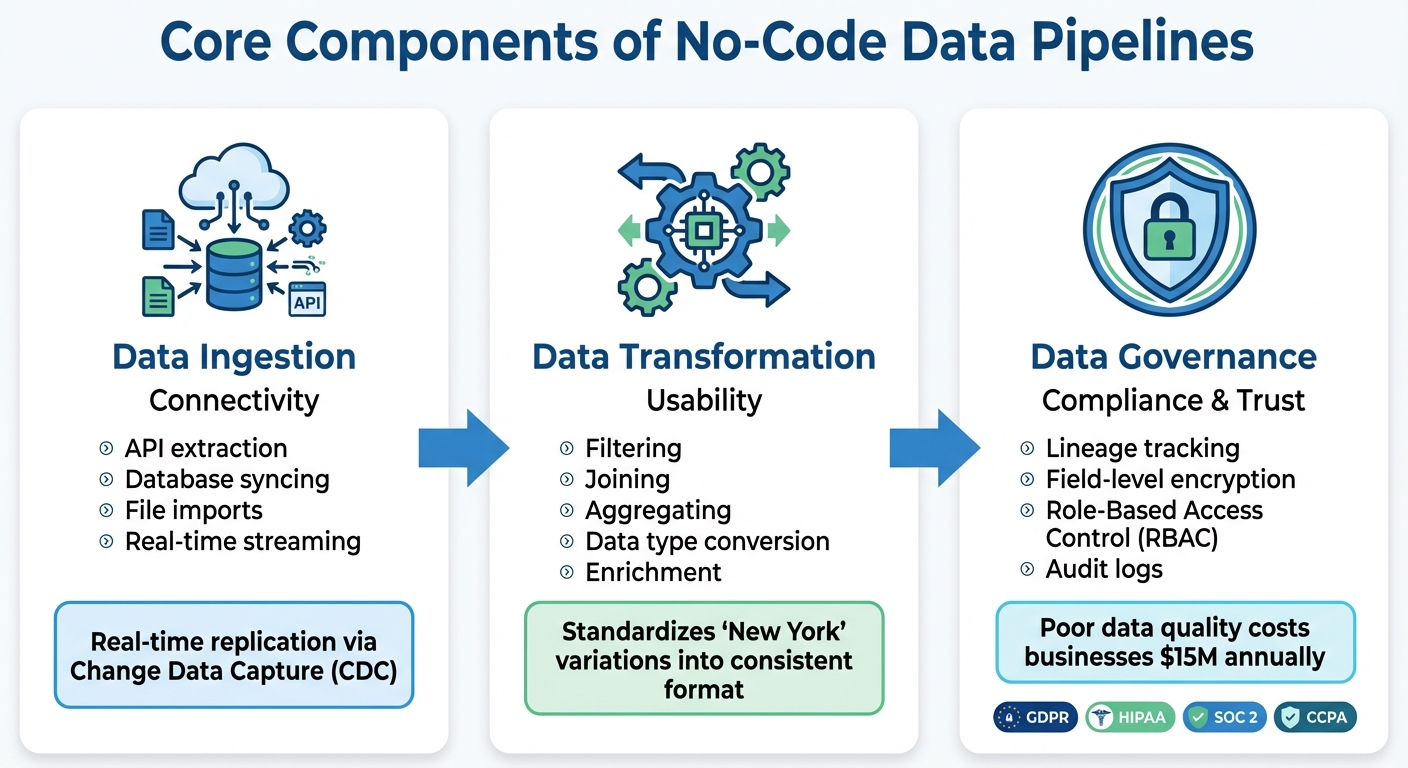
No-Code Data Pipeline Components: Ingestion, Transformation, and Governance
No-code data pipelines rely on three interconnected components to seamlessly transfer data from its source to its destination. These components - data ingestion, transformation, and governance - ensure the pipeline functions efficiently and effectively.
Data Ingestion
This is where the pipeline begins, gathering raw data from a variety of sources. It connects to APIs, databases, SaaS tools like Salesforce or HubSpot, cloud storage, and even IoT devices. Depending on the setup, data can be pushed in real-time (e.g., through webhooks) or pulled on a schedule.
No-code platforms simplify this process by automating the technical complexities. With advancements like real-time replication via Change Data Capture (CDC), pipelines can sync data as it’s generated, eliminating the need for overnight batch processing. This is especially useful for teams that rely on up-to-date information, such as sales needing the latest customer insights or operations tracking inventory levels in real-time.
Once the data is collected, the next step is to make it usable.
Data Transformation
After ingestion, raw data needs to be cleaned, standardized, and prepared for analysis. This transformation process ensures data is consistent and ready for use.
For example, data from different systems might record "New York" in multiple ways - spelling variations, abbreviations, or even typos. Transformation tools standardize these discrepancies, so analytics platforms don’t misinterpret them as separate entries. No-code platforms offer visual tools for tasks like filtering, joining, aggregating, and converting data types, making the process accessible even without technical expertise.
Once transformed, data requires strict oversight to maintain its integrity and security.
Data Governance
Governance is the backbone of a trustworthy and secure pipeline, ensuring compliance and data quality throughout its lifecycle. It includes tracking data lineage, which provides a clear audit trail showing where data originated, how it was transformed, and where it ended up. This level of transparency is vital for answering compliance questions, like how customer email addresses are handled.
Enterprise-grade no-code platforms bolster governance with features like Role-Based Access Control (RBAC), which restricts who can access, modify, or view sensitive workflows. These platforms also align with regulations such as GDPR, HIPAA, SOC 2, and CCPA by implementing field-level encryption and maintaining detailed audit logs. Poor data quality can have a massive financial impact - costing businesses an average of $15 million annually - making governance a critical part of any pipeline.
| Component | Primary Role | Key Functions |
|---|---|---|
| Data Ingestion | Connectivity | API extraction, database syncing, file imports, real-time streaming |
| Data Transformation | Usability | Filtering, joining, aggregating, data type conversion, enrichment |
| Data Governance | Compliance & Trust | Lineage tracking, field-level encryption, role-based access control (RBAC) |
Key Features to Look for in No-Code Platforms
Picking the right no-code data pipeline platform can be a bit daunting, especially with so many options available. The trick is to zero in on features that make building pipelines faster, ensure they run smoothly, and make troubleshooting a breeze.
Visual Interface
A drag-and-drop interface is at the heart of any no-code platform. It's what makes the platform accessible to business analysts without needing constant help from engineers. The best tools offer reusable modules, step-by-step previews, and searchable transformation libraries to streamline the process.
This visual setup can drastically cut down project timelines. Tasks that used to take 12–18 months to code can now be completed in around three months. When trying out a platform, pay attention to how intuitive the interface feels - if you're spending too much time reading documentation, the tool might not be as user-friendly as it should be. A well-designed interface speeds up deployments and simplifies connectivity.
Pre-Built Connectors
After evaluating the interface, the next thing to consider is connectivity. A platform with a large library of pre-built connectors reduces the need for custom coding. For instance, a tool with 600+ connectors versus one with only 50 can mean the difference between setting up a pipeline in hours versus spending weeks on workarounds. Check if the platform supports the tools your team uses frequently, like Salesforce, HubSpot, PostgreSQL, Snowflake, or BigQuery.
Another key feature is automated schema drift handling. This ensures that when a source system makes changes - like adding a new column or modifying its API structure - your pipeline adjusts automatically without breaking downstream dashboards. A great example of this is Westwing, an e-commerce retailer that integrated Fivetran into their setup in August 2025. This move automated their marketing data flows and saved 40 hours of engineering work per week, letting the team focus on growth instead of manual pipeline maintenance.
Error Handling and Monitoring
Once the interface and connectors are sorted, the focus shifts to keeping pipelines resilient. A reliable platform should handle common issues like API downtimes, unexpected source changes, or traffic spikes with ease. Look for features like real-time job monitoring and detailed error logs that go beyond generic failure messages. Automated retry logic is another must-have - it helps recover from temporary failures without requiring manual fixes.
Companies using modern no-code platforms with strong error-handling capabilities report resolving issues 40% to 50% faster compared to traditional setups. For example, Ben Nickerson, Senior Manager of CRM at Integrate.io, shared that after implementing no-code workflows to unify customer data, the company saw a 15% increase in inbound ticket inquiry conversions within just eight months. This kind of success is made possible by having clear visibility into pipeline health and the ability to fix problems quickly.
| Capability | What It Does | Why It Matters |
|---|---|---|
| Fault Tolerance | Recovers from disruptions and retries failed steps automatically | Reduces downtime and manual intervention |
| Schema Drift Handling | Adjusts to changes like new columns or API updates | Prevents broken dashboards and hidden errors |
| Data Observability | Tracks job status, latency, and throughput in real time | Offers detailed insights into pipeline performance |
| Audit Logs | Keeps records of every pipeline run and user action | Crucial for compliance (e.g., GDPR, HIPAA) and troubleshooting |
When testing a platform, try simulating a failure - disconnect a data source or input invalid data - and see how quickly you can identify and resolve the issue. If it takes more than a few minutes to figure out what went wrong, the monitoring tools might not be robust enough for your needs.
How to Build a No-Code Data Pipeline: Step-by-Step
Creating a no-code data pipeline requires a structured approach and a user-friendly platform. The process can be divided into three main stages: identifying your data sources and destinations, setting up transformations to clean and prepare the data, and automating the workflow to ensure everything runs seamlessly.
Identify Data Sources and Destinations
Start by mapping out where your data is coming from and where it needs to go. Your sources might include tools like CRM systems (e.g., Salesforce), web server logs, external APIs, or other key systems your business depends on. Determine whether these sources actively push data into the pipeline or if you’ll need to query them periodically to retrieve information.
Next, define the structure of your target destination. For example, if you’re building a customer analytics dashboard, you might need fields like customer ID, purchase date, total spend, and geographic location. Make sure the platform you choose has pre-built connectors for your specific data sources and destinations to simplify integration.
Configure Data Transformation
Clean, standardized data is essential for generating reliable insights. Most no-code platforms provide drag-and-drop tools that let you handle transformations without writing SQL. Use these tools to clean your data by removing duplicates, standardizing formats (like converting dates to MM/DD/YYYY), and enriching it by combining details from multiple sources. For instance, you could append geographic details to IP addresses to enhance your analysis.
Efficiently converting and aggregating data is equally important. You might summarize transaction records into daily sales totals or convert data formats (e.g., JSON to Parquet) for better storage and retrieval. Visual field mapping tools make it easy to align source columns with destination fields, while validation rules catch errors like missing values or formatting issues. This ensures that only clean, accurate data makes it to the final destination.
Once your data is transformed and validated, it’s time to automate and monitor the pipeline.
Automate and Monitor Workflows
Set up a schedule that suits your needs - whether that’s hourly updates for real-time dashboards, daily refreshes for reports, or event-triggered updates for specific tasks. For more complex workflows, use orchestration features to manage task sequences and dependencies.
Monitoring is critical for keeping your pipeline running smoothly. Use dashboards to track its health and set up alerts (via email or Slack) to notify your team when issues occur. Incorporate error-handling mechanisms like automatic retries for temporary issues, and redirect problematic records to separate logs for review without halting the entire process.
To improve performance, filter data at the source to only pull what you need, process tasks in parallel whenever possible, and schedule resource-heavy jobs during off-peak hours to avoid overloading systems. These steps will help ensure your pipeline remains efficient and reliable over time.
Common Challenges and Best Practices
No-code data pipelines are often praised for their speed and simplicity, but they come with their own set of challenges. Knowing these obstacles ahead of time can help you avoid costly errors and keep your data flowing smoothly.
Avoiding Overcomplicated Workflows
One common pitfall in no-code development is the tendency for workflows to become overly complex. What starts as a straightforward three-step process can quickly grow into a tangled mess that's difficult to debug.
Here’s a handy rule: if you can’t explain your workflow in under three minutes, it’s probably too complicated. Break large workflows into smaller, focused modules, each handling a specific task. For example, instead of having a single workflow that collects, transforms, validates, and loads data into multiple destinations, consider creating separate workflows for tasks like authentication, data sanitization, and alerting. This modular approach not only simplifies testing but also isolates failures. If one part breaks, it won’t take down your entire pipeline.
A real-world example illustrates this perfectly. A marketing technology agency managing 40 enterprise clients faced chaos when Meta deprecated Marketing API v13.0. Their Zapier-based system kept running but delivered empty data fields instead of errors. It took two weeks and 47 staff-hours to rebuild connectors and backfill data after clients received inaccurate reports showing zero performance.
Next, let’s look at how proper monitoring can prevent such issues from escalating.
Using Built-In Monitoring Tools
Silent failures - when a pipeline runs without crashing but produces incorrect or incomplete data - are particularly dangerous. Unlike obvious crashes, these issues can go unnoticed for weeks, corrupting systems along the way. On average, organizations without formal monitoring take 4.2 days to detect failures, while those with automated checks catch them in just 47 minutes.
Effective monitoring goes beyond checking if a pipeline runs successfully. Watch for anomalies, like a sudden drop in the number of processed records. For instance, if your pipeline usually handles 5,000 records but only processes 50, that’s a red flag even if it technically "succeeds." Set up alerts to notify your team through reliable channels like Slack, rather than relying solely on email, which can be missed if someone is unavailable.
Another best practice is to direct failed records to a dead letter queue. This ensures that problematic data can be reviewed manually without halting the entire pipeline. A European financial services company learned this the hard way when an accounts payable automation failed due to a vendor changing its invoice format. The system misread fields, resulting in incorrect payments for 1,847 invoices over 11 weeks. Fixing the issue cost 340 staff-hours and strained relationships with six vendors.
Once monitoring is under control, it’s time to think about scalability.
Designing for Scalability
From the start, design your pipeline to handle growth. One key practice is implementing idempotency, which ensures that running the same transformation multiple times doesn’t create duplicates. Use "upsert" logic - update if a record exists, insert if it doesn’t - based on unique identifiers like customer IDs or order numbers, instead of relying on simple inserts.
Separate data collection from transformation, and enforce schema validation at both entry and exit points. This lets you reprocess data efficiently and avoids cascading errors. Always store raw data in its original format before transforming it. That way, if your transformation logic fails or needs updating, you can reprocess the data without recollecting it from the source. This approach strengthens your pipeline as data volumes grow and prevents early mistakes from snowballing.
For large data transfers, use checkpointing. This involves storing the last successfully processed item, like a record ID or timestamp, so your pipeline can resume from where it left off instead of starting over. A great example comes from a seed-stage SaaS company that built a marketing analytics pipeline in November 2025. They used n8n to sync HubSpot and Stripe data into BigQuery, leveraging idempotent keys and a dead-letter queue in Google Cloud Storage. Their setup processed about 60,000 rows daily, all for less than $30 per month in infrastructure costs.
Conclusion: Getting Started with No-Code Data Pipelines
No-code data pipelines are reshaping how teams handle data integration. The results are hard to ignore: companies adopting no-code platforms report development times that are up to 90% faster compared to traditional methods, while also saving an average of $187,000 on integration costs. And the trend is only growing - Gartner estimates that by 2025, 70% of new business applications will rely on low-code or no-code tools, marking a major shift in how businesses approach data workflows.
To succeed, it’s crucial to stick to the core principles covered in this guide. Start by defining clear objectives, testing with real-world data, and establishing governance from the beginning. Keep workflows modular and straightforward, leverage built-in monitoring tools to catch silent errors, and design systems with scalability in mind. These practices can make the difference between a pipeline that thrives and one that falters under pressure.
Equally important is selecting the right platform. The Best Low Code & No Code Platforms Directory (https://lowcodenocode.org) simplifies this process by offering a side-by-side comparison of tools tailored for analytics, automation, and development. Instead of scouring scattered reviews, you can evaluate features, pricing, and security compliance all in one place. Whether you’re considering a beginner-friendly option like Zapier (starting at $19.99/month) or an open-source solution like Airbyte, the directory helps you align your choice with your team’s skills, data needs, and budget.
Real-world examples show how impactful these tools can be. Companies like PwC and Decathlon have used visual development platforms to create production-ready data tools without the need for traditional engineering cycles. This has kept their teams agile and focused on data-driven decision-making.
Getting started is easier than you might think. Many platforms offer free trials, allowing you to test workflows before committing. Begin with a single use case to build confidence, and then expand as you see results. With the right tools and approach, you can transition from scattered spreadsheets and manual processes to automated, scalable data flows that grow with your business. The groundwork is laid - now it’s time to take the next step.
FAQs
When should I use real-time syncing vs scheduled batches?
When immediate data processing is a must - think live analytics, fraud detection, or operational dashboards - real-time syncing is the way to go. It processes data as it comes in, giving you up-to-the-minute insights to act on quickly.
On the other hand, scheduled batches are better suited for tasks that don’t demand instant updates, like periodic reports, nightly data loads, or updating models. This method is more resource-efficient and works well when small delays won’t affect the results.
How do I prevent silent failures and bad data from slipping through?
To avoid silent failures and incorrect data in no-code data pipelines, it's essential to incorporate validation, quarantine, and monitoring at every stage. Here's how:
- Validation: Use data quality gates to stop invalid records from entering your pipeline. This ensures only accurate data moves forward.
- Quarantine: Isolate problematic data for further review instead of letting it flow through the system.
- Monitoring: Deploy tools to spot anomalies and flag issues as they arise.
By identifying potential failure points and creating robust error-handling strategies, you can catch problems early. This safeguards downstream systems and helps maintain consistent, trustworthy analytics.
What governance basics do I need for HIPAA/GDPR compliance?
When working with no-code platforms, adhering to HIPAA and GDPR regulations requires careful attention to governance practices. Here’s what you need to focus on:
- For GDPR Compliance: Prioritize data accuracy and security. Establish clear data processing agreements, and ensure users have control over their personal information. This includes granting rights like data access, rectification, and deletion.
- For HIPAA Compliance: Protect Protected Health Information (PHI) by implementing encryption, strict access controls, and maintaining detailed audit trails.
Across both regulations, regular risk assessments, effective breach response plans, and comprehensive user training are critical to maintaining compliance and safeguarding sensitive information.