Version control and change management are two distinct but complementary processes in project workflows. Here's the quick takeaway:
- Version control tracks and manages changes to files (like code or documents). It ensures a detailed history of edits, allows rollbacks, and supports collaboration by preventing overwrites.
- Change management oversees how updates are planned, reviewed, and implemented. It focuses on approvals, risk analysis, and aligning changes with business goals.
Both are critical for smooth operations, especially in software development and low-code and no-code platforms. While version control handles the technical side, change management ensures decisions are well-coordinated and strategic.
Quick Comparison
| Feature | Version Control | Change Management |
|---|---|---|
| Scope | Tracks changes to files (code, documents, etc.) | Manages process-level updates and organizational risks |
| Focus | Revision tracking, branching, and merging | Approval workflows, risk assessments, and planning |
| Tools | Git, SVN, Azure DevOps | ITIL frameworks, Change Advisory Boards |
| Nature | Continuous tracking | Event-driven, triggered by requests |
| Goal | Maintain file integrity and enable collaboration | Reduce disruptions and align changes with objectives |
Version control keeps the technical workflow organized, while change management ensures updates are deliberate and impactful. Together, they create a reliable and efficient system for managing projects.
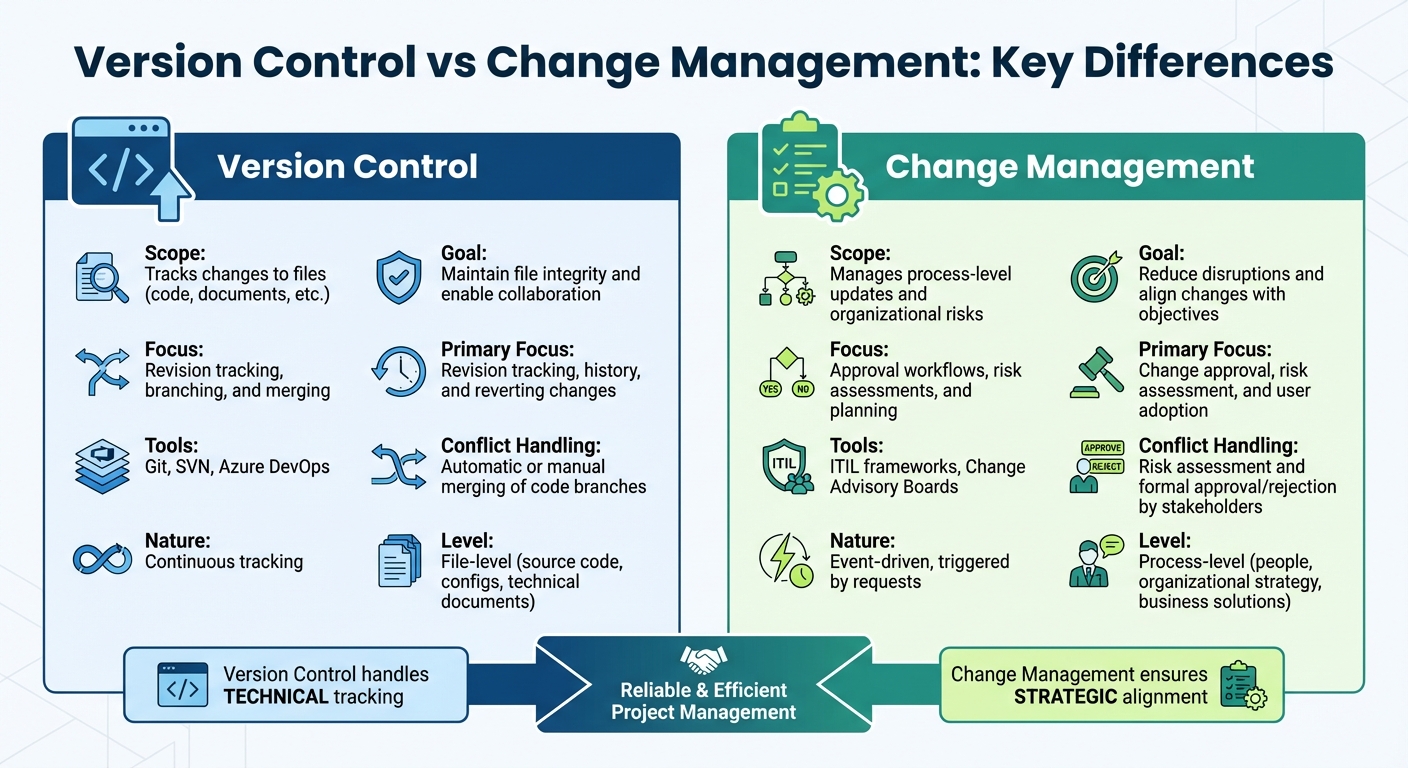
Version Control vs Change Management: Key Differences Comparison Chart
Version Control and Change Management - CompTIA Security+ SY0-501 - 3.6
sbb-itb-3a330bb
What is Version Control?
Version control is a system designed to track and manage changes to files over time. It creates a detailed history of edits, logging who made changes, when they were made, and why. While it's a staple in software development for managing code, it can also handle other file types like documents or configurations.
The system works by either capturing snapshots of files at specific points or storing the differences (deltas) between versions. This method conserves disk space by maintaining one complete file copy alongside smaller change sets for each revision. It also acts as a safety net - if something goes wrong, such as a bug or an unintended feature issue, you can easily revert to a previous "known good" state. Microsoft describes it this way:
Version control systems are software that help track changes make in code over time. As a developer edits code, the version control system takes a snapshot of the files.
For collaborative teams, version control becomes the single source of truth, ensuring no one accidentally overwrites someone else’s work. It allows multiple contributors to work on the same project simultaneously, often through branching - a feature that’s especially useful in low-code and no-code platforms where visual workflows and automated processes need precise tracking.
Main Features of Version Control
Modern version control systems come packed with tools designed to simplify teamwork and project management. Here are the standout features:
- History Tracking: Every change is recorded, creating an audit trail that helps teams trace the project's evolution step by step.
- Branching: This feature lets developers create independent lines of work without affecting the main project. It’s ideal for testing new features or fixing bugs. For instance, Git, the most widely used distributed version control system, enables offline work that can later sync with a remote repository.
- Merging: Once separate development lines are ready, merging combines them back into the main codebase. Built-in tools help resolve conflicts when multiple contributors edit the same sections, ensuring smooth integration.
- Rollback Capabilities: If something goes wrong, rollback tools allow you to restore a file or project to a previous version. Additional features like "Blame" provide accountability by showing who made specific changes and when.
Atlassian sums it up well:
Version control protects source code from both catastrophe and the casual degradation of human error and unintended consequences.
What is Change Management?
Change management is all about keeping things running smoothly when making updates to critical IT systems. Unlike version control, which tracks changes to files, change management focuses on evaluating, approving, and implementing changes in a structured way. Atlassian describes it as:
Change management - also known as change enablement - is an IT practice designed to minimize disruptions to IT services while making changes to critical systems and services.
This process requires formal documentation and approvals, which help prevent unauthorized changes and avoid scope creep - where projects grow beyond their original plan without proper oversight. By conducting thorough impact analyses, organizations can assess how a change might affect technical systems, budgets, and timelines, reducing risks before implementation even begins.
There are two main types of change management: Organizational Change Management, which deals with people and workplace dynamics, and Change Control, which focuses on technical approvals and deployment. Changes are usually categorized by their risk level:
- Standard Changes: Low-risk and pre-approved.
- Normal Changes: Require a full review and approval process.
- Emergency Changes: Critical fixes that need fast-tracked approval to resolve urgent issues.
The stakes for effective change management are high. IT downtime can cost businesses over $300,000 per hour, and without clear systems for managing tasks and changes, 26% of deadlines are missed every week. The Project Management Institute explains the concept as:
Change control is a process whereby modifications to documents, deliverables, or baselines associated with the project are identified, documented, approved, or rejected.
Next, let’s dive into the essential steps that create a solid change management process.
Main Steps in Change Management
A strong change management process typically includes five key stages to ensure changes are intentional and well-managed:
- Initiation: A change request is submitted, outlining the details, reasons, and urgency. This step ensures changes align with business objectives from the start.
- Assessment: Project leaders evaluate the impact on technical systems, resources, budgets, and timelines. Early identification of risks and dependencies helps avoid surprises down the road.
- Approval: A Change Advisory Board (CAB) or other authority reviews the request and analysis, deciding whether to approve or reject it after thorough consideration.
- Implementation: The change is developed and tested in a staging environment before being deployed to live systems. This testing phase helps catch issues before they affect end users.
- Review & Closure: Once the change is implemented, results are verified against objectives, lessons learned are documented, and the process is formally closed. This ensures an audit trail and provides insights for future changes.
Organizations that adopt risk-based approvals can automate up to 70% of low-risk, standard changes, freeing up resources to focus on more complex or high-impact modifications. The ITIL 4 framework highlights the importance of this approach:
The change control practice ensures that risks are properly assessed, authorizing changes to proceed and managing a change schedule in order to maximize the number of successful service and product changes.
These structured steps stand in stark contrast to the fast-paced, technical nature of version control, emphasizing their distinct but complementary roles in IT workflows.
Main Differences Between Version Control and Change Management
Although both version control and change management involve handling updates, they serve different purposes and operate on distinct levels. Version control focuses on tracking changes at the file level, such as source code, configuration files, and technical documents. On the other hand, change management oversees updates at the process level, dealing with decisions, approvals, and the broader strategic effects of changes. These differences form the foundation for comparing the two practices.
Version control works continuously, capturing every iteration in real time. In contrast, change management is event-driven, coming into play only when a formal change request is initiated. This means version control operates quietly in the background, while change management requires deliberate action and oversight.
When it comes to conflict resolution, version control uses tools like automated or manual merging to address technical discrepancies in code. Change management, however, relies on risk assessments and formal stakeholder approvals to resolve conflicts, focusing on organizational risks and strategic alignment.
Comparison Table: Version Control vs. Change Management
| Feature | Version Control | Change Management |
|---|---|---|
| Scope | File-level: Source code, configs, and technical documents | Process-level: People, organizational strategy, and business solutions |
| Primary Focus | Revision tracking, history, and reverting changes | Change approval, risk assessment, and user adoption |
| Primary Goal | Maintain codebase integrity and enable collaboration | Reduce disruption and maximize ROI for organizational changes |
| Tools | Git, SVN, Perforce, Azure DevOps | ITIL frameworks, Prosci ADKAR model, Change Control Boards |
| Conflict Handling | Automatic or manual merging of code branches | Risk assessment and formal approval/rejection by stakeholders |
| Nature | Proactive tracking of every minor iteration | Reactive, triggered by specific change requests |
Differences in Low Code/No Code Workflows
Low-code/no-code platforms bring a fresh approach to version control and change management, moving away from the text-based processes used in traditional coding environments. Instead of handling lines of code, these platforms focus on visual components, workflows, and business logic configurations, which require a different set of strategies for managing changes effectively .
Unlike traditional systems that rely on tools like Git for version control, many no-code platforms use snapshots to capture specific states of a project. For instance, Adalo's Design Versions save UI layouts and branding details but exclude critical elements like database records, API keys, and custom actions. As Adalo explains:
Design versions only save the visuals and layouts of your app. They do not save database changes of any kind.
To address these gaps, developers often schedule automatic data exports to external storage solutions like Amazon S3 or Google Drive to ensure that changes outside the scope of snapshots are preserved.
In terms of change management, platforms like Quickbase emphasize creating "guardrails, not roadblocks". A key practice here is environment separation, where development, staging, and production environments are isolated. This ensures that end users only interact with stable, tested versions, while developers can experiment freely in separate spaces .
Collaboration is another area with unique challenges. Many platforms, such as Adalo, lack real-time multi-user editing. This forces teams to coordinate carefully to avoid overwriting each other's work. Version control becomes a tool for managing collaboration, with teams assigning specific design versions to individual members. For example, in June 2025, Scale By Tech implemented a structured workflow for their Zapier projects, using three separate workspaces and nightly snapshots. This approach - combined with clear version tagging and side-by-side diff reviews - helped them cut production errors by 40% and reduced rollback times to less than a minute.
The growing reliance on low-code/no-code platforms is clear. Gartner predicts that by 2026, 70% of new applications will be developed using these platforms. However, the lack of governance and versioning infrastructure remains a significant challenge, with 95% of AI pilot programs failing to achieve measurable business results for this reason. Teams that adopt incremental changes and commit frequently in no-code environments report 80% fewer errors compared to those who save less often.
Here’s a breakdown of the pros and cons of version control and change management in low-code/no-code development:
Pros and Cons in Low Code/No Code Development
| Aspect | Version Control | Change Management |
|---|---|---|
| Primary Advantage | Allows for experimentation with instant rollbacks | Mitigates scope creep and ensures accountability |
| Key Challenge | Snapshots often miss database and API configurations | Approval workflows can slow development |
| Cost Consideration | Requires subscriptions (e.g., Adalo: $36/month, FlutterFlow: $70/month per user) | Adds overhead through reviews and documentation |
| Collaboration Impact | Demands manual coordination in single-editor platforms | Provides clear audit trails for compliance |
| Speed to Market | Strong version control speeds up delivery by 40% | Governance reduces errors but may delay releases |
How Version Control and Change Management Work Together
Version control and change management are like two sides of the same coin. When combined, they create a more efficient and transparent development process. Together, they establish a detailed audit trail, ensuring accountability at every step. Version control keeps track of who made changes and when - down to the file level. Meanwhile, change management documents who authorized those changes and the outcomes of any verification steps taken. Each system serves its own purpose, but their collaboration ensures both technical precision and process reliability.
Another major advantage of this integration is risk management. Change management evaluates the potential impact of proposed adjustments before they’re implemented. On the other hand, version control acts as a safety net, enabling teams to roll back to a stable version if a newly approved change causes issues.
This partnership also helps prevent scope creep. By requiring all technical changes to go through a backlog for review, impact analysis, and approval, it ensures that only authorized adjustments make it into the codebase. In DevOps and CI/CD workflows, version control automates testing and building for changes that have passed through the change management process. This guarantees that only verified code reaches production. In fact, research demonstrates that structured change management processes make change initiatives seven times more likely to succeed, highlighting the importance of maintaining reliable workflows.
For low-code and no-code platforms, this integration is particularly useful. It connects development efforts to business approvals by linking commits to specific change requests. By tagging each configuration commit with its corresponding change request ID, teams can maintain a clear and traceable connection between development and business decisions. This approach balances speed and stability, ensuring that development aligns with organizational goals.
When to Use Version Control vs. Change Management
Think of version control as your go-to tool for managing the day-to-day technical aspects of a project - tracking file changes, merging branches, and debugging with your team. It’s designed to provide detailed visibility into who changed what and when, making it a cornerstone for continuous development work.
Change management, on the other hand, comes into play when you’re dealing with high-stakes decisions. These are the moments that call for risk assessments, formal approvals, and careful planning - like system upgrades, infrastructure adjustments, or protocol updates that could ripple across business operations. As Nati Turtledove puts it:
Change management ensures that changes to data are made in a controlled and documented manner.
This division of roles is essential throughout the development lifecycle. Version control is your ally during the build phase, capturing every commit and change. Meanwhile, change management steps in during the release phase, ensuring that any scope changes are integrated into a well-structured plan.
In low-code or no-code environments, this balance becomes even more crucial. Version control keeps track of configuration changes and provides a detailed history of workflow modifications. At the same time, change management ensures these adjustments align with broader business goals before they’re implemented. For teams navigating these platforms, the Best Low Code & No Code Platforms Directory (https://lowcodenocode.org) is a handy resource for finding tools that support both practices.
Here’s a striking statistic: projects with strong change management practices are seven times more likely to succeed. Plus, incorporating change management from the start has been shown to increase ROI by 40% to 60%. But don’t let this lead you to overcomplicate things - version control should handle the technical details, while change management focuses on the big-picture decisions that carry significant business risks.
Conclusion
Version control and change management serve as two essential pillars in modern development workflows, each addressing a different but interconnected aspect of project management. Version control focuses on the technical details - tracking file changes, managing branches, and enabling rollbacks. On the other hand, change management ensures that all modifications are reviewed, approved, and assessed for risks before implementation. Together, they form the backbone of Software Configuration Management, ensuring projects remain consistent and dependable throughout their lifecycle.
In low-code and no-code environments, this collaboration becomes even more crucial. Version control must adapt to track not just lines of code but also graphical UI elements and visual workflows. At the same time, change management safeguards that these modifications align with business goals and pass necessary governance checks. As Meegle explains:
In low-code/no-code environments, mastering VCS is not just about maintaining order; it is about driving innovation, improving efficiency, and ensuring scalability.
The stakes are high. Roughly 95% of AI pilot programs fail to achieve measurable business impact, often due to a lack of production-ready infrastructure, including version control and governance. However, organizations that integrate strong version control and change management practices from the outset report clear advantages - such as a 40% faster time-to-market and annual savings averaging $187,000 when using no-code platforms.
These numbers highlight the importance of investing in reliable tools for low-code and no-code projects. For teams navigating this space, selecting the right platforms is critical. Resources like the Best Low Code & No Code Platforms Directory (https://lowcodenocode.org) offer a valuable starting point, helping teams find platforms with built-in version control, governance features, and the support needed to scale projects from pilot to enterprise-ready solutions.
FAQs
Can you use version control without change management?
Version control can track file changes on its own, but relying solely on it without incorporating change management isn't a good idea. While version control focuses on the technical side of tracking updates, change management ensures that changes are planned, reviewed, and coordinated properly. Without this structured oversight, you could face errors, inconsistencies, or even a lack of accountability. Together, these two systems create a well-rounded approach to managing development workflows efficiently.
How do you link commits to change requests for audits?
To make audits easier and maintain traceability, include specific change request or ticket identifiers in your commit messages. Tools that integrate with version control systems like Git can track these identifiers, creating a clear link between commits and their related work items or change requests. This approach streamlines the audit process by connecting code changes directly to their originating tasks.
What should you do if a no-code snapshot misses data changes?
If a no-code snapshot doesn't capture data changes, resist the urge to update snapshots without careful thought. Instead, prioritize designing targeted and effective tests. This ensures the system stays dependable and accurate while helping to pinpoint and resolve potential problems more efficiently.