AI-assisted user journey mapping transforms how businesses understand and improve customer experiences. Unlike outdated, static methods, AI enables real-time updates, precise persona creation, and actionable insights by analyzing large datasets quickly and efficiently. Here's what you need to know:
- Why it matters: AI shortens sales cycles by up to 30%, improves conversion rates by 15–25%, and saves teams 10–15 hours weekly by automating repetitive tasks.
- How it works: AI uses tools like machine learning, natural language processing (NLP), and predictive analytics to identify customer behaviors, emotions, and friction points across touchpoints.
- Key steps:
- Define personas using AI-driven data analysis.
- Identify customer touchpoints and journey stages.
- Use AI to analyze user actions, emotions, and challenges.
- Write clear, structured prompts for AI tools.
- Combine AI insights with human expertise for accuracy.
- Test and refine journey maps using real customer feedback.
AI tools like UserBit, Mitzu, and ProductFuture simplify the process, while low-code platforms and no-code tools make implementation faster. Regular updates and feedback loops ensure journey maps remain relevant and actionable. By blending technology with human input, businesses can deliver better customer experiences and drive measurable results.
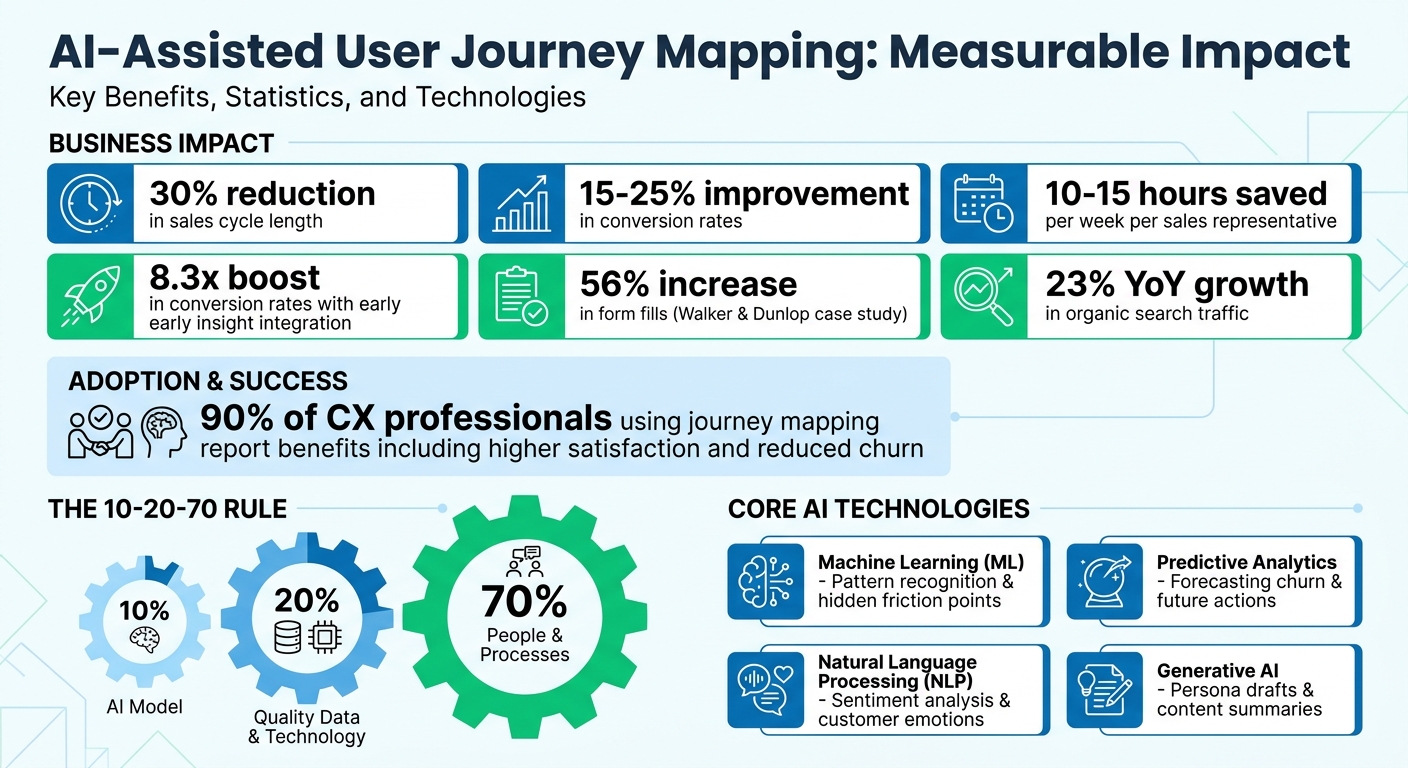
AI-Assisted User Journey Mapping: Key Benefits and ROI Statistics
A Deeper Dive Into AI-Powered Journey Mapping
sbb-itb-3a330bb
Steps for Creating User Journey Maps with AI
Creating a user journey map with AI boils down to three main tasks: identifying your users, pinpointing their interactions with your product, and understanding their behaviors and emotions at each stage. What sets AI apart is its ability to turn these steps into precise, data-driven processes that reflect actual customer experiences. Here’s a closer look at how AI can transform journey mapping.
Using AI to Define User Personas and Project Scope
AI tools excel at turning raw research data - like interview notes, support logs, and survey results - into detailed user personas. They can even go a step further, using generative AI to craft persona details such as names, backstories, and daily routines, making it easier for teams to connect with their target audience. AI also helps break down a large user base into smaller, behavior-driven segments by analyzing patterns and preferences within massive datasets.
To build strong personas, combine qualitative data (like customer reviews) with quantitative metrics (like web analytics). Use iterative prompts to refine persona details, and make sure to label AI-generated assumptions clearly. As Kyle Soucy, Founding Principal at Usable Interface, LLC, explains:
AI is a tool that helps us get the job done more efficiently; it does not replace us.
When defining your project’s scope, frame your objectives as specific questions, such as: "Where are users most likely to drop off during onboarding?". AI can then suggest relevant journey stages and touchpoints based on your business goals. Keep in mind the "10-20-70 rule" for AI success: 10% of the effort goes to the AI model, 20% to quality data, and 70% to the people and processes that turn insights into actionable outcomes.
Once your personas and scope are clear, the next step is identifying key touchpoints in the user journey.
Finding Touchpoints and Journey Stages with AI
AI can sift through data from multiple sources - like CRM records, web analytics, and social media comments - to identify where and when users interact with your product. Natural Language Processing (NLP) evaluates sentiment at each stage, while Machine Learning (ML) uncovers patterns or friction points that might fly under the radar of human analysis. For instance, AI might reveal unexpected touchpoints, like users discovering your brand through niche online forums instead of traditional marketing channels.
When mapping these touchpoints, it’s important to differentiate between tools. Platforms like Miro or Smaply help visualize journeys, while analytics tools like Contentsquare or Mixpanel capture real-time user behavior. If you’re using generative AI, structure your prompts carefully by defining the persona, the journey, and the specific details you need - such as "Jobs to be Done", "Moments of Truth", or "Frustrations". Feeding data into AI models in smaller chunks rather than all at once can also improve accuracy.
AI-driven journey maps are dynamic, constantly updating as new data comes in. This approach allows for micro-segmentation, tailoring journeys to specific user behaviors rather than relying on broad generalizations. It’s no surprise that 90% of customer experience professionals who use journey mapping report benefits like higher satisfaction and reduced churn.
With touchpoints identified, the next step is understanding what users do, feel, and struggle with at each stage.
Analyzing User Actions, Emotions, and Problems with AI
AI dives into customer feedback to uncover actions, emotions, and challenges. NLP processes unstructured text - like reviews or support tickets - to assess sentiment and intent at each stage of the journey. Meanwhile, machine learning detects patterns and friction points that might not be immediately obvious. For example, AI can track time spent at specific touchpoints, flagging longer durations as potential signs of confusion or technical issues.
Anomaly detection tools can identify unusual behaviors, such as sudden spikes in cart abandonment, enabling teams to address issues in real time. Clustering algorithms help group users by behavior (e.g., "quick deciders" versus "thorough researchers") instead of relying solely on demographic data, resulting in more actionable insights. To maintain balance, instruct AI to pinpoint the "top 3 pain points" and "top 3 moments of delight" for each stage.
Monitoring drop-off rates is another critical task. High exit rates at specific stages often signal friction that needs to be addressed. Beyond analyzing past behavior, AI can also predict future actions - like which users might churn or which features they’re likely to adopt next. These insights feed back into your journey map, creating a continuous improvement loop. However, it’s essential to validate AI-generated findings with human expertise to ensure accuracy and context.
| AI Technology | Role in Journey Mapping | Benefit |
|---|---|---|
| Machine Learning (ML) | Pattern recognition | Identifies hidden friction points |
| Natural Language Processing (NLP) | Sentiment analysis | Analyzes customer emotions |
| Predictive Analytics | Forecasting | Predicts future actions like churn |
| Generative AI (GenAI) | Content & structure | Drafts personas and summaries |
How to Use AI Effectively in User Journey Mapping
AI-assisted journey mapping relies on a mix of technology and human expertise to create maps that drive meaningful action. The results you get from AI tools depend heavily on how well you communicate with them. Simply put, the clearer and more structured your prompts, the better your outcomes will be when using no-code platforms.
Writing Clear Prompts for AI Tools
Using structured frameworks like C.S.I.R. (Context, Specific Info, Intent, Response Format) or RTCF (Role, Task, Context, Format) helps ensure precision in AI outputs. These frameworks guide you in crafting prompts that include all the necessary details. For instance, instead of vaguely requesting, "Create a user persona", you could say:
"Act as a customer experience professional. Using the attached 500 support tickets from Q1 2026, create a persona for users who abandoned their cart during checkout. Include professional aspirations, decision-making style, and the top 3 frustrations. Present the output in a table format."
Grounding prompts in real customer data is essential for generating accurate insights. When handling large datasets, take an incremental approach. Start by uploading raw data, then ask the AI to segment personas, and finally, request mapped journey stages based on those segments. This step-by-step method helps the AI manage complex instructions more effectively.
Role-based prompts can also add clarity and focus. For example, instruct the AI to "Act as a market researcher" or "Act as a UX strategist" to align the output with your needs. Additionally, ask the AI to clearly label any assumptions it makes as "educated guesses" if they aren’t directly supported by your data.
Once you’ve set up clear, data-driven prompts, the next step is to verify the AI’s insights with human oversight.
Combining AI Results with Human Review
After refining your prompts, it’s important to combine AI-generated outputs with human judgment to ensure they align with your strategic goals. AI can act as a "24/7 data analyst", processing massive amounts of data - like reviews, support tickets, or social media feedback - to uncover patterns and sentiment shifts that might otherwise go unnoticed. However, AI lacks the strategic thinking and contextual understanding that your team brings to the table. This makes human verification a critical step to avoid bias or unsupported conclusions in AI-generated personas and maps.
A well-balanced workflow splits responsibilities between AI and your team. AI can identify data patterns (the "what"), while your team interprets those patterns (the "so what?") and determines actionable steps (the "now what?"). For example, if AI flags a drop-off on the pricing page, your team can decide whether the solution involves revising pricing tiers, adding a comparison chart, or integrating a live chat feature. Certain sections of your journey map - like "Opportunities" and "Solutions" - should always be reserved for human input, as AI often lacks the broader organizational context needed to recommend effective changes.
Here’s how roles can be divided across different phases of journey mapping:
| Mapping Phase | AI Role | Human Role |
|---|---|---|
| Research | Sentiment analysis of reviews; summarizing interviews | Defining research goals and key questions |
| Persona Creation | Generating fictional backgrounds and "day in the life" stories | Validating personas against real user behavior |
| Journey Mapping | Identifying touchpoints and predicting next actions | Brainstorming solutions and assigning tasks |
| Implementation | Drafting email sequences or product descriptions | Evaluating feasibility and ROI of ideas |
The "10-20-70 rule" is a helpful guideline: 10% of effort goes to the AI model, 20% to data and technology, and 70% to people and processes. While AI can handle repetitive tasks like data clustering, the real value of journey mapping comes from team collaboration and shared insights found in no-code and low-code tools.
Adapting AI Outputs to Your Business Goals
Once you’ve reviewed AI-generated insights, adapt them to align with your business objectives and brand identity. Start by defining key performance indicators (KPIs) in your prompts. For example, you might ask the AI to include metrics like "time to first purchase" or "support ticket volume by journey stage". This ensures the output is actionable for decision-makers.
Contextual details also matter. Share information about your target audience, product goals, and brand voice so the AI can tailor its outputs to your style. For instance, if your brand has a casual and friendly tone, include those guidelines so the AI creates persona narratives that reflect that tone. You can further refine outputs by focusing on specific categories, such as "Professional Aspirations", "Incentives and Rewards", or "Decision-Making Style".
To make AI outputs easy to integrate into your workflows, request structured formats. For example, you could ask for data to be presented in "swim lanes" (Actions, Thoughts, Emotions, Touchpoints) for seamless integration into tools like Miro or Canva. If the AI identifies pricing confusion as a barrier, you can turn that insight into actionable tasks, such as drafting a "Transparent Pricing" page or creating an FAQ section.
Finally, prioritize data privacy when working with sensitive customer information. Standard tools like ChatGPT Plus may use uploaded files for model training, so opt for secure platforms like HeyMarvin or Dovetail, or use enterprise-level versions of AI tools for added security.
Using Low Code/No Code Platforms for AI Journey Mapping
Low code/no code platforms are transforming the way businesses approach AI-powered journey mapping. By removing technical hurdles, these tools make it easier and faster to create detailed journey maps. Instead of waiting on coding or technical teams, you can simply describe a customer scenario in plain English, and AI will generate a visual map for you instantly. The Best Low Code & No Code Platforms Directory (https://lowcodenocode.org) provides a detailed comparison of tools across analytics, automation, and development categories, helping you find the right platform for your journey mapping needs.
Low Code/No Code Tools That Support AI Integration
Several tools stand out for their ability to integrate AI into journey mapping with minimal setup. Here are a few examples:
-
UserBit: This tool allows teams to create journey maps directly from existing user personas, automatically incorporating goals and pain points into customizable templates. Their free plan includes one active journey map and five AI automations to help you get started. Brittany Williams, a UX/Human Factors Engineer at BD, shared her experience:
UserBit has been pivotal in standardizing and operationalizing my research and design process. UserBit has allowed me to complete quick and efficient analysis of rich but text-heavy qualitative data, where great insights are sometimes difficult to extract.
- Mitzu: Designed for data-heavy organizations, Mitzu connects directly to data warehouses like Snowflake, BigQuery, and Databricks. Its warehouse-native approach eliminates the need for complex ETL processes, automatically detecting schemas and building journey visualizations from raw event tables. This makes it capable of handling billions of events.
- ProductFuture: For teams that prefer conversational interfaces, ProductFuture offers 10 free AI generations. You can describe a journey in natural language, and the tool will produce a visual map with 4–6 stages, complete with touchpoints and friction points.
- Delve AI: Trusted by over 41,000 businesses, Delve AI specializes in automatic customer segmentation using first-party data. Pricing starts at $89/month, and it’s ideal for tasks like website and competitor persona analysis.
| Platform | Key AI Capability | Starting Price | Best For |
|---|---|---|---|
| UserBit | Persona-to-journey automation | Free (1 map, 5 AI automations) | Teams with existing research data |
| Mitzu | Warehouse-native path analysis | Custom pricing | Data-heavy organizations |
| ProductFuture | Natural language to visual map conversion | Free (10 generations) | Quick prototyping and testing |
| Delve AI | Automatic segmentation from first-party data | $89/month | B2B and competitor analysis |
These tools not only simplify the creation of journey maps but also make it easier to refine and improve them over time.
Faster Implementation with Low Code/No Code Platforms
The real advantage of these platforms lies in their ability to cut down on traditional development timelines. For example, IdeaBoard uses conversational AI assistants that let you make changes to maps with simple commands like "add a post-purchase support stage" or "make the onboarding stage more positive." This approach turns hours of work into a task that takes just minutes.
Another standout feature is cross-platform synchronization. Tools like Miro ensure that journey maps stay updated across multiple platforms like Jira, Notion, Confluence, and Azure DevOps. This synchronization ensures that your team always works from a single, up-to-date source of truth. Plus, identified pain points can be turned into actionable tasks with assignees and deadlines, all synced to your project management system.
These platforms are changing the game, making journey mapping faster, more accessible, and easier to iterate.
Improving Journey Maps Through Testing and Feedback
When it comes to AI-assisted journey mapping, testing and gathering feedback are essential steps in fine-tuning the process. AI-generated journey maps rely on data, but without proper testing, they can be based on assumptions that may not hold up in practice. Fortunately, modern tools make it easier to compare AI predictions with actual user behavior, allowing you to adjust your maps accordingly.
Testing AI-Generated Maps with Real Users
The best way to validate an AI-generated journey map is by observing how real users interact. Tools like session replays provide detailed recordings of user sessions, letting you compare the predicted paths with actual behaviors. These recordings can reveal unexpected behaviors, such as "rage clicks" or drop-offs, that the AI might have overlooked. For instance, while your AI might predict a seamless checkout process, session replays could uncover that users are abandoning the process due to a confusing form field.
Before beginning any tests, instruct your AI to label areas where it has made assumptions due to missing data. This approach helps focus your testing efforts on the sections most likely to need improvement. After conducting user interviews, feed the transcripts back into the AI to perform thematic analysis. This step allows you to compare newly identified themes with your existing journey map, pinpointing gaps or changes in user sentiment.
AI can also assist in creating specific validation questions to confirm or challenge the assumptions in your map. As UX Research Consultant Kyle Soucy puts it:
AI is a tool that helps us get the job done more efficiently; it does not replace us.
For AI-generated triggers or "next best actions", running A/B tests can help validate which sequences drive the highest engagement. Many top low code platforms now include automated features that identify the winning variations based on real performance data. These insights provide a foundation for ongoing improvements.
Using Feedback to Refine Your Maps
Once you've validated your insights, continuous feedback ensures that your journey maps stay aligned with actual user behavior. Feedback loops transform static maps into dynamic tools that evolve alongside your customers. For example, in 2025, Walker & Dunlop used analytics and optimization tools to track conversion paths. Under the leadership of Kokko Tso, Vice President of Digital Marketing, the team made 10–15 content updates daily based on real user data. This approach led to a 56% increase in form fills and a 23% year-over-year growth in organic search traffic.
Think of your AI-powered maps as living documents that require regular updates. Schedule monthly or quarterly reviews to incorporate fresh data from customer support tickets, user testing, and analytics. To ensure the map reflects real experiences rather than internal assumptions, feed your AI tool with diverse qualitative data like online reviews, support transcripts, and open-ended survey responses.
Cross-functional collaboration is also key. Gather feedback from teams in sales, support, and marketing to identify where AI-generated insights may conflict with human observations. These teams often notice friction points that data alone can't capture, such as unclear terminology or missing details that lead to support calls.
When you're going to different tools or people to ask for insights, that adds a lot of friction along the way. Especially after a launch... you need to see how people are using it and make actionable, data-driven decisions. - Corey Moen, Manager of Web Design, Webflow
For every issue or opportunity identified through feedback, assign a specific owner and timeline to ensure the insight leads to actual changes. This accountability ensures your refined maps result in meaningful improvements, not just updates to documentation.
Summary and Implementation Steps
AI-assisted user journey mapping can condense weeks of effort into just hours by centralizing data from sources like CRM systems, support tickets, and customer reviews. Elizabeth Gerbel, CEO, highlights this shift:
Now we have a lot less data, but it's quality data. That change allows us to use AI confidently, without second-guessing the outputs.
To get started, focus on micro-conversions - actions like viewing a pricing page or downloading a resource template. These smaller steps reveal detailed patterns. Research indicates that early integration of key insights can boost conversion rates by up to 8.3 times, allowing automated, targeted follow-ups within hours.
The implementation process follows a logical sequence:
- Audit your touchpoints: Identify every interaction point in the customer journey.
- Establish a strong data foundation: Use 60–90 days of historical behavior to guide analysis.
- Build dynamic personas: Base these on user actions rather than just demographics.
- Automate follow-ups: Personalize interactions to save time and improve engagement.
Companies leveraging AI for sales automation have reported significant gains, including a 30% reduction in sales cycle length and saving 10–15 hours per week for each sales representative.
To ensure accuracy, validate AI-generated insights with real user testing methods like session replays and A/B tests. Feed these validated findings directly into tools like Kanban boards or user story maps for seamless integration.
Finally, keep your journey maps fresh by scheduling regular reviews. Use updated data from support tickets, analytics, and team feedback to refine your approach. This turns static documentation into a dynamic system that delivers measurable results.
FAQs
What data do I need before using AI for journey mapping?
To make the most of AI for journey mapping, start by collecting high-quality data that captures customer interactions. This could include sources like customer feedback, website analytics, sales records, social media activity, and customer service logs. The key is to ensure this data is accurate, complete, and consistent. Tools such as Pandas or Talend are excellent for cleaning and organizing your data effectively.
Remember, quality matters more than quantity. Clean, reliable data allows AI to spot patterns and generate customer journey maps that lead to actionable insights.
How do I prevent AI-generated personas from being wrong or biased?
To minimize errors or bias in AI-generated personas, emphasize reducing bias and validating results. Start by using a variety of data sources to ensure balanced inputs. Improve personas through iterative prompts, refining them step by step. Always cross-check the AI-generated outputs with real customer data to confirm their accuracy.
Incorporate human oversight into the process. This means reviewing personas manually and comparing them with original research to catch and fix any inaccuracies. Additionally, set up clear governance frameworks to keep personas reliable, useful, and free from stereotypes or assumptions.
Which KPIs should my AI-assisted journey map track?
When incorporating AI into user journey mapping, it's essential to keep an eye on critical KPIs. Start with attribution accuracy, which can see improvements of up to 28%. Then, evaluate conversion speed and efficiency, as automation can make processes up to 34% faster. Keep a close watch on drop-off rates, which often highlight disengagement points affecting 60-70% of users.
Also, pay attention to multi-touch attribution. This can help you identify overlooked touchpoints, such as voice searches and chatbots, that might otherwise go unnoticed. Tracking these metrics is key to refining user journeys and driving better results for your business.