Low-code platforms make app development faster but introduce security risks, especially during ransomware attacks. Misconfigurations can expose sensitive data, creating "shadow apps" that bypass security oversight. Here's how Microsoft Power Platform, OutSystems, and Mendix handle ransomware threats:
- Microsoft Power Platform: Uses Microsoft Sentinel for detecting threats and Azure Logic Apps for automated response. Strong audit logging, backup features, and compliance with security standards make it a solid choice for organizations already using Microsoft services.
- OutSystems: Focuses on real-time monitoring and static code analysis to prevent vulnerabilities. Offers robust tools like a Web Application Firewall (WAF) and 24/7 incident response teams. However, it requires specialized expertise and comes with higher costs.
- Mendix: Provides multi-cloud flexibility, continuous backups, and strong encryption. Partners with HackerOne for vulnerability disclosure and relies on Siemens Cyber Defense Center for 24/7 monitoring. Users must secure application logic themselves.
Key takeaway: Each platform has strengths and limitations. Choose based on your infrastructure, budget, and security needs. Always maintain governance, enforce access controls, and monitor applications to mitigate risks.
1. Microsoft Power Platform
Ransomware Detection Capabilities
Microsoft Power Platform uses Microsoft Sentinel to spot ransomware threats before they spiral out of control. Sentinel's analytics rules are designed to detect unusual activity, like "Data destruction following publishing of a new app." For example, it flags instances where a new app initiates mass updates or deletions in Dataverse within an hour. Additionally, its integration with Microsoft Entra ID employs adaptive algorithms to track compromised credentials across public and dark web sources. It also identifies unauthorized app executions from unexpected locations. These detection tools activate immediate incident response protocols to mitigate risks.
Incident Response Tools
Azure Logic Apps plays a key role in automating responses during ransomware incidents. For instance, it can instantly disable suspicious apps or limit user access. Administrators can rely on the Power Platform Admin Center, which features a centralized Security Overview page. This page helps review security recommendations and monitor the overall security score, making it easier to strengthen systems proactively.
To aid investigations, Microsoft Purview logs activities across Power Apps, Power Automate, Copilot Studio, and administrative actions, ensuring a detailed audit trail. The Customer Lockbox feature adds another layer of protection by requiring explicit customer approval before Microsoft personnel can access data during troubleshooting. Microsoft also advises isolating compromised systems without shutting them down, preserving critical forensic evidence for investigations. Beyond immediate actions, the platform's robust backup and recovery tools provide an additional safety net.
Backup and Recovery Features
The Power Platform's backup system is designed to quickly restore operations after a ransomware attack. Data backups are securely stored in Azure, keeping them out of attackers' reach. A soft delete feature ensures that even if a backup is maliciously deleted, it remains recoverable for 14 days. Security measures like multi-factor authentication and security PINs are required for critical recovery actions.
Organizations can further secure backups using Azure Blob's "Write Once, Read Many" (WORM) feature, which makes data non-erasable and non-modifiable for a set period. For added resilience, the cross-region restore capability allows data recovery in a secondary paired region. Built-in tools like versioning and the recycle bin in OneDrive or SharePoint also enable users to revert files to their original state before infection.
Compliance with Security Standards
The Power Platform aligns with rigorous security standards to protect data and ensure reliable backups. Its trusted cloud infrastructure is designed with high availability, disaster recovery, and extended backup retention in mind. Managed Environments, accessible through the Admin Center, offer enhanced visibility into low-code applications while supporting proactive governance.
To prevent unauthorized access, the platform uses network isolation through IP firewalls and Virtual Networks. Additionally, customer-managed keys provide users with precise control over data encryption, further strengthening security.
sbb-itb-3a330bb
2. OutSystems
Ransomware Detection Capabilities
OutSystems takes a proactive approach to ransomware threats by continuously monitoring for intrusions and malware in real-time. The platform also keeps a close watch on runtime integrity to detect any unusual activity. A standout feature is the AI Mentor System, which performs static analysis during the development phase. This system identifies insecure patterns early, preventing vulnerabilities from reaching production. Additionally, the TrueChange IDE flags risky code patterns, such as injection vulnerabilities, before deployment. This "shift-left" approach ensures that potential threats are caught and addressed well before applications go live.
Incident Response Tools
OutSystems equips organizations with robust tools to respond effectively to ransomware incidents. The platform includes a Web Application Firewall (WAF) that defends against common attack methods like SQL injection and Cross-Site Scripting. Administrators can swiftly implement protective measures, such as blocking IP addresses and enforcing least-privilege access. A dedicated 24/7 SOC and CSIRT team investigates incidents and coordinates resolutions. Furthermore, detailed audit trails log every platform operation - from permission updates to application deployments - ensuring full accountability.
"The primary mission of OutSystems CSIRT is to help ensure company, platform, and data preservation by thoroughly investigating computer security incidents and contributing to their prevention." - OutSystems CSIRT
Backup and Recovery Features
OutSystems ensures rapid recovery from ransomware attacks through continuous incremental data backups. The platform supports failover across multiple availability zones, keeping operations running smoothly even during incidents. By isolating production, development, and QA environments with dedicated databases, OutSystems prevents ransomware from spreading across systems. Data is encrypted both in transit and at rest using built-in cryptographic tools. Organizations can restore systems to any point within the retention period, while automated security patching keeps everything up-to-date without requiring downtime.
Compliance with Security Standards
OutSystems adheres to strict security standards, holding certifications such as SOC 2 Type II, ISO 27001, and ISO 22301. The platform supports compliance with regulations like GDPR, HIPAA, and PCI DSS. For industries with higher regulatory demands, OutSystems is FedRAMP Authorized and complies with national standards in Spain (ENS), Italy (ACN), and the UAE (DESC). This extensive compliance framework ensures that organizations can trust their ransomware defense strategies align with industry and regulatory expectations. Up next, we’ll explore how Mendix approaches ransomware response to continue our comparative review.
3. Mendix
Ransomware Detection Capabilities
Mendix relies on CrowdStrike and the Siemens Cyber Defense Center for around-the-clock threat monitoring. This system continuously scans for unusual activity and emerging risks in real-time. A Cloud-Native Application Protection Platform (CNAPP) checks infrastructure for misconfigurations and vulnerabilities during runtime. Additionally, all applications hosted on Mendix Cloud v4 are safeguarded by AWS WAF, which blocks malicious traffic such as bots, scanners, and exploits like the Log4j remote code execution.
To strengthen security, Mendix conducts monthly external penetration tests and supports numerous client-driven security assessments. They’ve also teamed up with HackerOne for a vulnerability disclosure program. As Mendix explains:
"We have partnered with HackerOne for a vulnerability disclosure program opening up our product to the world's best and brightest ethical hackers for crowd-sourced security".
The Software Composition feature in the Control Center tracks all components across your application landscape, allowing for quick impact analysis when a vulnerability is identified. This comprehensive detection system supports Mendix's swift incident response processes.
Incident Response Tools
Mendix builds on its detection capabilities with tools designed for immediate threat mitigation. The Siemens Cyber Defense Center plays a key role, operating 24/7 to analyze security events and ensure quick resolutions. Security advisories are issued through Siemens ProductCERT, complete with CVSS scores and actionable remediation advice. Administrators can also configure a Security Contact in the Control Center to receive instant alerts for critical vulnerabilities.
"Security operations for the platform are supported by the Siemens Cyber Defense Center, which provides continuous security monitoring, threat detection, and incident response capabilities." - Mendix
To enhance security, Mendix suggests implementing Single Sign-On (SSO) with enterprise identity providers like Entra ID, which enforces two-factor authentication and centralized password policies. For sensitive data, the Mendix Marketplace Encryption module offers AES-based encryption at the database record level. Additionally, Strict Mode ensures entities are only accessible through defined model paths, reducing risks from misconfigured access rules.
Backup and Recovery Features
Mendix’s backup and recovery systems ensure services can be restored quickly in the aftermath of an incident. The platform performs automated nightly backups, while developers can trigger manual backups whenever needed for point-in-time recovery. These backups are stored in geographically distinct locations with retention schedules: nightly backups for 2 weeks, weekly backups (Sunday) for 3 months, and monthly backups for 1 year. Full snapshots include both the PostgreSQL database and external file storage, ensuring all components are restored together for data consistency.
Database files are kept on an AES-256-bit encrypted file system. To minimize downtime, administrators can upload backup archives to create new backup items in the cloud before beginning restoration. Mendix advises ensuring the target database has enough capacity for decompressed data, plus an additional 30% overhead, to avoid restoration issues. The platform also logs backup activity to detect and address any partial restores.
Compliance with Security Standards
Mendix adheres to SOC 1, SOC 2, and SOC 3 Type 2 standards, covering data security, confidentiality, and financial data handling. The platform is certified under ISO/IEC 27001, ISO/IEC 27017, PCI DSS Level 1, and NEN 7510-1. Its certified Business Continuity Management System (BCMS) includes features such as auto-recovery and failover within the same availability zone for enterprise licenses. The SOC 2 audit runs annually from November 1st to October 31st, with reports published each December.
Roland Busch, President & CEO of Siemens AG, highlights the company’s focus:
"Cybersecurity is a key ingredient for trust from our customers. It is also the basis for sustainable success and a strong ecosystem".
Mendix also allows customers to choose where their data is stored, with options including the US, EU, UK, and Japan, ensuring adherence to local data privacy laws. The platform’s stateless architecture enables automated container replacement in the event of a runtime crash, reducing downtime during ransomware attacks.
Are Low-Code and No-Code Tools a Security Risk?
Pros and Cons
Microsoft Power Platform vs OutSystems vs Mendix Ransomware Response Comparison
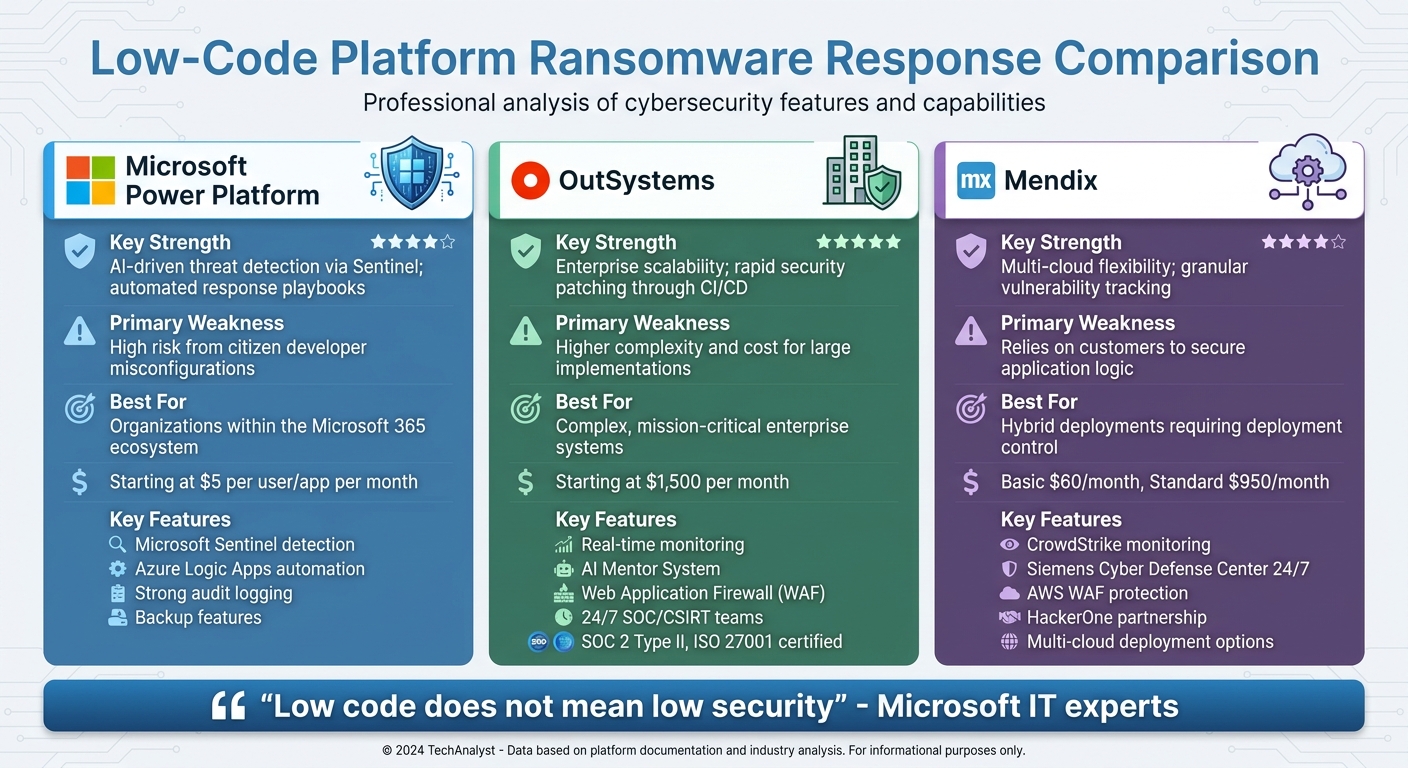
Every platform brings its own strengths and challenges when it comes to ransomware response. Here's a closer look at the standout features and limitations of each.
Microsoft Power Platform shines in automated threat detection, thanks to Microsoft Sentinel, which can flag suspicious activities like mass app deletions or data destruction. Its seamless integration with Azure and Microsoft 365 makes it a budget-friendly option for organizations already using those services, with prices starting at just $5 per user or app per month. However, there's a catch: relying on citizen developers can lead to misconfigurations, often exposing sensitive data.
OutSystems is known for its scalability and ability to quickly roll out security patches through CI/CD pipelines. With ISO and SOC 2 certifications, it provides a solid compliance framework. On the downside, it comes with a hefty price tag - starting at about $1,500 per month - and managing security during fast-paced development cycles demands specialized IT expertise.
Mendix offers unmatched deployment flexibility, supporting public, private, and on-premise setups - an invaluable feature if a primary cloud environment is compromised. Its Software Composition tool is another highlight, helping detect vulnerabilities in application components. Pricing is moderate, with the Basic plan at $60 per month and the Standard plan at $950 per month. However, the shared responsibility model poses a challenge: while Mendix secures the platform infrastructure, users are responsible for securing application logic, and flaws in visual models may bypass traditional security checks.
The table below provides a quick comparison of these platforms:
| Platform | Key Strength | Primary Weakness | Best For |
|---|---|---|---|
| Microsoft Power Platform | AI-driven threat detection via Sentinel; automated response playbooks | High risk from citizen developer misconfigurations | Organizations within the Microsoft 365 ecosystem |
| OutSystems | Enterprise scalability; rapid security patching through CI/CD | Higher complexity and cost for large implementations | Complex, mission-critical enterprise systems |
| Mendix | Multi-cloud flexibility; granular vulnerability tracking | Relies on customers to secure application logic | Hybrid deployments requiring deployment control |
As Microsoft IT experts Joe Unwin and Justin Tung put it:
"Low code does not mean low security".
Ultimately, organizations need to strike a balance between development speed and robust governance, regardless of the platform they choose.
Conclusion
Microsoft Power Platform stands out as a strong tool for ransomware response within the Microsoft ecosystem. By leveraging Sentinel's detection capabilities and Azure Logic Apps, it can automatically disable suspicious applications, adding a layer of proactive security. A real-world example of its impact is PG&E, which achieved secure low-code innovation and saved over $75 million annually.
When comparing platforms, it's clear that each has its own niche. OutSystems is designed for enterprise scalability, making it a solid choice for mission-critical systems requiring SOC 2 or HIPAA compliance. On the other hand, Mendix offers flexibility with deployment options across public clouds, private clouds, and on-premise environments. Its SDK-based code export also helps reduce vendor lock-in, a key consideration for many organizations. The right platform for your needs ultimately depends on factors like your current infrastructure, budget, and specific security demands.
However, even the most capable platforms need effective governance to ensure a strong defense. Without full visibility and consistent patching, vulnerabilities can persist. To mitigate risks, maintain a detailed registry of all low-code applications, enforce MFA and RBAC, and integrate a SIEM system for real-time monitoring.
To establish secure practices, consider implementing pre-approved templates, enforcing Data Loss Prevention (DLP) policies, and segregating environments to maintain secure defaults. Creating a Center of Excellence (CoE) to train citizen developers and assigning "security buddies" to review connectors before deployment can further enhance your security framework.
Finally, for additional resources and strategic planning tools, visit the Best Low Code & No Code Platforms Directory at https://lowcodenocode.org. This hub provides valuable insights to help you navigate and optimize your low-code journey.
FAQs
What should I do first if a low-code app is hit by ransomware?
If a low-code app falls victim to ransomware, the first step is to contain the incident quickly by isolating any affected systems. It's crucial to preserve all related evidence within the first four hours. This window is critical for supporting both the investigation and recovery process.
How can I prevent citizen-developer apps from becoming “shadow apps”?
To keep citizen-developer apps from turning into "shadow apps", it's crucial to have robust governance, security measures, and oversight in place. Start by creating clear policies that outline the dos and don’ts of citizen development. Make sure these developers follow established security standards and centralize the management and monitoring of all apps.
Additionally, thoroughly evaluate low-code and no-code platforms before adopting them. Assess their security features, as well as their data backup and recovery capabilities. Taking these steps ensures better control and minimizes the chances of non-compliant apps becoming security risks.
Which low-code platform is easiest to integrate with a SIEM for ransomware monitoring?
Microsoft’s Power Platform works seamlessly with Microsoft Sentinel, making it one of the simplest low-code platforms to link with a SIEM for ransomware monitoring. Microsoft Sentinel offers a specialized solution for keeping an eye on Power Platform apps, which enhances threat detection and response for low-code and no-code applications. This integration streamlines security management, making it an effective option for organizations leveraging Power Platform for development.