Runtime Application Self-Protection (RASP) is a game-changer for securing low-code/no-code (LCNC) mobile apps. These platforms, while simplifying app development, often expose apps to security risks like injection attacks, misconfigurations, and tampering. Traditional tools like firewalls and static testing fall short in protecting these apps during runtime. RASP addresses this gap by embedding security directly into the app, monitoring for threats like rooting, malicious overlays, and binary tampering in real-time.
Key Takeaways:
- LCNC platforms enable rapid app development but introduce risks due to limited developer expertise and reliance on third-party components.
- Security challenges include client-side vulnerabilities, injection flaws, and rooting/jailbreaking threats.
- RASP operates within the app's runtime, detecting and blocking attacks like SQL injection, tampering, and hooking attempts.
- Unlike traditional tools, RASP offers real-time protection and contextual awareness, reducing false positives.
- Integration is seamless through SDKs or agents during the CI/CD pipeline, with minimal impact on app performance.
RASP is essential for ensuring LCNC mobile apps remain secure, even in high-risk environments. By embedding protection directly into the runtime, it safeguards apps from evolving threats that other tools might miss.
Security Risks in Low Code/No Code Mobile Apps
Common Vulnerabilities in Low Code/No Code Apps
Low-code/no-code platforms come with their own set of risks, especially when it comes to client-side data access. By default, many of these platforms enforce access restrictions only on the client side, which can be bypassed by users, exposing data sources that were never meant to be accessible.
Injection vulnerabilities are another major concern. When user input from web forms or social media isn't properly sanitized, it opens the door to SQL, HTML, or even OS command injections. The issue is often exacerbated by the fact that citizen developers - who usually lack extensive technical expertise - may not prioritize or even recognize the need for input validation. As a result, these vulnerabilities often go unnoticed until they're actively exploited.
Misconfigured access policies are another weak point. These occur when developers unintentionally expose sensitive data by failing to properly differentiate between "internal" and "public" environments. Amichai Shulman, CTO of Nokod Security, highlights the root of the issue:
"The root cause of this vulnerability can be traced back to the fact that developers are setting their access policies, which often do not follow security best practices".
Mobile apps built on these platforms are also vulnerable to Man-at-the-End (MATE) attacks. Since the app’s binary resides on the user’s device, attackers can use tools like Frida to intercept function calls and bypass security controls. Ryan Lloyd, Chief Product Officer at Guardsquare, puts it plainly:
"A mobile app is a 'messenger in enemy territory.' The device and the end-user cannot be trusted, as the app binary is physically in the attacker's hands".
AI-generated code introduces its own set of risks, such as insecure boilerplate code containing hardcoded credentials or outdated TLS protocols. Research shows that AI-assisted developers are 80% more likely to create code with vulnerabilities like plaintext credentials. With Gartner predicting that 90% of engineers will use AI tools by 2028, this is a growing concern. These examples underline the need for security measures that go beyond traditional testing methods, as LCNC platforms often have inherent design flaws.
Why Traditional Security Tools Fall Short
The tools traditionally used for application security often fall short when applied to low-code/no-code platforms. For instance, Static Application Security Testing (SAST) tools are designed to analyze source code. However, LCNC platforms rely on visual drag-and-drop interfaces that abstract the underlying code, making SAST tools far less effective. Security researcher Fiza Nadeem explains:
"Traditional AppSec processes rely on code reviews, static analysis, dynamic testing, and development pipelines. These practices are difficult or impossible to implement when the application is primarily visual rather than code-based".
Web Application Firewalls (WAFs), which detect threats using pattern matching at the network perimeter, also fall short. They lack insight into the internal workflows and data flows of LCNC apps, leading to a bypass rate of about 52%.
Dynamic Application Security Testing (DAST) faces its own limitations. As a pre-deployment "black box" testing method, it cannot address runtime threats or specific risks like device rooting, jailbreaking, or malicious UI overlays. The growing reliance on vulnerability exploitation - expected to account for 20% of initial access vectors by 2025, a 34% increase from the prior year - further highlights the inadequacy of point-in-time testing.
Finally, the knowledge gap among citizen developers compounds these challenges. Many of these users lack a deep understanding of security principles, leading to misconfigurations that traditional tools are not equipped to detect. This is why a proactive, runtime-focused approach is essential to securing mobile apps built on LCNC platforms. Without such measures, these gaps will continue to leave applications vulnerable.
sbb-itb-3a330bb
Runtime Application Self Protection (RASP): What is Mobile Application Protection?
How RASP Solves Security Problems
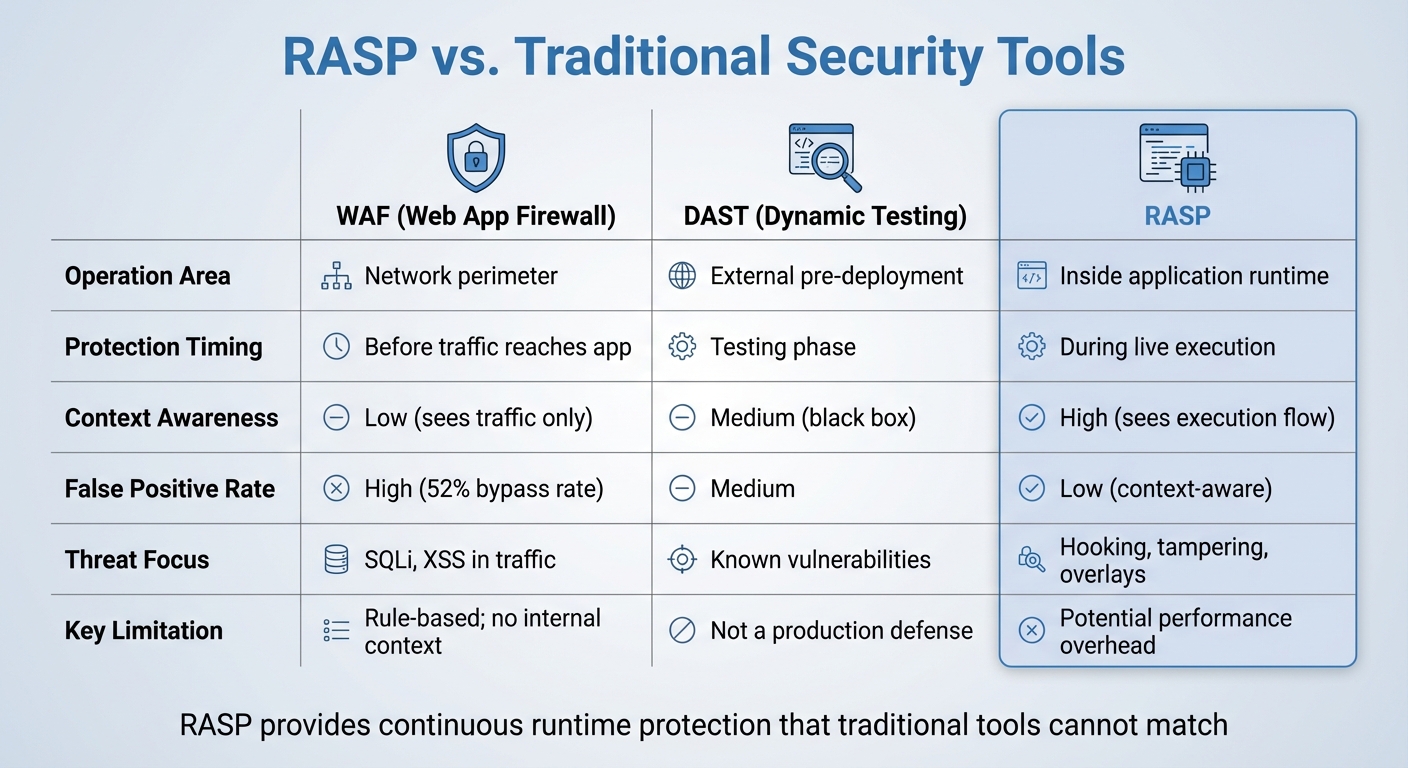
RASP vs Traditional Security Tools Comparison for Mobile Apps
What is RASP and How Does it Work?
Runtime Application Self-Protection (RASP) offers a fresh way to tackle security by embedding itself directly into the application. Unlike firewalls that monitor traffic externally, RASP operates from within the app's runtime environment. This internal positioning allows it to monitor everything happening during execution in real-time.
RASP integrates into applications through SDKs, agents, or library hooks. These components actively track system calls, data inputs, and execution flows. As noted in NIST SP 800-53:
"RASP can reduce the susceptibility of software to attacks by monitoring its inputs and blocking those inputs that could allow attacks".
A standout feature of RASP is its automatic injection of security checks during the build process. This eliminates the need for manual coding. Some tools go even further, using polymorphic defense mechanisms that place checks in random code locations with each build. Guardsquare highlights the advantage of this approach:
"It's easier for a reverse engineer to find and bypass six static checks than it is to find and bypass 600 checks automatically injected in different locations from build to build".
RASP also employs behavioral analysis to detect zero-day attacks, which is crucial as these types of threats are increasingly common. By 2025, vulnerability exploitation is expected to account for 20% of initial access vectors - a 34% jump from the previous year. This capability is especially vital for LCNC (Low-Code/No-Code) apps, where traditional tools struggle to analyze top no code tools and visual development environments. These adaptive features make RASP particularly effective for securing mobile apps, as detailed below.
Key RASP Features for Mobile Apps
RASP offers several important features tailored to mobile app security.
- Environment integrity monitoring: This feature detects when a device has been rooted (Android) or jailbroken (iOS). If the underlying operating system's security is compromised, the app can self-terminate or limit functionality. This is critical, especially as Android malware-driven financial fraud surged by 67% year-over-year as of 2025.
- Anti-tampering and repackaging detection: By running signature and integrity checks during execution, RASP can identify if an app has been altered or cloned with malicious code.
- Overlay and accessibility abuse detection: This feature spots malicious UI overlays and misuse of accessibility APIs, which are often used to steal credentials or intercept one-time passwords. These threats are invisible to network-level defenses.
Additionally, RASP defends against dynamic analysis tools like Frida, debuggers, and emulators. These tools are often used by attackers to reverse engineer or modify app functions. When a threat is detected - whether it’s a hooking attempt, a tampered binary, or a malicious overlay - RASP can respond instantly by reporting the event, ending the session, or triggering custom callbacks to restrict access. As Protectt.ai explains:
"Perimeter defenses - firewalls, network monitoring, server-side controls - don't follow an attacker into the runtime environment".
What sets RASP apart is its contextual awareness. It can access call stacks, memory allocation, and data access patterns within mobile apps, which dramatically reduces false positives. This is a major advantage, as 73% of respondents in a 2025 detection and response survey identified false positives as a persistent challenge.
RASP vs. Traditional Security Tools
RASP shines in runtime protection, offering capabilities that traditional tools like WAFs (Web Application Firewalls) and DAST (Dynamic Application Security Testing) simply can't match. Here's how they compare:
| Feature | WAF (Web App Firewall) | DAST (Dynamic Testing) | RASP |
|---|---|---|---|
| Operation Area | Network perimeter | External pre-deployment | Inside application runtime |
| Protection Timing | Before traffic reaches app | Testing phase | During live execution |
| Context Awareness | Low (sees traffic only) | Medium (black box) | High (sees execution flow) |
| False Positive Rate | High (52% bypass rate) | Medium | Low (context-aware) |
| Threat Focus | SQLi, XSS in traffic | Known vulnerabilities | Hooking, tampering, overlays |
| Key Limitation | Rule-based; no internal context | Not a production defense | Potential performance overhead |
RASP provides continuous protection during live execution, unlike point-in-time testing tools that cannot detect runtime threats such as rooting, jailbreaking, or malicious overlays. While some microservices have reported performance impacts - throughput reductions of up to 8.4% and latency increases between 20% and 49% - modern RASP solutions are built to minimize these effects when properly configured.
Implementing RASP in Low Code/No Code Platforms
How to Integrate RASP
Adding Runtime Application Self-Protection (RASP) to low-code/no-code applications is a straightforward process. This technology integrates through agents, SDKs, or library hooks, embedding directly into the application runtime. The best part? It requires little to no changes to the underlying application code, making it a great fit for platforms where developers often have limited access to source code.
The integration typically happens during the CI/CD build stage. At this point, the RASP agent or SDK is automatically injected into the application binary. Popular CI/CD tools like Bitrise, GitHub Actions, Jenkins, and Azure DevOps support this seamless process. As Protectt.ai explains:
"RASP embeds into your app's runtime, detecting and blocking SQL injection, XSS, and more in real time - no code changes needed".
Additionally, RASP solutions offer remote policy updates. This allows security teams to tweak threat responses - such as switching from "log" mode to "block" mode - without needing to roll out a new app version or update code. This adaptability is especially useful in low-code/no-code environments, where redeployment cycles can be time-consuming.
Once integration is complete, the focus shifts to ensuring deployment strategies balance robust protection with optimal app performance.
Best Practices for RASP Deployment
Start by deploying RASP in monitor mode for a week or two. This initial phase helps identify flagged events and fine-tune policies before enabling active blocking. It minimizes disruptions to legitimate user activities and reduces false positives - an issue that 73% of security teams identified as a recurring challenge in a 2025 SANS survey.
After this monitoring period, test system performance in real-world environments to ensure it meets acceptable standards. While RASP delivers strong protection, deployments can sometimes result in throughput decreases of up to 8.4% and latency increases ranging from 20% to 49%. Testing is key to maintaining smooth app performance, particularly during critical operations like payment processing or user authentication.
Adopt a staged rollout approach for deployment. For example, release the RASP-protected app to 10% of users during the first 72 hours. This phased rollout allows you to monitor for stability issues and false positives before expanding to the full user base. This method aligns with a proactive security strategy, addressing potential vulnerabilities early on.
For comprehensive security, combine RASP with other tools. Static Application Security Testing (SAST) can catch source code vulnerabilities, while Mobile App Security Testing (MAST) identifies risks during development. RASP fills the gap by protecting against runtime threats, such as hooking attempts or malicious overlays, which pre-deployment tools can't detect. Ryan Lloyd, Chief Product Officer at Guardsquare, highlights the importance of this layered approach:
"In 2026, a robust mobile pipeline doesn't just 'check for bugs' but assumes the app is being run in a laboratory by a malicious actor".
Finally, consider implementing hardware-backed attestation using services like the Android Play Integrity API. This step ensures the device isn't rooted and the app binary hasn't been tampered with before granting access to sensitive resources. It's a crucial safeguard, given that 43% of breaches now originate at the mobile edge.
Conclusion
Low-code and no-code mobile app development brings unique security challenges that demand modern, integrated solutions. These apps are increasingly targeted by attackers, with vulnerability exploitation now responsible for 20% of all breaches and Android malware-driven financial fraud spiking by 67% year-over-year. In this landscape, runtime protection has become a critical line of defense.
Runtime Application Self-Protection (RASP) offers a deeper level of security by monitoring the app's behavior from within. Unlike Web Application Firewalls (WAFs), which focus on external traffic, or static analysis tools that assess code before deployment, RASP works directly in the app's runtime environment. This allows it to detect and block threats like SQL injection, tampering, and hooking attempts in real time, effectively preventing data breaches.
For developers using the best low-code and no-code platforms, RASP simplifies security by automating protection without requiring manual coding. Modern RASP solutions can be integrated into the app binary during the CI/CD pipeline, eliminating the need to alter source code. These solutions also introduce polymorphic defenses - changing with each build - to make it significantly harder for attackers to bypass security measures. This streamlined approach ensures security is baked into the development process without disrupting workflows.
To deploy RASP effectively, start by using monitor mode to establish behavioral baselines. Benchmark performance to ensure minimal impact on app functionality, and roll out the solution in stages to reduce potential disruptions. Combining RASP with tools like Static Application Security Testing (SAST) strengthens your security posture, creating a layered defense that anticipates hostile environments.
As mobile threats grow more sophisticated, runtime protection is no longer just an option - it’s a necessity. RASP equips low-code/no-code apps with the ability to self-protect, addressing dynamic threats that other tools might overlook. This ensures your applications remain secure, even on devices beyond your control.
FAQs
Do I still need RASP if I already use SAST/DAST?
RASP (Runtime Application Self-Protection) remains crucial because it delivers a type of protection that SAST (Static Application Security Testing) and DAST (Dynamic Application Security Testing) simply don’t cover. While SAST and DAST are excellent for spotting vulnerabilities during the development and testing phases, RASP steps in during execution. It actively monitors your application in real-time, identifying and blocking threats as they happen. This real-time defense adds an indispensable layer of security, ensuring your app stays protected even after deployment.
How can RASP be added to an LCNC mobile app without source code?
Embedding RASP into a low-code/no-code (LCNC) mobile app without access to the source code involves incorporating a RASP solution directly into the app's runtime environment. This is usually achieved by integrating a RASP agent or SDK during the deployment phase. This approach enables the RASP tool to monitor and safeguard the app in real-time, all without requiring any changes to the source code. Many RASP solutions are designed to support runtime integration, making them compatible with LCNC app ecosystems.
Will RASP slow down my mobile app for users?
RASP works directly within the app to identify and respond to threats as they happen. It's built to have minimal impact on performance, but the actual effect can vary based on how it's set up. With the right configuration, users can enjoy a seamless experience without any noticeable lag.